Freedom251 › Music Practice Software
My Practice Canvas
What My Practice Canvas is
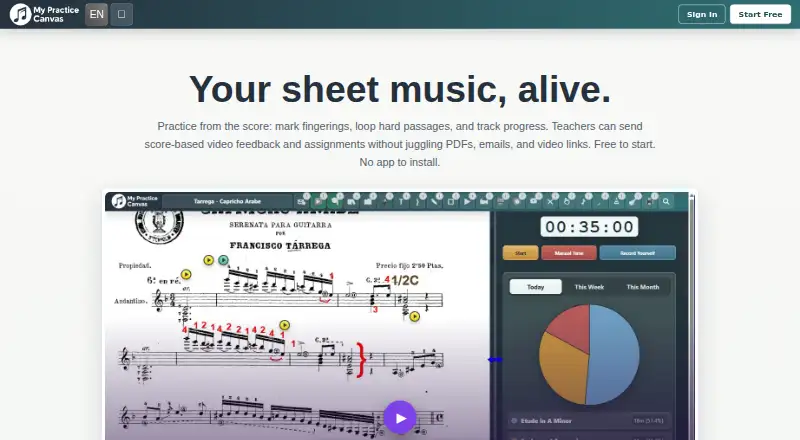
My Practice Canvas is a web-based workspace for musicians practicing from sheet music and teachers managing lessons. Musicians can upload scores, mark them with annotations and fingerings, loop challenging passages, slow practice, and track sessions and streaks. Its Practice Coach builds a daily plan from a musician’s pieces and keeps time during practice. Teachers can use recorded video feedback, a live teaching room, or a mix of the two for each student. They can also link YouTube videos to score sections and use regular Zoom or Google Meet links for live teaching. Students can access assigned lessons, feedback videos, and practice materials at no extra cost under teacher plans. The free plan includes one PDF of up to 10 pages; paid plans start at $5.99/mo, and a 14-day trial is listed. Teacher plans range from $19.99 per month for up to 15 students to $69.99 per month for unlimited students. The site warns that canceling through the Stripe portal permanently deletes associated PDFs, annotations, and videos.
Who it suits
It suits musicians who want sheet-music practice tools and teachers who need lesson organization, feedback, and student progress tracking. Teacher plans include no-extra-cost access for students to assigned materials.
What it does well
- Practice Coach plans and times daily practice.
- Loop passages, slow practice, and track sessions.
- Teachers can give video feedback or teach live.
- Students access assigned materials at no extra cost.
What to know first
- Free plan allows one PDF up to 10 pages.
- Canceling via Stripe permanently deletes associated PDFs, annotations, and videos.
- Paid plans start at $5.99/mo.
Limits
The free plan is limited to one PDF of up to 10 pages. The $5.99 per month Practice Studio plan provides a full personal PDF library; teacher plans have student limits of 15, 40, or unlimited, depending on the plan.
Plans
| Plan | Billed and limits | Price |
|---|---|---|
| Free Practice | Free forever · 1 PDF up to 10 pages · YouTube loops and annotations · Practice Coach included | Free |
| Teacher Studio | Monthly plan · Up to 15 students · Video feedback and assignment tools · Student submissions and progress tracking | $19.99 a month |
| Teacher Plus | Monthly plan · Up to 40 students · All teacher workflow tools · Stronger room for studio growth | $39.99 a month |
| Practice Studio | Monthly plan · Full personal PDF library · All core practice tools · Cloud sync and print | $5.99 a month |
| Teacher Pro | Monthly plan · Unlimited students · Full teacher platform access · Built for larger active studios | $69.99 a month |
As mypracticecanvas.com lists them, read 2 Oct 2026. The maker's own page has the final word.
Getting started
- Visit the My Practice Canvas website.
- Use the free plan for one PDF of up to 10 pages, or select a paid plan.
- Musicians can upload scores and add annotations or fingerings.
- Teachers can choose video feedback, a live teaching room, or a hybrid format.
- Use supported YouTube links or regular Zoom or Google Meet links where relevant.
Verdict
My Practice Canvas combines score-based practice tools with teacher workflows for assignments and feedback. Check the free plan’s PDF limit and the stated cancellation impact before choosing a plan.
Questions
Does My Practice Canvas have a free plan?
Yes. Free Practice costs $0.00 and is free forever. It allows one PDF of up to 10 pages and includes YouTube loops, annotations, and Practice Coach.
What do the paid plans cost?
Practice Studio is $5.99 per month. Teacher Studio is $19.99 per month for up to 15 students, Teacher Plus is $39.99 per month for up to 40 students, and Teacher Pro is $69.99 per month for unlimited students.
Is there a free trial?
Yes. A 14-day trial is listed.
Which platforms does it support?
My Practice Canvas is available on the web.
Can teachers use Zoom or Google Meet?
Yes. The service supports regular Zoom or Google Meet links for live teaching. Teachers can also choose asynchronous video feedback or a live teaching room.
What happens to stored work if I cancel through Stripe?
The site warns that cancellation through the Stripe portal permanently deletes associated PDFs, annotations, and videos.
Facts from My Practice Canvas's own pages
- Cancellation impact
- The site warns that canceling a membership through the Stripe portal permanently deletes associated PDFs, annotations, and videos. · mypracticecanvas.com, 2 Oct 2026
- Data retention
- The privacy policy says data is retained during an active subscription and immediately deleted upon account termination unless retention is required by law. · mypracticecanvas.com, 2 Oct 2026
- Integrations
- The service links YouTube videos to score sections and supports regular Zoom or Google Meet links for live teaching. · mypracticecanvas.com, 2 Oct 2026
- Notable limit
- The free plan is limited to one PDF of up to 10 pages. · mypracticecanvas.com, 2 Oct 2026
- Practice Coach
- The built-in Practice Coach plans daily practice from a musician’s pieces and keeps time while they play. · mypracticecanvas.com, 2 Oct 2026
- Practice tools
- Musicians can upload scores, add annotations and fingerings, loop difficult passages, slow practice, and track sessions and streaks. · mypracticecanvas.com, 2 Oct 2026
- Privacy
- The privacy policy says the service does not use third-party advertising cookies, cross-site tracking, or third-party analytics scripts. · mypracticecanvas.com, 2 Oct 2026
- Purpose
- MyPracticeCanvas is an online space for musicians to practice from sheet music and for teachers to organize lessons and give score-based feedback. · mypracticecanvas.com, 2 Oct 2026
- Security
- The privacy policy says the service uses encryption, secure authentication, and regular security audits, and stores data on cloud infrastructure in the United States and, when necessary, other regions. · mypracticecanvas.com, 2 Oct 2026
- Student access
- Students can access their assigned lessons, feedback videos, and practice materials at no extra cost under teacher plans. · mypracticecanvas.com, 2 Oct 2026
- Support
- Users can send questions, bug reports, or suggestions through an in-app feedback form, with responses sent by email. · mypracticecanvas.com, 2 Oct 2026
- Teacher workflows
- Teachers can choose asynchronous video feedback, a live teaching room, or a hybrid format for each student. · mypracticecanvas.com, 2 Oct 2026
Where My Practice Canvas stands on Freedom251
- Music Practice Software#17 of 23