Freedom251 › Family Calendar Apps
My Family Calendar
What My Family Calendar is
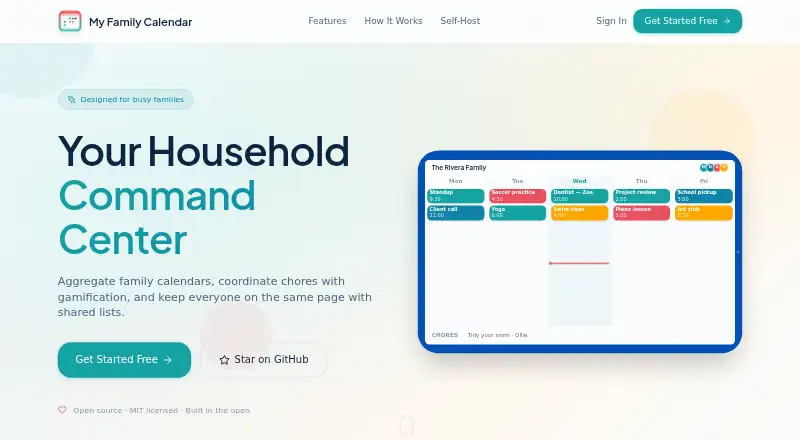
My Family Calendar brings household calendars, school schedules, chores and shared lists into one view. It connects to Google Calendar, Microsoft Outlook, Compass Education and ICS feeds, with day, week and month views. Calendars sync every few minutes, and smart deduplication handles events shared across calendars. Families can assign recurring chores and track points, streaks and a leaderboard. Shared shopping, packing and custom lists support two-way Google Keep sync.
Each child can have a school view with reminders and an evening pack-for-tomorrow mode. Compass sync can show timetables, subjects, rooms, teachers, learning tasks and school events. A touch-friendly kitchen tablet display includes kiosk mode and device pairing, while Google Maps integration calculates travel-time alerts. The maker describes the open-source, MIT-licensed project as intended for Australian school parents, especially families using Compass. It can be used on the hosted site or self-hosted with Docker Compose. The Free plan costs nothing and is described as free forever for basic features, including self-hosting. The maker says analytics run only if users configure their own PostHog key. Compass credentials are stored encrypted, and an encryption key is required for stored credentials. Contributions are welcome, and response times may vary because it is a side project.
Who it suits
It suits households coordinating calendars, school reminders, chores and shared lists, particularly Australian school parents using Compass. Families can use the hosted site or self-host the open-source project with Docker Compose.
What it does well
- Connects Google, Outlook, Compass and ICS calendars.
- Offers day, week and month calendar views.
- Chores include points, streaks and a leaderboard.
- Shared lists support two-way Google Keep sync.
What to know first
- Compass credentials require an encryption key for storage.
- Support response times may vary.
- Analytics require users to configure their own PostHog key.
Plans
| Plan | Billed and limits | Price |
|---|---|---|
| Free | Free forever for basic features · free to self-host | Free |
As myfamilycalendar.app lists them, read 10 Oct 2026. The maker's own page has the final word.
Getting started
- Open the hosted website or prepare a self-hosted deployment
- Run the project with Docker Compose if self-hosting
- Connect Google Calendar, Microsoft Outlook, Compass Education, or ICS feeds
- Create family chores, reminders, and shared lists
- Pair a kitchen tablet display if you want kiosk mode
Verdict
My Family Calendar brings household planning and school details together, with features for chores, lists and travel alerts. Its Compass-focused school tools may be especially relevant to families using that service.
Questions
Is My Family Calendar free?
Yes. The Free plan costs nothing and is free forever for basic features, including free self-hosting.
Can it be self-hosted?
Yes. The maker says users can self-host it with Docker Compose or use the hosted site.
Which calendar services connect?
It connects to Google Calendar, Microsoft Outlook, Compass Education, and ICS feeds.
Does it support shared tasks and shopping lists?
Yes. It supports shared tasks, recurring chores, reminders, and shared shopping, packing, and custom lists with two-way Google Keep sync.
How are Compass credentials protected?
The project says Compass credentials are stored encrypted and requires an encryption key for stored credentials.
Facts from My Family Calendar's own pages
- Calendar sources
- It connects to Google Calendar, Microsoft Outlook, Compass Education, and ICS feeds. · github.com, 10 Oct 2026
- Calendar views
- The calendar supports day, week, and month views, with automatic sync every few minutes and smart deduplication across shared calendars. · myfamilycalendar.app, 10 Oct 2026
- Chores
- Families can assign recurring chores and track points, streaks, and a leaderboard. · myfamilycalendar.app, 10 Oct 2026
- Compass details
- Compass Education sync can show timetables, subjects, rooms, teachers, learning tasks, and school events. · github.com, 10 Oct 2026
- Credential security
- The project says Compass credentials are stored encrypted and requires an encryption key for stored credentials. · github.com, 10 Oct 2026
- Deployment
- The maker says users can self-host the open-source product with Docker Compose or use the hosted site. · myfamilycalendar.app, 10 Oct 2026
- Intended users
- The maker describes the project as an open-source family calendar for Australian school parents, especially families using Compass. · github.com, 10 Oct 2026
- Kitchen display
- The product describes a touch-friendly kitchen tablet display with kiosk mode and device pairing. · github.com, 10 Oct 2026
- License and analytics
- The maker describes the project as MIT licensed and says analytics run only when users configure their own PostHog key. · myfamilycalendar.app, 10 Oct 2026
- Purpose
- My Family Calendar combines family calendars, school schedules, chores, and shared lists in one household view. · github.com, 10 Oct 2026
- School view
- The per-child school view shows reminders and supports an evening pack-for-tomorrow mode. · myfamilycalendar.app, 10 Oct 2026
- Shared lists
- Shared shopping, packing, and custom lists support two-way Google Keep sync. · myfamilycalendar.app, 10 Oct 2026
- Support
- The maker says contributions are welcome and response times may vary because it is a side project. · github.com, 10 Oct 2026
- Travel alerts
- Google Maps integration calculates travel time alerts to help families know when to leave. · github.com, 10 Oct 2026
Where My Family Calendar stands on Freedom251
- Family Calendar Apps#20 of 43