Freedom251 › AI Birthday Song Generators

MusiCraft Stem Splitter
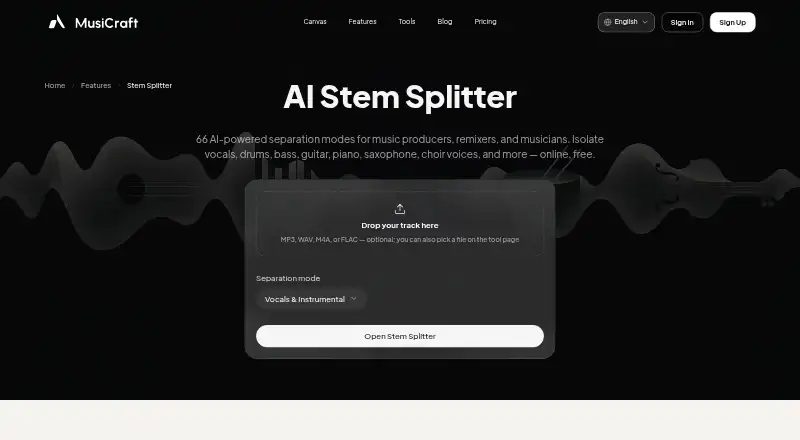
What MusiCraft Stem Splitter is
MusiCraft Stem Splitter separates audio into stems in a browser. Its 66 modes cover vocals, drums, bass, instruments, choir and sound effects, with options for 2-stem vocal and instrumental separation, 4-stem and 6-stem splits, and full-band separation. Listed stem types also include guitar, piano, strings, brass, woodwind, saxophone, speech and music.
Upload an MP3, WAV, M4A or FLAC file, or select a track from My Music. The browser player lets you preview stems and solo or mute them before downloading. Uploads are limited to 100 MB and eight minutes. The Free plan includes two editing runs per month and preview playback, but downloads are locked. Paid access starts at $7.49/mo. Studio and Business include Stem WAV mode and a commercial license; the Speech / Music / SFX mode provides 320 kbps MP3, with 16-bit WAV available on those two plans. That mode costs five credits per minute. The splitter can be used alongside MusiCraft mastering, BPM/key and generation tools in the same account.
Who it suits
MusiCraft Stem Splitter suits producers, remixers, musicians, karaoke singers, and editors or samplers who want to separate audio in a browser. Its range of stem types and split modes supports work with vocals, instruments, speech, music and sound effects.
What it does well
- Offers 66 separation modes.
- Accepts MP3, WAV, M4A and FLAC uploads.
- Preview, solo or mute stems in the browser.
- Lists a broad range of vocal and instrument stem types.
- Works alongside MusiCraft mastering, BPM/key and generation tools.
What to know first
- Free includes two editing runs per month.
- Free downloads are locked.
- Uploads are limited to eight minutes and 100 MB.
- No desktop app or API access.
Limits
Free includes 50 credits per month and two editing runs per month, with preview playback but locked downloads. Uploads are limited to eight minutes and 100 MB. Stem WAV mode and a commercial license are included with Studio and Business.
Plans
| Plan | Billed and limits | Price |
|---|---|---|
| Free | 50 credits / mo · 2 editing runs / month · preview playback (downloads locked) | Free |
| Pro | $179.88 billed annually · 24,000 credits / year · unlimited editing runs · MP3, stem & image downloads | $179.88 a year |
| Studio | $359.88 billed annually · 72,000 credits / year · unlimited editing runs · Stem WAV mode · commercial license included | $359.88 a year |
| Basic | $89.88 billed annually · 9,600 credits / year · 20 editing runs / month · MP3, stem & image downloads | $89.88 a year |
| Business | $959.88 billed annually · 240,000 credits / year · unlimited editing runs · Stem WAV mode · commercial license · priority generation queue | $959.88 a year |
As musicraft.ai lists them, read 7 Oct 2026. The maker's own page has the final word.
Getting started
- Open the MusiCraft Stem Splitter website.
- Use the web-based splitter in a browser.
- Upload an MP3, WAV, M4A or FLAC file, or select a track from My Music.
- Choose a separation mode and preview the stems; solo or mute them as needed.
- Choose a plan with downloads available to download stems.
Verdict
Choose MusiCraft Stem Splitter if you want browser-based audio separation with many modes and stem types. The Free plan lets you preview results, while Studio and Business add Stem WAV mode and commercial licensing. Look elsewhere if you need free downloads, a desktop app or API access.
Questions
Is MusiCraft Stem Splitter free?
Yes. The Free plan costs nothing and includes 50 credits per month and two editing runs per month. It allows preview playback, but downloads are locked.
How much do paid plans cost?
Paid access is listed from $7.49/mo. The plan details also list Basic at $7.49 a year, billed $89.88 annually; Pro at $14.99 a year, billed $179.88 annually; Studio at $29.99 a year, billed $359.88 annually; and Business at $79.99 a year, billed $959.88 annually.
What platforms does it support?
MusiCraft Stem Splitter runs on the web. It has no desktop app.
What audio files can I upload?
You can upload MP3, WAV, M4A or FLAC files. Uploads can be up to 100 MB and eight minutes long.
Which plans include commercial use?
Studio and Business include a commercial license. Music from the Free plan is not licensed for commercial use.
Does it provide API access?
No. API access is listed as unavailable.
Facts from MusiCraft Stem Splitter's own pages
- Browser workflow
- The splitter works in a browser and lets users upload or select a track from My Music, preview stems, and download them. · musicraft.ai, 7 Oct 2026
- Commercial use
- The pricing page includes a commercial license with Studio and Business, while the license agreement says free-plan music is not licensed for commercial use. · musicraft.ai, 7 Oct 2026
- Credits
- The Speech / Music / SFX mode costs 5 credits per minute. · musicraft.ai, 7 Oct 2026
- File limits
- Stem splitter mode pages state uploads are limited to 8 minutes and 100 MB. · musicraft.ai, 7 Oct 2026
- Free usage limit
- The Free plan includes 2 editing runs per month and allows preview playback, while downloads are locked. · musicraft.ai, 7 Oct 2026
- Input formats
- Users can upload MP3, WAV, M4A, or FLAC files. · musicraft.ai, 7 Oct 2026
- Integrations
- The splitter page describes use alongside MusiCraft mastering, BPM/key, and generation tools in the same account. · musicraft.ai, 7 Oct 2026
- Modes
- Available modes include 2-stem vocal and instrumental, 4-stem, 6-stem, and full-band splits. · musicraft.ai, 7 Oct 2026
- Output format
- The Speech / Music / SFX mode provides MP3 at 320 kbps, with 16-bit WAV available on Studio and Business. · musicraft.ai, 7 Oct 2026
- Privacy claim
- The stem splitter page says uploaded audio is processed securely, not shared with third parties, and stems are deleted after download. · musicraft.ai, 7 Oct 2026
- Privacy policy
- The privacy policy says uploads and generated content may be processed by AI, storage, and infrastructure providers, and describes security measures including access controls and encryption in transit where appropriate. · musicraft.ai, 7 Oct 2026
- Stem player
- The in-browser player lets users solo and mute stems before downloading. · musicraft.ai, 7 Oct 2026
- Stem splitting
- The AI stem splitter offers 66 separation modes for vocals, drums, bass, instruments, choir, and sound effects. · musicraft.ai, 7 Oct 2026
- Who it serves
- The maker identifies producers, remixers, musicians, karaoke singers, and editors or samplers as intended users. · musicraft.ai, 7 Oct 2026
Where MusiCraft Stem Splitter stands on Freedom251
- AI Birthday Song Generators#6 of 31
- AI Stem Splitters#16 of 26
- Stem Separation Software#14 of 21