Freedom251 › Video Player Software
MPC-Qt
What MPC-Qt is
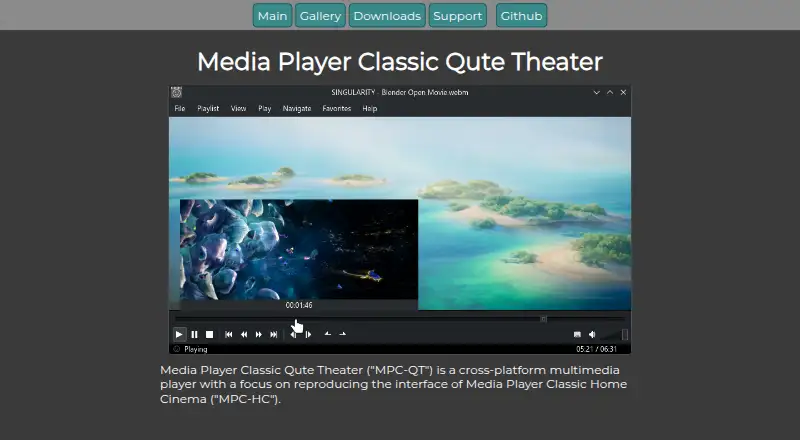
MPC-Qt is a free, open-source multimedia player for Windows and Linux. It is designed to reproduce the interface and functions of MPC-HC while using libmpv for video playback instead of DirectShow. The player supports hardware acceleration and playback-speed control. You can maintain multiple playlists, remember the last played file in each list, search or shuffle entries, queue items quickly, and loop playback. Hovering over the seek bar shows a video thumbnail preview. MPC-Qt also plays online videos through yt-dlp, including subtitles and multiple audio tracks. Displayed subtitles can be copied to the clipboard. Screenshot filename templates, included screenshot information, playlist metadata, and visual styling are customizable, with dark and light themes supported. Windows downloads include installer and portable packages; Linux downloads include Flatpak, AppImage, and executable packages. The project is licensed under GPL v2.
Who it suits
MPC-Qt suits Windows or Linux users who want an MPC-HC-style player with extensive playlist controls and online-video support. It also fits users who need portable packages or customizable playback and appearance settings.
What it does well
- Free and open-source under GPL v2
- Runs on Windows and Linux
- Multiple playlists remember last-played files
- Online playback supports subtitles and audio tracks
- Hardware acceleration and speed control
What to know first
- VirtualDub-style encoding support may not be implemented
- Some options are hidden or disabled
- Online video playback depends on yt-dlp
Verdict
MPC-Qt combines an MPC-HC-like interface with libmpv playback and detailed playlist tools. Its Windows and Linux packages, online-video support, and customization options make it a capable free player, while some planned functions remain unavailable.
Facts from MPC-Qt's own pages
- Appearance
- The app supports custom styling and adapts to dark or light themes. · mpc-qt.github.io, 11 Oct 2026
- Development builds
- Development versions are intended for testing the latest unreleased version and are updated after each commit to the main repository. · mpc-qt.github.io, 11 Oct 2026
- Downloads
- The downloads page lists Windows installer and portable packages, plus Linux Flatpak, AppImage, and executable packages. · mpc-qt.github.io, 11 Oct 2026
- Feature status
- The project notes that unimplemented options are hidden or disabled in the options dialog. · github.com, 11 Oct 2026
- License
- The project states that MPC-QT is copyrighted under GPL v2 by the MPC-QT developers. · mpc-qt.github.io, 11 Oct 2026
- Limit
- The project describes encoding support like VirtualDub as a possible upcoming feature dependent on developer time. · github.com, 11 Oct 2026
- Linux downloads
- The downloads page lists Linux Flatpak, AppImage, and executable packages. · mpc-qt.github.io, 11 Oct 2026
- Multiple playlists
- It supports separate playlists and tracks the last played file in each playlist. · mpc-qt.github.io, 11 Oct 2026
- Online video
- It can play online videos using yt-dlp, including subtitles and multiple audio tracks. · mpc-qt.github.io, 11 Oct 2026
- Options
- The options dialog exposes mpv scalar and color-correction options alongside options laid out like MPC-HC. · mpc-qt.github.io, 11 Oct 2026
- Playback controls
- Features include seekbar video previews, shuffle, quick queuing, playlist search, and looped playback. · mpc-qt.github.io, 11 Oct 2026
- Playback engine
- It uses libmpv to play video instead of DirectShow. · mpc-qt.github.io, 11 Oct 2026
- Playlist library
- Deleted playlists can be restored from backup, according to the gallery page. · mpc-qt.github.io, 11 Oct 2026
- Playlists
- It supports multiple playlists and tracks the last played file for each playlist. · mpc-qt.github.io, 11 Oct 2026
- Playlist tools
- It supports playlist shuffling, quick queuing, and playlist searching. · mpc-qt.github.io, 11 Oct 2026
- Product
- MPC-QT is a cross-platform multimedia player that aims to reproduce the interface and functionality of MPC-HC. · mpc-qt.github.io, 11 Oct 2026
- Screenshots
- Screenshot templates let users customize the screenshot filename and choose what information to include. · mpc-qt.github.io, 11 Oct 2026
- Screenshots and metadata
- Users can set screenshot filename templates and display custom metadata in the playlist. · mpc-qt.github.io, 11 Oct 2026
- Seek preview
- Hovering over the seek bar displays a video thumbnail at that position. · mpc-qt.github.io, 11 Oct 2026
- Source builds
- The project encourages compiling from source and provides instructions in the Git repository README. · mpc-qt.github.io, 11 Oct 2026
- Styling
- The app supports custom styling in the app. · mpc-qt.github.io, 11 Oct 2026
- Subtitle feature
- Displayed subtitles can be copied to the clipboard. · mpc-qt.github.io, 11 Oct 2026
- Support
- Users can ask questions, report bugs, or request features through the issue tracker; bug reports should include the app version and a description. · mpc-qt.github.io, 11 Oct 2026
- Windows downloads
- The downloads page lists Windows installer and portable packages. · mpc-qt.github.io, 11 Oct 2026
Where MPC-Qt stands on Freedom251
- Video Player Software#42 of 42