Freedom251 › Animation Software
Motionity
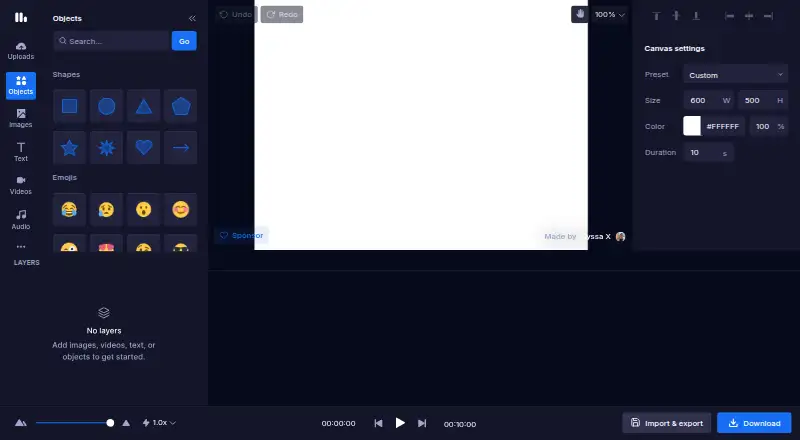
What Motionity is
Motionity is a free, open-source motion graphics and animation editor that runs in a web browser. It supports keyframes with custom easing, video trimming and cutting, and layer masking. Image and video effects include adjustments, blur, and chroma key, while text can use typewriter, scale, and fade animations. Projects may include audio and Lottie animations. An asset browser searches for images, videos, shapes, and other items, with Pixabay integration listed for browsing. Finished work can be downloaded as WEBM video, animated GIF, or an image. Project files can be saved locally, imported, and exported for storage outside the editor. Motionity works without signing in, and its source code is publicly available on GitHub. The Free plan costs nothing. The project says the editor is not optimized for mobile and requires a computer to create animations. Support questions and feedback can be sent to the maker by email or Twitter.
Who it suits
It suits creators who want a browser-based, open-source animation editor without signing in, provided they can work on a computer rather than a mobile device.
What it does well
- Free and open source
- No sign-in needed
- Keyframes with custom easing
- WEBM, GIF, and image exports
- Local project file handling
What to know first
- Requires a computer for animation
- Not optimized for mobile
- No free trial
- Web-based only
Plans
| Plan | Billed and limits | Price |
|---|---|---|
| Free | free and open source · no sign in needed | Free |
As motionity.app lists them, read 11 Oct 2026. The maker's own page has the final word.
Verdict
Motionity provides a broad set of animation, masking, effects, asset, and export tools without an account. Its desktop-oriented web setup and local project handling are important considerations for mobile-focused workflows.
Facts from Motionity's own pages
- Asset browsing
- Users can search for images, videos, shapes, and other assets to add to projects. · github.com, 11 Oct 2026
- Effects
- Image and video effects include adjustments, blur, and chroma key. · github.com, 11 Oct 2026
- Export formats
- WEBM,animated GIF,image · motionity.app, 22 Sept 2026
- Exports
- The web app offers downloads as WEBM video, animated GIF, or image. · motionity.app, 11 Oct 2026
- Free plan
- Yes · motionity.app, 22 Sept 2026
- Integration
- The project lists Pixabay integration for browsing assets. · github.com, 11 Oct 2026
- Keyframes
- It supports keyframing with custom easing. · github.com, 11 Oct 2026
- Layer tools
- It supports layer masking. · github.com, 11 Oct 2026
- Media support
- The editor supports audio and Lottie animations. · github.com, 11 Oct 2026
- Mobile support
- Motionity says it is not optimized for mobile and requires a computer to create animations. · motionity.app, 11 Oct 2026
- Motion graphics
- Yes · motionity.app, 22 Sept 2026
- Supported platforms
- web · motionity.app, 22 Sept 2026
- Project files
- Projects can be saved locally, imported, and exported. · motionity.app, 11 Oct 2026
- Purpose
- Motionity is a free and open-source web-based motion graphics and animation editor. · motionity.app, 11 Oct 2026
- Sign-in
- The project says Motionity is available without signing in. · github.com, 11 Oct 2026
- Source code
- The project source code is publicly available on GitHub. · github.com, 11 Oct 2026
- Support
- The project README invites users to contact the maker by email or Twitter with questions or feedback. · github.com, 11 Oct 2026
- Text animation
- Text animation options include typewriter, scale, and fade effects. · github.com, 11 Oct 2026
- Video editing
- It supports trimming and cutting videos. · github.com, 11 Oct 2026
Where Motionity stands on Freedom251
- Animation Software#57 of 106