Freedom251 › Database Testing Tools
mori
What mori is
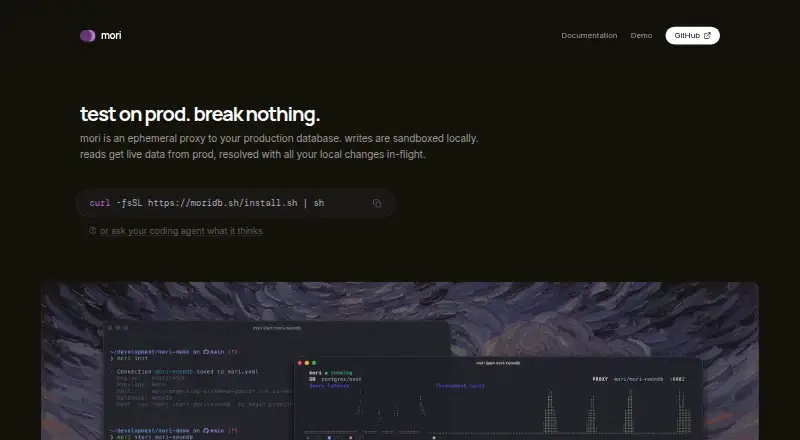
mori is a free, open-source command-line proxy for working with a production database while keeping writes and schema changes local. Reads come from live production, and writes go to a local Shadow database; mori combines those local changes with production reads. This approach supports querying, data changes and migration testing in a production-like view, after which an instance can be reset or removed. Production is described as write-protected.
The software supports PostgreSQL, CockroachDB, MySQL, MariaDB, Microsoft SQL Server, SQLite, DuckDB, Redis and Firestore. It can use provider credentials it detects for AWS RDS, GCP Cloud SQL, Supabase, Neon and PlanetScale, or a supplied connection string. Other listed integrations include Azure, Vercel Postgres, MongoDB Atlas, DigitalOcean, Railway, Upstash, Cloudflare and Firebase. For private database networks, mori supports SSH tunnels, GCP Cloud SQL Proxy and AWS SSM.
A terminal dashboard displays connections, query routing, local change counts, schema divergence, logs, latency metrics and QPS. Its built-in Model Context Protocol server lets AI agents read production data, write to Shadow, verify results and reset. mori runs on Linux and macOS, uses the MIT license and provides a shell installer. The maker says it was built in Los Angeles, California.
Who it suits
mori suits developers and database teams who want to query production data or test migrations while routing changes to a local Shadow database. It is also relevant to users working with supported database providers, private networks or AI agents that need the stated read-and-verify workflow.
What it does well
- Production is kept write-protected while changes go to Shadow.
- Reads combine live production data with local modifications.
- Supports nine listed database engines.
- Includes migration testing and instance reset.
- Built-in MCP server supports AI agent workflows.
What to know first
- The listed operating systems are limited to Linux and macOS.
- Installation uses a shell command-line installer.
- Database access depends on provider credentials or a supplied connection string.
Getting started
- Visit the mori website.
- Use the provided shell command to download and run the installer.
- Run mori on Linux or macOS.
- Connect with detected credentials for a supported provider or supply a connection string.
- Use the terminal dashboard to review routing and local changes, then reset or remove the instance when finished.
Verdict
Pick mori if you need a free, open-source way to test queries and migrations against production-like reads without sending writes to production. Look elsewhere if you need an operating system beyond Linux or macOS.
Questions
Is mori free?
Yes. It is free and open source under the MIT license.
Which operating systems does it support?
The listed platforms are Linux and macOS.
Which databases does mori support?
It lists PostgreSQL, CockroachDB, MySQL, MariaDB, Microsoft SQL Server, SQLite, DuckDB, Redis and Firestore.
How does mori protect production from writes?
Reads use production data, while writes and schema changes are routed to a local Shadow database. Production is described as write-protected.
Can AI agents use mori?
Yes. Its built-in Model Context Protocol server lets AI agents read production data, write to Shadow, verify results and reset.
Facts from mori's own pages
- Additional auth providers
- The repository also lists Azure, Vercel Postgres, MongoDB Atlas, DigitalOcean, Railway, Upstash, Cloudflare, and Firebase. · github.com, 9 Oct 2026
- AI agent integration
- Mori includes a built-in Model Context Protocol server that lets AI agents read production data, write to Shadow, verify results, and reset. · github.com, 9 Oct 2026
- AI integration
- The repository says mori includes a built-in Model Context Protocol server for AI agents to read production data, write to Shadow, verify results, and reset. · github.com, 4 Oct 2026
- Authentication
- The homepage says mori uses existing provider credentials and can auto-detect credentials for AWS RDS, GCP Cloud SQL, Supabase, Neon, and PlanetScale, or use a supplied connection string. · moridb.sh, 4 Oct 2026
- Copy-on-write isolation
- Mori tracks local changes so reads can combine production data with local modifications. · github.com, 9 Oct 2026
- Dashboard
- The homepage lists a terminal user interface dashboard, and the repository says it shows active connections, query routing, local change counts, schema divergence, logs, latency metrics, and QPS. · github.com, 4 Oct 2026
- Database engines
- The repository lists PostgreSQL, CockroachDB, MySQL, MariaDB, MS SQL Server, SQLite, DuckDB, Redis, and Firestore as supported engines. · github.com, 9 Oct 2026
- Install
- The homepage provides a shell command that downloads and runs the installer: curl -fsSL https://moridb.sh/install.sh | sh. · moridb.sh, 4 Oct 2026
- Installation
- The official site provides a shell installation command and describes Mori as a command-line tool. · moridb.sh, 9 Oct 2026
- Isolation
- The repository says writes go to a local Shadow database while reads come from production and merge with local changes; it describes production as write-protected. · github.com, 4 Oct 2026
- License
- The public repository is licensed under MIT. · github.com, 9 Oct 2026
- Maker location
- The official site says Mori was built in Los Angeles, California. · moridb.sh, 9 Oct 2026
- Migration testing
- The maker lists migration testing as a feature, and says users can apply migrations in a sandbox and reset or kill the instance afterward. · moridb.sh, 9 Oct 2026
- Network access
- Mori supports SSH tunnels, GCP Cloud SQL Proxy, and AWS SSM for reaching databases behind private networks. · github.com, 9 Oct 2026
- Product
- mori is an ephemeral proxy to a production database: writes are sandboxed locally and reads use live production data with local changes applied. · moridb.sh, 4 Oct 2026
- Production protection
- Mori says production is write-protected while writes and schema changes are routed to the local shadow database. · github.com, 9 Oct 2026
- Provider authentication
- The maker says Mori detects credentials for providers including AWS RDS, GCP Cloud SQL, Supabase, Neon, and PlanetScale, or accepts a connection string. · moridb.sh, 9 Oct 2026
- Provider integrations
- The repository lists direct connections and integrations for GCP Cloud SQL, AWS RDS, Neon, Supabase, Azure, PlanetScale, Vercel Postgres, MongoDB Atlas, DigitalOcean, Railway, Upstash, Cloudflare, and Firebase. · github.com, 4 Oct 2026
- Purpose
- Mori is an ephemeral proxy to a production database: writes are sandboxed locally while reads use live production data merged with local changes. · moridb.sh, 9 Oct 2026
- Security and trust
- The homepage says mori authenticates with existing provider credentials; the repository says production is write-protected, and the pages opened did not state a security certification or compliance standard. · moridb.sh, 4 Oct 2026
- Support contact
- The official site lists [email protected] as an email contact. · moridb.sh, 9 Oct 2026
- Terminal dashboard
- The maker lists a terminal dashboard; the repository says it shows connections, routing, local change counts, schema divergence, query logs, and latency metrics. · github.com, 9 Oct 2026
- Tunneling
- The repository says mori supports SSH tunnels, GCP Cloud SQL Proxy, and AWS SSM to reach databases behind private networks. · github.com, 4 Oct 2026
- Use case
- The maker presents mori as a way to run queries, apply migrations, and modify data against production-like reads, then reset or remove the instance. · moridb.sh, 4 Oct 2026
Where mori stands on Freedom251
- Database Testing Tools#26 of 28