Freedom251 › AI Sound Effect Generators
MMAudio
What MMAudio is
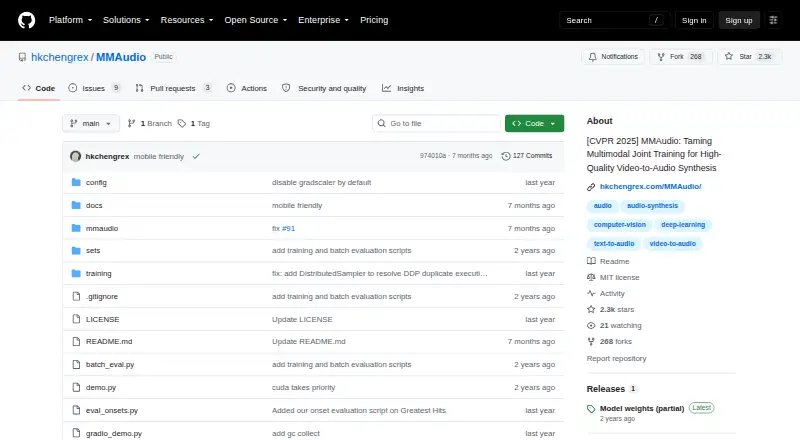
MMAudio generates audio synchronized with video, using video and text inputs. Its synchronization module aligns generated audio with video frames. The command-line demo and Gradio interface support video-to-audio and text-to-audio; the interface also offers experimental image-to-audio processing. The model was not trained for image-to-audio, and the demo handles a still image by duplicating it into a video. The project is free and open source for Linux or self-hosted use. Installation requires Python 3.9 or later and PyTorch 2.5.1 or later, with corresponding torchvision and torchaudio; the project says it has only been tested on Ubuntu. In the project’s experiments, its default large_44k_v2 model uses around 6 GB of GPU memory for inference in 16-bit mode. The demo saves audio as FLAC and video as MP4, with an 8-second default output and training duration. Generated audio may include unintelligible speech-like sounds or background music, and the model may struggle with unfamiliar concepts. Repository code is MIT licensed, while pretrained checkpoints use CC-BY-NC 4.0; the project does not guarantee that pretrained models are suitable for commercial use.
Who it suits
MMAudio suits Linux or self-hosted users who want to generate audio from video or text and can meet its installation requirements. Its pretrained checkpoints are not guaranteed to be suitable for commercial use.
What it does well
- Supports video-to-audio and text-to-audio generation.
- Synchronization module aligns audio with video frames.
- Provides command-line and Gradio interfaces.
- Links to Hugging Face, Colab, and Replicate demos.
What to know first
- Image-to-audio is experimental and was not trained for.
- Project has only been tested on Ubuntu.
- Default output duration is 8 seconds.
- Commercial suitability of pretrained models is not guaranteed.
Limits
The default output duration is 8 seconds, and durations far from the training duration may reduce quality. Image-to-audio is experimental because the model was not trained for it. Pretrained checkpoints use CC-BY-NC 4.0, and the project does not guarantee they are suitable for commercial use.
Plans
| Plan | Billed and limits | Price |
|---|---|---|
| MMAudio | Code released under MIT license · pretrained checkpoints under CC-BY-NC 4.0 | Free |
As github.com lists them, read 10 Oct 2026. The maker's own page has the final word.
Getting started
- Visit the project repository at https://github.com/hkchengrex/MMAudio.
- Install Python 3.9 or later and PyTorch 2.5.1 or later, with corresponding torchvision and torchaudio.
- Use a Linux or self-hosted environment; the project says it has only been tested on Ubuntu.
- Choose the command-line demo or the Gradio interface.
- Provide video or text for generation; image input is experimental and processed as a duplicated video.
Verdict
MMAudio offers video- and text-driven audio generation through command-line and browser-based interfaces. Users should account for its environment requirements, output limitations, and separate licenses for code and pretrained checkpoints.
Questions
Is MMAudio free?
Yes. Its plan is free, and the repository code is released under the MIT license.
What does the project generate?
The demos support video-to-audio and text-to-audio synthesis. The Gradio interface also has experimental image-to-audio processing.
What platforms and requirements are listed?
It is listed for Linux and self-hosted use. Installation requires Python 3.9 or later and PyTorch 2.5.1 or later, plus corresponding torchvision and torchaudio; the project says it has only been tested on Ubuntu.
Can the pretrained models be used commercially?
The pretrained checkpoints use the CC-BY-NC 4.0 license. The project does not guarantee that they are suitable for commercial use.
What files does the demo save?
The demo saves audio as FLAC and video as MP4. Its default output duration is 8 seconds.
Where can users find demos or report issues?
The repository links to Hugging Face, Colab, and Replicate demos. It invites users to open a repository issue about failure modes or suspected bugs.
Facts from MMAudio's own pages
- Commercial use
- The project says it does not guarantee pretrained models are suitable for commercial use. · github.com, 4 Oct 2026
- Data handling
- The maintainers say they cannot redistribute the training datasets for copyright reasons. · github.com, 10 Oct 2026
- Demo availability
- The repository links to Hugging Face, Colab, and Replicate demos. · github.com, 10 Oct 2026
- Demos and integrations
- The repository links to Hugging Face and Colab demos and a Replicate demo. · github.com, 4 Oct 2026
- Generation modes
- The command-line demo supports video-to-audio and text-to-audio generation. · github.com, 4 Oct 2026
- Hardware
- The README says inference uses around 6 GB of GPU memory in 16-bit mode in its experiments. · github.com, 10 Oct 2026
- Image limitation
- Image-to-audio is experimental and the model was not trained for it; the demo duplicates the image into a video for processing. · github.com, 4 Oct 2026
- Input processing
- The CLIP encoder resizes frames to 384×384 pixels, while Synchformer resizes the shorter edge to 224 pixels and center-crops each frame. · github.com, 4 Oct 2026
- Installation
- The repository documents installation with Python 3.9 or later and PyTorch 2.5.1 or later, and says it has only been tested on Ubuntu. · github.com, 10 Oct 2026
- Interface
- The project provides a Gradio interface for video-to-audio and text-to-audio, with experimental image-to-audio support. · github.com, 4 Oct 2026
- Interfaces
- The project provides a command-line demo and a Gradio interface. · github.com, 10 Oct 2026
- Joint training
- Its multimodal joint training uses audio-visual and audio-text datasets. · github.com, 10 Oct 2026
- Known limitations
- The model may produce unintelligible human speech-like sounds, background music, and poor results for unfamiliar concepts. · github.com, 10 Oct 2026
- Licensing
- The repository code is MIT licensed, while pretrained checkpoints are released under CC-BY-NC 4.0. · github.com, 4 Oct 2026
- Model license
- The code is MIT licensed, while the pretrained checkpoints are released under CC-BY-NC 4.0; the README does not guarantee pretrained models are suitable for commercial use. · github.com, 10 Oct 2026
- Output and duration
- The demo saves audio as FLAC and video as MP4, and its default output and training duration is 8 seconds. · github.com, 4 Oct 2026
- Output duration
- The default output and training duration is 8 seconds; durations far from training duration may reduce quality. · github.com, 10 Oct 2026
- Purpose
- MMAudio generates synchronized audio from video and/or text inputs. · github.com, 10 Oct 2026
- Runtime requirements
- Installation requires Python 3.9+ and PyTorch 2.5.1+ with corresponding torchvision and torchaudio; the project says it has only been tested on Ubuntu. · github.com, 4 Oct 2026
- Support
- The project invites users to open a repository issue if they notice a failure mode or believe there is a bug. · github.com, 4 Oct 2026
- Synchronization
- A synchronization module aligns generated audio with video frames. · github.com, 10 Oct 2026
- Synthesis modes
- The included demos support video-to-audio and text-to-audio synthesis, with experimental image-to-audio processing through a duplicated still image. · github.com, 10 Oct 2026
- Training hardware
- The authors recommend, for smooth training, single-node setups with two 80 GB H100 GPUs for the small model or eight for the large model, plus hundreds of gigabytes of system memory. · github.com, 10 Oct 2026
- Training limitation
- The current training script does not support _v2 training. · github.com, 10 Oct 2026
Where MMAudio stands on Freedom251
- AI Sound Effect Generators#11 of 29