Freedom251 › Minecraft Seed Finders
Minecraft Structure Finder
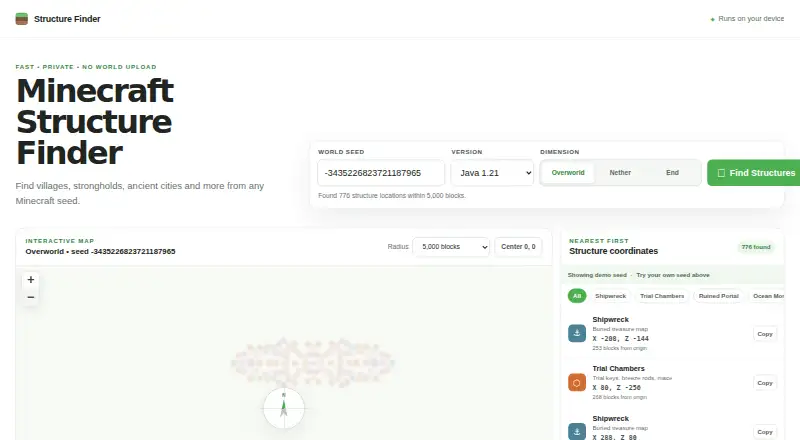
What Minecraft Structure Finder is
Minecraft Structure Finder is a free web tool that finds structures from a Minecraft world seed and shows their map markers and coordinates. It covers over 15 structure types, including villages, ancient cities, strongholds, and shipwrecks. Choose the Overworld, Nether, or End, set a search radius, and filter results by structure type. Results are sorted by distance from the world origin; selecting one centers the map on it and lets you copy its X and Z coordinates. Java results are calculated in the browser using the cubiomes WebAssembly engine. The site says the seed stays on your device and is not uploaded with a world. It describes coordinates as exact to the block, while noting that some terrain-dependent candidates may not generate in-game. The interface includes a Bedrock preview, but verified coordinate calculations currently use the Java engine. The tool requires no account or download and does not need a launcher mod, data pack, or browser extension. It is described as an independent tool, unaffiliated with Mojang or Microsoft.
Who it suits
The site describes the tool for speedrunners, survival players, server owners, and friends planning multiplayer worlds. It suits players who want to search a seed for structures and view or copy their coordinates in a browser.
What it does well
- Covers over 15 structure types.
- Searches the Overworld, Nether, and End.
- Filters results by structure type and search radius.
- Shows map markers and coordinates, with copyable X and Z values.
- Java calculations run in the browser; no account or download is needed.
What to know first
- Verified coordinate calculation currently uses the Java engine; Bedrock is only a preview.
- Some terrain-dependent candidates may not generate in-game.
- It does not provide terrain analysis or biome search.
Limits
The tool’s verified coordinate calculation currently uses the Java cubiomes engine; the interface’s Bedrock option is a preview. Some terrain-dependent candidates may not generate in-game. Terrain analysis and biome search are not provided.
Plans
| Plan | Billed and limits | Price |
|---|---|---|
| Free | No download · no sign-up · runs in browser | Free |
As minecraftstructurefinder.com lists them, read 8 Oct 2026. The maker's own page has the final word.
Getting started
- Open the Minecraft Structure Finder website.
- Enter a Minecraft world seed.
- Choose the Overworld, Nether, or End and set a search radius.
- Filter results by structure type.
- Select a result to center the map and copy its X and Z coordinates.
Verdict
Choose Minecraft Structure Finder if you want to locate structures from a seed and work with their map positions and coordinates in a browser. It is aimed at several kinds of Minecraft players and needs no account or download. Look elsewhere if you need verified Bedrock coordinate calculation, terrain analysis, or biome search.
Questions
Is Minecraft Structure Finder free?
Yes. Its Free plan is listed as free.
Which Minecraft editions does it support?
The interface includes a Bedrock preview, but verified coordinate calculation currently uses the Java cubiomes engine.
Does it require an account or download?
No account or download is required. The site also says it does not need a launcher mod, data pack, or browser extension.
How does it handle my seed?
The site says the seed stays on your device and is not uploaded with a world. Java results are calculated in the browser.
How reliable are the coordinates?
The site says coordinates are exact to the block, while noting that some terrain-dependent candidates may not generate in-game.
Who makes Minecraft Structure Finder?
The site describes it as an independent tool and says it is not affiliated with Mojang or Microsoft.
Facts from Minecraft Structure Finder's own pages
- Accuracy
- The site says coordinates are exact to the block, while noting that some terrain-dependent candidates may not generate in-game. · minecraftstructurefinder.com, 8 Oct 2026
- Calculation
- Java results are powered by the cubiomes WebAssembly engine and calculated in the browser. · minecraftstructurefinder.com, 8 Oct 2026
- Edition support
- The interface includes a Bedrock preview, but the site says verified coordinate calculation currently uses the Java cubiomes engine. · minecraftstructurefinder.com, 8 Oct 2026
- Integrations
- Structure placement is powered by cubiomes; the site says it does not require a launcher mod, data pack, or browser extension. · minecraftstructurefinder.com, 8 Oct 2026
- Intended users
- The site describes use cases for speedrunners, survival players, server owners, and friends planning multiplayer worlds. · minecraftstructurefinder.com, 8 Oct 2026
- Maker and affiliation
- The site calls Minecraft Structure Finder an independent tool and says it is not affiliated with Mojang or Microsoft. · minecraftstructurefinder.com, 8 Oct 2026
- Map controls
- Supports Overworld, Nether, and End dimensions, a search radius, and filtering results by structure type. · minecraftstructurefinder.com, 8 Oct 2026
- Privacy
- The site says the seed stays on the user's device and is not uploaded with a world. · minecraftstructurefinder.com, 8 Oct 2026
- Purpose
- Finds Minecraft structures from a world seed and displays map markers and coordinates. · minecraftstructurefinder.com, 8 Oct 2026
- Results
- Sorts results by distance from the world origin and lets users center the map on a result and copy its X and Z coordinates. · minecraftstructurefinder.com, 8 Oct 2026
- Structure coverage
- Lists over 15 structure types, including villages, ancient cities, strongholds, and shipwrecks. · minecraftstructurefinder.com, 8 Oct 2026
- Support
- The site says no account is required and no download is needed. · minecraftstructurefinder.com, 8 Oct 2026
Where Minecraft Structure Finder stands on Freedom251
- Minecraft Seed Finders#19 of 36