Freedom251 › AI Meme Generators
MemePhoto AI
What MemePhoto AI is
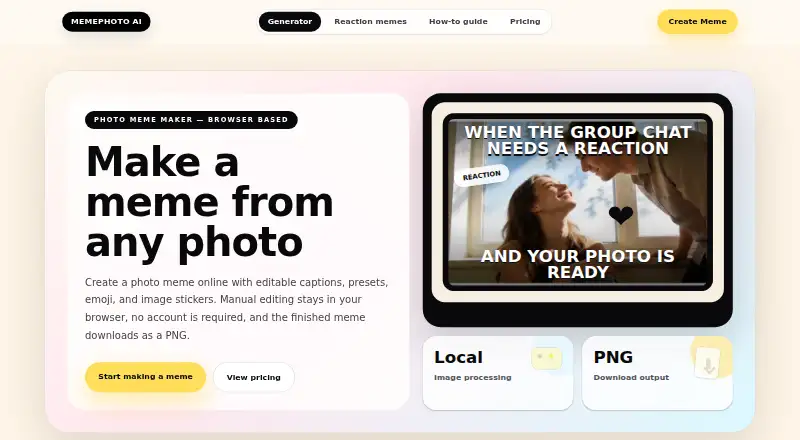
MemePhoto AI is a browser-based tool for making memes and reaction images from photos. Users can add editable top or bottom captions, choose presets, and adjust text size, rotation and orientation. The editor supports emoji stickers as well as uploaded PNG, JPG or WEBP image stickers. Users can preview a design and export it as a PNG in square, portrait or story format. The Free Demo costs nothing and includes a watermark on exports. The Creator Plan costs $9, paid once, removes the watermark, does not expire, and can be activated on up to three browsers. No account is required. Photo editing and PNG creation take place locally in the browser, without uploading or storing photos for meme creation. Optional AI caption generation sends a compressed image copy to the configured provider only after the user reviews a notice and explicitly continues. MemePhoto AI says it does not sell personal information and does not currently use selected images to train AI models.
Who it suits
MemePhoto AI suits people who want to create photo-based memes with captions and stickers in a browser, without creating an account. The free option may suit users who accept a watermark; the one-time Creator Plan removes it.
What it does well
- No account is required.
- Photo editing happens locally in the browser.
- Supports emoji and uploaded image stickers.
- Exports PNGs in square, portrait or story formats.
- Creator Plan removes the watermark and does not expire.
What to know first
- Free exports include a watermark.
- No meme template library.
- No text-to-meme generation.
- AI caption generation sends a compressed image copy after opt-in.
Limits
The Free Demo exports PNGs with a MemePhoto AI watermark. The Creator Plan costs $9, paid once, removes the watermark, and activates on up to three browsers.
Plans
| Plan | Billed and limits | Price |
|---|---|---|
| Free Demo | Photo upload · captions and presets · emoji and image stickers · 1:1, 4:5, or 9:16 formats · watermarked PNG export | Free |
| Creator Plan | one-time · Removes watermark from previews and PNG exports · license does not expire · activate on up to 3 browsers | $9, paid once |
As memephotoai.com lists them, read 7 Oct 2026. The maker's own page has the final word.
Getting started
- Open MemePhoto AI in a browser
- Upload a photo to edit
- Add captions, presets, or stickers and choose an output format
- Preview the meme and download the PNG
- Choose the Creator Plan if you want watermark-free previews and exports
Verdict
MemePhoto AI provides photo editing, caption presets, stickers and several PNG layouts. The free export is watermarked, while the one-time Creator Plan removes the mark and supports activation on up to three browsers.
Questions
What does MemePhoto AI cost?
The Free Demo costs nothing. The Creator Plan is $9, paid once.
What is included in the free option?
Free Demo includes photo upload, captions and presets, emoji and image stickers, 1:1, 4:5, or 9:16 formats, and watermarked PNG export.
Does the Creator Plan expire?
No. Its license does not expire, removes watermarks from previews and PNG exports, and can be activated on up to three browsers.
Do I need an account?
No account is required to use MemePhoto AI.
Are photos uploaded for meme creation?
Manual editing and PNG creation happen locally in the browser, and photos are not uploaded to or stored by MemePhoto AI for meme creation. Optional AI caption generation sends a compressed image copy to the configured AI provider only after you review the notice and explicitly continue.
How do I request a refund?
Submit a refund request within 14 days after purchase. Requests are reviewed under the published refund policy.
Facts from MemePhoto AI's own pages
- Accounts
- The tool can be used without creating an account. · memephotoai.com, 7 Oct 2026
- Editing
- Users can add editable top and bottom captions, use caption presets, and adjust text size, rotation, and orientation. · memephotoai.com, 7 Oct 2026
- Export
- Users can preview their meme and download it as a PNG in square, portrait, or story format. · memephotoai.com, 7 Oct 2026
- Integrations
- The pricing page identifies Creem as the secure checkout and license delivery provider. · memephotoai.com, 7 Oct 2026
- Limits
- The free export includes a MemePhoto AI watermark; Creator Plan removes it and activates on up to three browsers. · memephotoai.com, 7 Oct 2026
- Optional AI
- Optional AI caption generation sends a compressed image copy to the configured AI provider only after the user reviews the notice and explicitly continues. · memephotoai.com, 7 Oct 2026
- Payment provider
- Creator Plan payments are processed by Creem, and MemePhoto AI says it does not collect or store complete payment card details. · memephotoai.com, 7 Oct 2026
- Photo processing
- Manual photo editing and PNG creation happen locally in the browser, and photos are not uploaded to or stored by MemePhoto AI for meme creation. · memephotoai.com, 7 Oct 2026
- Privacy
- MemePhoto AI says it does not sell users’ personal information and does not currently use user-selected images to train AI models. · memephotoai.com, 7 Oct 2026
- Purpose
- MemePhoto AI is a browser-based tool for turning photos into shareable memes and reaction images. · memephotoai.com, 7 Oct 2026
- Refunds
- Refund requests must be submitted within 14 days after purchase and are reviewed under the published refund policy. · memephotoai.com, 7 Oct 2026
- Stickers
- The editor supports emoji stickers and uploaded PNG, JPG, or WEBP image stickers. · memephotoai.com, 7 Oct 2026
- Support
- Users can contact [email protected] with questions about payments, refunds, or using the service. · memephotoai.com, 7 Oct 2026
Where MemePhoto AI stands on Freedom251
- AI Meme Generators#20 of 29