
MemeGenerator.dev
What MemeGenerator.dev is
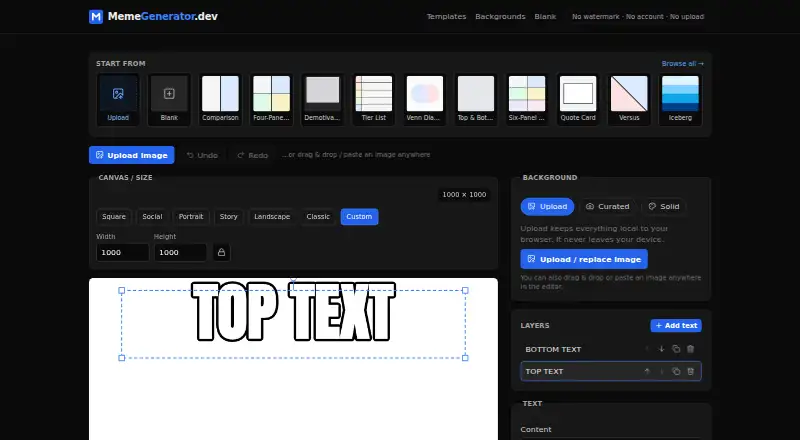
MemeGenerator.dev is a free browser editor for creating memes from uploaded images, layout templates, or curated photo backgrounds. It provides 24 templates covering compare, panels, caption, and lists formats. PNG, JPG, and WebP images can be uploaded by drag and drop or paste. The editor includes canvas-size presets, layers, text styling, undo, and redo, with PNG or JPG export. Rendering happens in the browser, so uploaded images are not sent to a server. There is no account or sign-up, and the service does not store users’ memes. A draft and some recent text-only projects may be saved in browser localStorage; uploaded image bytes are not persisted. Share links encode lightweight template, color, and text settings, while image-based projects can be exported as local .meme.json files. Layout templates are CC0 designs. The free plan costs nothing and includes watermark-free, full-resolution export.
Who it suits
It suits anyone who wants to make memes in a browser without creating an account or sending uploaded images to a server. Users who need simple layouts, text styling, and local project handling can work directly in the editor.
What it does well
- 24 templates across four layout categories
- Accepts PNG, JPG, and WebP uploads
- Browser rendering keeps uploaded images off servers
- No sign-up or account required
- Full-resolution export without a watermark
What to know first
- Users must secure rights to uploaded images
- Provided as is without warranty
- Uploaded-image projects require local .meme.json files for sharing
- Only recent text-only projects may be saved locally
Plans
| Plan | Billed and limits | Price |
|---|---|---|
| Free | No watermark · No account · Full-resolution export | Free |
As memegenerator.dev lists them, read 4 Oct 2026. The maker's own page has the final word.
Getting started
- Open MemeGenerator.dev in a browser
- Choose a layout template or curated photo background
- Upload or paste a PNG, JPG, or WebP image, if needed
- Edit the canvas with layers, text styling, and size presets
- Export the finished meme as PNG or JPG
- Save an uploaded-image project as a local .meme.json file when needed
Verdict
MemeGenerator.dev offers a no-account, browser-based workflow with local rendering and watermark-free export at no cost. Its templates and editing controls cover straightforward meme creation, while image rights and local project handling remain the user’s responsibility.
Questions
How much does MemeGenerator.dev cost?
The Free plan costs nothing. It includes full-resolution, watermark-free export without an account.
Do I need to create an account?
No. The service has no sign-up or account, and it does not store users’ memes.
Which image formats can I upload?
You can upload PNG, JPG, or WebP images by dragging and dropping or pasting them.
Are uploaded images sent to a server?
No. Meme rendering happens in the browser, and uploaded images are not sent to a server.
Can I share a project?
Share links encode lightweight template, color, and text state. Projects with uploaded images are exported as local .meme.json files.
Are the templates rights-cleared?
The layout templates are original designs released under CC0. Users remain responsible for rights to uploaded images.
Facts from MemeGenerator.dev's own pages
- Accounts
- The service has no sign-up or account and does not store users’ memes. · memegenerator.dev, 4 Oct 2026
- Editor tools
- The editor supports PNG and JPG export, canvas size presets, layers, text styling, and undo and redo. · memegenerator.dev, 4 Oct 2026
- Image formats
- Users can upload PNG, JPG, or WebP images, including by drag and drop or paste. · memegenerator.dev, 4 Oct 2026
- Local drafts
- The current draft and a small list of recent text-only projects may be saved in browser localStorage; uploaded image bytes are not persisted. · memegenerator.dev, 4 Oct 2026
- Photo backgrounds
- The built-in photo background library is a curated, self-hosted subset sourced from Unsplash photographers, with attribution metadata retained. · memegenerator.dev, 4 Oct 2026
- Privacy
- Meme rendering happens in the browser, and uploaded images are not sent to a server. · memegenerator.dev, 4 Oct 2026
- Purpose
- MemeGenerator.dev is a free browser-based meme editor for making memes from uploaded images, layouts, or curated photo backgrounds. · memegenerator.dev, 4 Oct 2026
- Sharing
- Share links encode lightweight template, color, and text state in the URL; projects with uploaded images are exported as a local .meme.json file. · memegenerator.dev, 4 Oct 2026
- Template rights
- The site says its layout templates are original rights-clean designs released under CC0. · memegenerator.dev, 4 Oct 2026
- Templates
- The site offers 24 free layout templates across compare, panels, caption, and lists categories. · memegenerator.dev, 4 Oct 2026
- User responsibility
- Users are responsible for the content they create and for ensuring they have rights to uploaded images. · memegenerator.dev, 4 Oct 2026
- Warranty
- The tool is provided as is, without warranty of any kind. · memegenerator.dev, 4 Oct 2026
Where MemeGenerator.dev stands on Freedom251
- Meme Makers#20 of 27