Freedom251 › Minecraft Skin Libraries
MC Toolbox Skin Library
What MC Toolbox Skin Library is
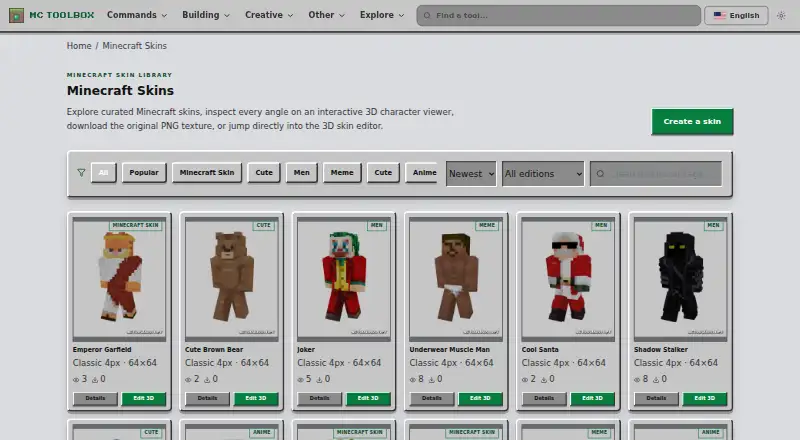
MC Toolbox Skin Library is a free web library for finding and working with Minecraft skins. Browse its listed 55 skins using category filters or search by skin or tag; the page shows 1–24 at a time and has three pagination buttons. Open a skin in an interactive 3D viewer, download its original PNG, or send it to the browser editor. Listed designs include Classic 4px and Slim 3px arm models, with examples in 64×64, 128×128, and 64×32 dimensions. The editor supports painting on a 3D model or UV map, base and overlay layers, face-aware mirroring, brush, eraser, fill and eyedropper tools, and undo and redo. Static, walking and running previews are available. The site says editing, importing, autosave and PNG export happen on the user's device. Public Java Edition username lookups do not require sign-in, but Bedrock gamertag lookup is unavailable through the profile service. The project describes itself as an independent fan-made site unaffiliated with Mojang Studios or Microsoft.
Who it suits
It suits Minecraft players, skin artists, builders and other creators who want to browse or edit skins in a browser. Bedrock creators should note that the profile lookup service does not support Bedrock gamertags.
What it does well
- Free plan includes the skin library and editor.
- Browse with category filters and skin or tag search.
- Download original PNGs without an account.
- Editor offers 3D and UV-map painting tools.
- Editing and export happen on the user's device.
What to know first
- The library page shows 1–24 of 55 skins.
- Bedrock gamertag lookup is unavailable through the profile service.
Limits
The free plan covers browsing 55 skins, 3D viewing, PNG downloads, and the skin editor. The profile service supports public Java Edition username lookups, not Bedrock gamertags.
Plans
| Plan | Billed and limits | Price |
|---|---|---|
| Free | Browse 55 skins · view in 3D · download PNG · use skin editor | Free |
As mctoolbox.net lists them, read 3 Oct 2026. The maker's own page has the final word.
Getting started
- Open https://mctoolbox.net/skin in a web browser.
- Browse using category filters or search for a skin or tag.
- Open a skin in the 3D viewer or editor.
- Download the original PNG or export your edited skin.
MC Toolbox Skin Library is a free browser-based catalogue for finding, inspecting, downloading, and editing Minecraft skins. It fits players, creators, teachers, builders, and server communities that want a no-account workflow and local PNG work, while readers needing a very large catalogue or Bedrock gamertag lookups should look elsewhere.
Overview
MC Toolbox combines a curated library with an interactive 3D viewer and a capable in-browser editor. The collection contains 55 skins, so it is a manageable starting shelf rather than a comprehensive marketplace. Filters, tag search, 3D inspection, and direct original-PNG downloads make the path from discovery to a usable texture short.
The project supports both Classic 4px and Slim 3px arm models, with examples in 64×64, 128×128, and 64×32 formats. It is an independent fan-made project operated by Gio Nui and is not affiliated with Mojang Studios or Microsoft.
Key features
Browse, inspect, and download
The library displays skins 1–24 at a time, across three pagination buttons. Category filters and a search field for skin names or tags are useful for narrowing this relatively small selection. The 3D viewer lets you inspect a design before downloading its original PNG or opening it in the editor. Public Java Edition username lookups require no sign-in, which is convenient when retrieving a known profile. The same service does not provide Bedrock gamertag lookups.
Browser editor
The editor supports both 3D and UV-map painting, with separate base and overlay layers and face-aware mirroring. Brush, eraser, fill, eyedropper, undo, and redo cover the core correction and recoloring work. Static, walk, and run previews are valuable for spotting how a design reads in motion, not just on a flat texture. Bedrock Edition skins are supported, although that support does not extend the username lookup service to Bedrock gamertags.
Local processing and privacy
Skin editing, importing, autosave, and PNG export take place on your device, without uploading the skin to MC Toolbox's server. That makes the workflow better suited to private or unfinished designs. Most tool work runs in the browser without an account, but online identifiers and usage data may still be processed by hosting, analytics, security, and advertising providers. The privacy policy names Cloudflare, Google Analytics, and Google AdSense, so users seeking an entirely tracker-free service should choose accordingly.
Pricing
| Plan | Price | Includes |
|---|---|---|
| Free | free | Browse 55 skins, view in 3D, download PNG, and use the skin editor |
There is no paid tier, trial, renewal, seat allowance, or quota to weigh against the free plan. Downloads do not require an account. The trade-off is scope: the free offering gives you the complete stated library and toolset, but that library remains 55 curated skins rather than an expansive catalogue.
Platforms
MC Toolbox Skin Library runs on the web. Its editor handles the work in the browser and exports PNG files locally. The service supports both skin model types and Bedrock Edition skins; Java Edition profile lookup is limited to public Java profiles.
Who it's for
Choose it if you are a Java player, Bedrock creator, server owner, datapack maker, teacher, builder, skin artist, or casual survival player who values quick browsing and editing without registration. It is particularly well matched to users adapting an existing skin, checking it in several animations, and keeping source files on their own device.
Look elsewhere if your priority is a deep, constantly broad catalogue, a mobile-first app, or Bedrock gamertag profile retrieval. The 55-skin shelf and web-only delivery are meaningful constraints for those needs.
Pros and cons
- Pros: Free access includes the full stated feature set, with no account needed to download.
- Pros: 3D and UV painting, layers, mirroring, core tools, and animation previews support serious edits rather than simple recoloring.
- Pros: Local editing, autosave, importing, and export avoid uploading skin files to the service.
- Cons: The catalogue has 55 skins, limiting choice compared with larger libraries.
- Cons: Username lookup covers public Java Edition profiles, not Bedrock gamertags.
- Cons: Analytics, advertising, hosting, and security providers may process online identifiers and usage data.
Alternatives
Browse Minecraft Skin Libraries when you want a wider comparison of services. World of Skins is a free Android, iOS, and web option, though opening a skin may require a short ad. Minecraft Plot suits readers who want a freemium service with a free basic tier and a $4.99 per 30-day premium plan. MinecraftSkins.app offers a free browser library, editor, combiner, and 64×64 PNG export without stated sign-up or installation. NeedCoolerShoes is another free cross-platform choice with no paid plans stated. SkinsCollection provides community skins, a built-in 3D editor, and PNG downloads on Android and web. Blessing Skin is worth considering for self-hosted or web use with no ads and no subscription fees. MC-Skins.net focuses on a free web library with no account, login, or paywall. mcskincraft is a free browser editor with no payment, subscription, or trial limit; signing in removes editor ads.
Verdict
MC Toolbox Skin Library is a strong pick for anyone who wants a free, no-account web editor attached to a curated skin shelf, especially when local processing and direct PNG export matter. Its main reason to look elsewhere is limited breadth: 55 skins and no Bedrock gamertag lookup will not satisfy users seeking a large catalogue or cross-edition profile search. Bug reports can be sent with the page URL, browser, device, Minecraft version, and expected behavior, with replies usually arriving within 1–2 business days.
Verdict
MC Toolbox combines a browsable skin collection, 3D previews, PNG downloads and a browser-based editor at no listed cost. Its Java Edition profile lookup is not a Bedrock gamertag lookup service.
Questions
Is MC Toolbox Skin Library free?
Yes. The Free plan costs nothing.
Which platforms does it support?
The listed platform is web.
Do I need an account to download a skin?
No. The facts say an account is not required for downloads.
Can I look up a Bedrock gamertag?
No. Username lookup supports public Java Edition profiles; Bedrock gamertags are unavailable through that profile service.
Does editing upload my skin to MC Toolbox?
The site says editing, importing, autosave, and PNG export happen on the user's device without uploading the skin to its server.
Who operates the project?
MC Toolbox says the project is operated by Gio Nui and is an independent fan-made project unaffiliated with Mojang Studios or Microsoft.
Facts from MC Toolbox Skin Library's own pages
- Browse and search
- The library has category filters and a search field for skins or tags. · mctoolbox.net, 3 Oct 2026
- Downloads
- The skin viewer offers the original PNG for download and says no sign-in is required for public Java Edition username lookups. · mctoolbox.net, 3 Oct 2026
- Intended users
- MC Toolbox describes its audience as Java Edition players, Bedrock creators, server owners, datapack makers, teachers, builders, skin artists, and casual survival players. · mctoolbox.net, 3 Oct 2026
- Library size
- The page says it shows 1–24 of 55 skins and provides three pagination buttons. · mctoolbox.net, 3 Oct 2026
- Local processing
- The editor says skin editing, importing, autosave, and PNG export happen on the user's device without uploading the skin to MC Toolbox's server. · mctoolbox.net, 3 Oct 2026
- Operator and affiliation
- MC Toolbox says it is operated by Gio Nui and is an independent fan-made project unaffiliated with Mojang Studios or Microsoft. · mctoolbox.net, 3 Oct 2026
- Platform limitation
- Username lookup supports public Java Edition profiles; Bedrock gamertags are not available through the same profile service. · mctoolbox.net, 3 Oct 2026
- Privacy
- The site says most tool work happens in the browser and does not require an account, while hosting, analytics, security, and advertising providers may process online identifiers and usage data. · mctoolbox.net, 3 Oct 2026
- Purpose
- The library lets users browse curated Minecraft skins, inspect them in an interactive 3D viewer, download the original PNG texture, or open them in the 3D editor. · mctoolbox.net, 3 Oct 2026
- Skin editor
- The browser editor supports 3D and UV-map painting, base and overlay layers, face-aware mirroring, brush, eraser, fill, eyedropper, undo, redo, and static, walk, and run previews. · mctoolbox.net, 3 Oct 2026
- Skin formats
- Listed skins include Classic 4px and Slim 3px arm models, with examples in 64×64, 128×128, and 64×32 dimensions. · mctoolbox.net, 3 Oct 2026
- Support
- The contact page asks bug reports to include the page URL, browser, device, Minecraft version, and expected behavior, and says replies usually arrive within 1–2 business days. · mctoolbox.net, 3 Oct 2026
- Third-party services
- The privacy policy lists Cloudflare for hosting, content delivery and security, Google Analytics for usage measurement, and Google AdSense for advertising. · mctoolbox.net, 3 Oct 2026
Where MC Toolbox Skin Library stands on Freedom251
- Minecraft Skin Libraries#10 of 26