Freedom251 › AI Texture Generators
Material Forge
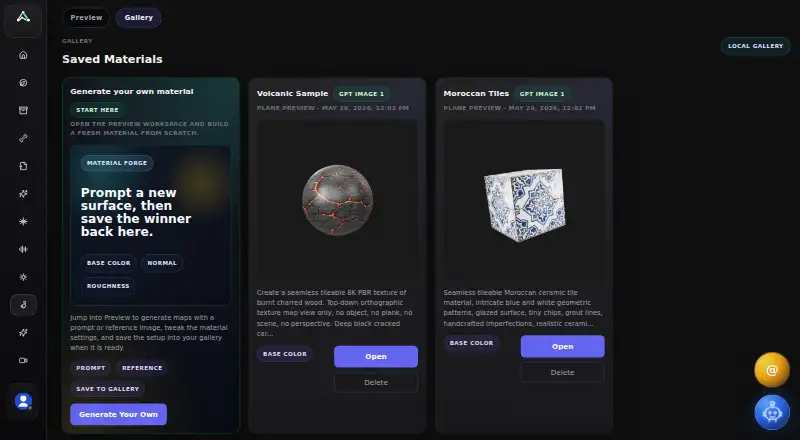
What Material Forge is
Material Forge is a web-based AI tool for creating PBR materials for Unreal Engine 5. Users can guide map generation with a surface photo, concept frame, or sample image, then select base color, normal, roughness, metallic, or emissive maps. The interface shows a cost of 20 credits for each selected map. Material controls cover tint, brightness, desaturation, metallic, roughness, normal intensity, clearcoat, and opacity, alongside UV scale, rotation, offset, and panner settings. Emissive and edge-glow settings are also available, and the tool includes a 3D material preview. A ZIP export contains a JSON configuration, generated texture maps, a preview PNG, and a reference image when one was provided. The UE5 plugin connects through a local listener and places assets in the project's MaterialForge folder; setup requires enabling the Python Editor Script Plugin and adding two downloaded files to Content/Python. The page also describes a UEFN listener workflow. The free plan includes 100 monthly credits and one concurrent generation.
Who it suits
Material Forge suits creators, indie teams, and developers making stylized characters, creatures, prototypes, or game assets. It is aimed at Unreal Engine 5 material workflows, with a separate UEFN listener workflow described.
What it does well
- Accepts reference images to guide map generation
- Provides several adjustable material and UV controls
- Exports maps and configuration in a ZIP
- Includes a 3D material preview
- Free plan has 100 monthly credits
What to know first
- Each selected map costs 20 credits
- Free plan allows one concurrent generation
- Seamless tiling is not available
- AI workflows may send inputs to configured model providers
Limits
The free plan includes 100 monthly credits and one concurrent generation. The interface shows a cost of 20 credits for each selected map.
Plans
| Plan | Billed and limits | Price |
|---|---|---|
| Free | 100 monthly credits · 1 concurrent generation | Free |
As animatemesh.com lists them, read 4 Oct 2026. The maker's own page has the final word.
Getting started
- Open https://www.animatemesh.com/materialforge/ in a web browser.
- Use the free plan, which includes 100 monthly credits and one concurrent generation.
- Add a surface photo, concept frame, or sample image to guide generation, if desired.
- For UE5, enable the Python Editor Script Plugin and place the two downloaded files in the project's Content/Python/ folder.
- Use the UE5 plugin with its local listener, or follow the described UEFN listener script workflow.
Verdict
Material Forge offers image-guided PBR map generation, material controls, preview, and ZIP export for Unreal Engine workflows. Review the credit use and UE5 setup requirements before starting.
Questions
Is Material Forge free?
Yes. The Free plan costs nothing and includes 100 monthly credits and one concurrent generation.
Which platforms does it support?
The listed platform is web.
What maps can it generate?
Generation options include base color, normal, roughness, metallic, and emissive maps. The interface shows a cost of 20 credits for each selected map.
Can I use it with Unreal Engine?
The UE5 plugin connects through a local listener and places materials and textures in /Game/MaterialForge/. The page also describes a UEFN listener script workflow.
What does the Material ZIP contain?
It contains material_config.json, generated texture maps, a preview PNG, and a reference image when one is present.
Can AI workflows send my uploaded data to another provider?
The privacy policy says prompts, uploaded images, or texture data may be sent to the configured model provider when AI texture workflows run.
Facts from Material Forge's own pages
- Additional effects
- The tool includes UV scale, rotation, offset and panner controls, plus emissive and edge-glow settings. · animatemesh.com, 4 Oct 2026
- AI data handling
- The privacy policy says prompts, uploaded images, or texture data may be sent to the configured model provider when users run AI texture workflows. · animatemesh.com, 4 Oct 2026
- Credit cost
- The interface shows 20 credits for one selected map and 20 credits each. · animatemesh.com, 4 Oct 2026
- Export
- The Material ZIP export contains material_config.json, generated texture maps, a preview PNG, and a reference image when present. · animatemesh.com, 4 Oct 2026
- Free credits
- AnimateMesh pricing lists a free plan with 100 monthly credits and one concurrent generation. · animatemesh.com, 4 Oct 2026
- Intended users
- AnimateMesh describes its audience as creators, indie teams, and developers building stylized characters, creatures, prototypes, and game assets. · animatemesh.com, 4 Oct 2026
- Local gallery
- The tool can save a full material setup to a local gallery in the browser interface. · animatemesh.com, 4 Oct 2026
- Maps
- The page offers generation options for base color, normal, roughness, metallic, and emissive maps. · animatemesh.com, 4 Oct 2026
- Material controls
- Material properties include tint, brightness, desaturation, metallic, roughness, normal intensity, clearcoat, and opacity controls. · animatemesh.com, 4 Oct 2026
- Privacy and security
- AnimateMesh says it uses authenticated sessions, provider-managed infrastructure, and access controls as safeguards, while noting that absolute security cannot be guaranteed. · animatemesh.com, 4 Oct 2026
- Purpose
- Material Forge is an AI-powered PBR material creator for Unreal Engine 5. · animatemesh.com, 4 Oct 2026
- Reference images
- Users can add a surface photo, concept frame, or sample image to guide material-map generation. · animatemesh.com, 4 Oct 2026
- UE5 setup
- UE5 setup requires enabling the Python Editor Script Plugin and placing two downloaded files in the project's Content/Python/ folder. · animatemesh.com, 4 Oct 2026
- UEFN integration
- The page describes a UEFN listener script workflow and says imported assets land under /<ProjectName>/MaterialForge/. · animatemesh.com, 4 Oct 2026
- Unreal Engine integration
- A UE5 plugin connects through a local listener at 127.0.0.1:7842 and places materials and textures in /Game/MaterialForge/. · animatemesh.com, 4 Oct 2026
Where Material Forge stands on Freedom251
- AI Texture Generators#10 of 19