Freedom251 › AI Video Lip Sync Tools
MakeItTalk
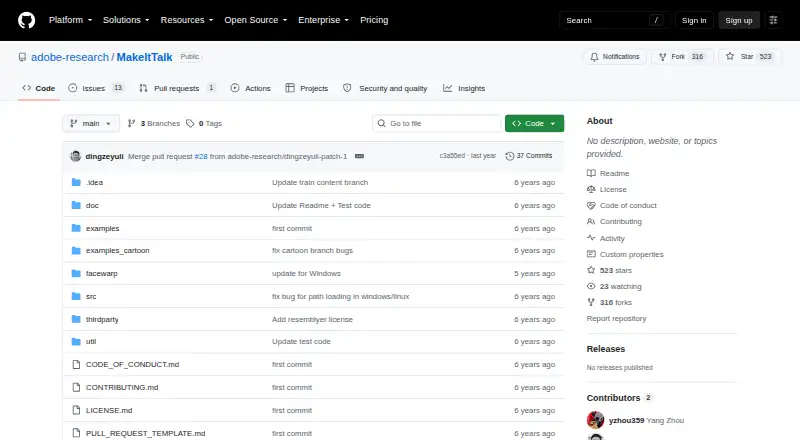
What MakeItTalk is
MakeItTalk is open-source research software that generates expressive talking-head videos from a single facial image and audio. Its method uses audio content to drive lip movement and nearby facial motion, while speaker information influences expressions and other head dynamics. The project describes use with human portraits, paintings, sketches, 2D cartoons, manga, and stylized caricatures, including faces and characters not observed during training. The repository includes pretrained models, module training code, and Google Colab demos for natural faces. For human faces and paintings, its README calls for a centered 256×256 JPG portrait and a WAV audio file. Optional command-line arguments adjust lip motion along the x and y axes and head displacement. Local setup requires Python 3.6, ffmpeg, and Python packages; cartoon face warping on Ubuntu also requires winehq-stable. Creating custom puppets remains on the project's to-do list, and training sections for voice conversion, the speaker-aware branch, and image-to-image translation are marked as unfinished. The software is free under a CC BY-NC 4.0 license, which permits noncommercial use subject to its terms. The listed platforms are Linux and self-hosted.
Who it suits
MakeItTalk suits people seeking research software for generating talking-head video from facial images and audio, including stylized artwork. It is limited to noncommercial use under its listed license.
What it does well
- Works with portraits, paintings, sketches, and cartoons.
- Includes pretrained models and training code.
- Optional settings adjust lip and head motion.
- Free open-source research code.
What to know first
- License permits noncommercial use only.
- Local setup requires Python 3.6 and ffmpeg.
- Custom puppets are on the to-do list.
- Several training sections remain unfinished.
Limits
The software is free under a CC BY-NC 4.0 license, which permits noncommercial use subject to its terms. The repository lists custom puppet creation as a to-do item, and several training sections are marked “Todo...”.
Plans
| Plan | Billed and limits | Price |
|---|---|---|
| Open-source research code | CC BY-NC 4.0 · noncommercial use only | Free |
As github.com lists them, read 4 Oct 2026. The maker's own page has the final word.
Getting started
- Open the MakeItTalk GitHub repository.
- The listed platforms are Linux and self-hosted.
- The README specifies Python 3.6, ffmpeg, and Python packages.
- For cartoon face warping on Ubuntu, the README says winehq-stable is also required.
- For human faces and paintings, prepare a centered 256×256 JPG portrait and a WAV audio file.
- Optional command-line arguments adjust lip motion along the x and y axes and head-motion displacement.
Verdict
MakeItTalk offers talking-head generation for a broad range of facial imagery, with pretrained models and motion controls. Its noncommercial license and local requirements are important constraints to check first.
Questions
Is MakeItTalk free?
Yes. It is open-source research code and free under the CC BY-NC 4.0 license.
Can MakeItTalk be used commercially?
The listed license permits noncommercial use subject to its terms.
What platforms does it support?
The listed platforms are Linux and self-hosted.
What inputs does it use?
It generates video from a facial image and audio as the only input. For human faces and paintings, the README calls for a centered 256×256 JPG portrait and a WAV file.
What does the repository include?
It includes pretrained models, training code for modules, and Google Colab demos for natural faces.
What is needed to run it locally?
The README specifies Python 3.6, ffmpeg, and Python packages. Cartoon face warping on Ubuntu also requires winehq-stable.
Facts from MakeItTalk's own pages
- Available code
- The repository includes pretrained models, training code for modules, and Google Colab demos for natural faces. · github.com, 4 Oct 2026
- Custom puppets
- The README lists creating custom puppets as a to-do item. · github.com, 4 Oct 2026
- Image and audio input
- For human faces and paintings, the README instructs users to provide a centered 256×256 JPG portrait and WAV audio file. · github.com, 4 Oct 2026
- License
- The repository license is Creative Commons Attribution-NonCommercial 4.0 International, which permits licensed use for noncommercial purposes subject to its terms. · github.com, 4 Oct 2026
- Local requirements
- The README specifies Python 3.6, ffmpeg, and Python packages; cartoon face warping on Ubuntu also requires winehq-stable. · github.com, 4 Oct 2026
- Motion controls
- Optional command-line arguments adjust lip motion along the x and y axes and head-motion displacement. · github.com, 4 Oct 2026
- Purpose
- MakeItTalk generates expressive talking-head videos from a single facial image, using audio as the only input. · github.com, 4 Oct 2026
- Security and privacy
- The repository page does not state security certifications or privacy practices. · github.com, 4 Oct 2026
- Speaker-aware animation
- The method separates audio content, which controls lip and nearby facial motion, from speaker information, which influences expressions and other talking-head dynamics. · github.com, 4 Oct 2026
- Supported imagery
- The project describes use with human portraits, paintings, sketches, 2D cartoons, manga, and stylized caricatures. · github.com, 4 Oct 2026
- Training status
- Voice conversion, speaker-aware branch, and image-to-image translation training sections are marked “Todo...”. · github.com, 4 Oct 2026
- Unseen inputs
- The method is described as generalizing to faces and characters not observed during training. · github.com, 4 Oct 2026
Where MakeItTalk stands on Freedom251
- AI Video Lip Sync Tools#15 of 28