Freedom251 › Church Website Builders
Mainfolk
What Mainfolk is
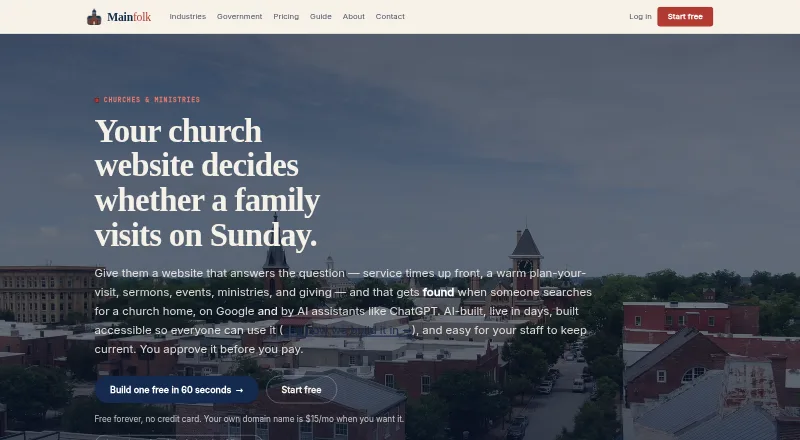
Mainfolk is a website builder for organizations, with features for churches and an AI-generated first draft. Church pages can cover service times, visitor planning, sermons and media, events, groups, ministries, and giving. Staff edit page content directly, and Mainfolk says published changes reach visitors worldwide in under a minute. A giving page can link to a church’s existing processor, including Tithe.ly, Pushpay, or PayPal. Mainfolk says its sites use structured data, semantic HTML, and a per-site llms.txt to support discovery in search engines and AI answers. All plans include hosting, SSL, updates, security patching, and global delivery. The service says it builds to WCAG 2.1 Level AA, but notes that uploaded documents and third-party embeds may bring accessibility issues. Users can export pages, images, submissions, and subscribers on any plan, and a site remains on Free after cancellation. There is a free plan; Launch starts at $15/month. Mainfolk is available on Android, iOS, and web.
Who it suits
Mainfolk describes its church offering as suited to small churches that want a website without an agency or a volunteer maintaining WordPress. It may also suit organizations that need church content, giving links, and staff editing.
What it does well
- AI-generated first draft for a website.
- Church pages support sermons, events, groups, and giving.
- Edits can publish worldwide in under a minute.
- Export pages, images, submissions, and subscribers on any plan.
- Free plan includes unlimited edits.
What to know first
- Free sites use a yourname.mainfolk.com address.
- Free plan includes about 10 AI assists per month.
- Uploaded documents and third-party embeds can cause accessibility issues.
- Paid plans start at $15/month.
Limits
Free includes about 10 AI assists per month, a yourname.mainfolk.com address, and a footer note. Launch starts at $15/month and includes an own domain and two editors; Pro adds analytics and nine editors for $29/month.
Plans
| Plan | Billed and limits | Price |
|---|---|---|
| Free | free forever; no card needed · 1 website · yourname.mainfolk.com address · about 10 AI assists/month · unlimited edits · community help · footer note | Free |
| Civic | $149/month or $1,490/year, 2 months free · up to 25 websites · unlimited staff editors · emergency alert banner · accessibility statement page · free site migration · written quote, W-9 and PO | $149 a month |
| Launch | $15/month or $150/year, 2 months free · own domain · up to 3 websites · 2 additional editors · more AI help · email support | $15 a month |
| White-Glove Design | one-time $199; ordinary plan price still applies · team designs site pages, words and photos | $199, paid once |
| Pro | $29/month or $290/year, 2 months free · up to 10 websites · visitor analytics · news and blog posts · 9 additional editors · priority support | $29 a month |
As mainfolk.com lists them, read 15 Oct 2026. The maker's own page has the final word.
Getting started
- Open https://www.mainfolk.com/church-websites.
- Choose Free, Launch, Pro, or another listed plan.
- Start with the AI-generated first draft.
- Click page content to edit the site.
- Link the giving page to an existing processor if needed.
- Publish the changes.
Overview
Mainfolk is a website builder that uses AI to create an initial site draft, with church-specific content and direct page editing. It is best suited to small churches that want staff to manage their own website rather than hire an agency or depend on a volunteer to maintain WordPress. Its free tier makes it easy to start, but the included Mainfolk address and limited AI assistance may prompt a growing congregation to upgrade.
Key features
Church pages and editing
Church sites can bring together service times, visit-planning information, sermons and media, events, groups, ministries, and giving. The AI draft provides a starting point, while staff can edit page content directly; Mainfolk says published changes go live worldwide in under a minute. That is a useful fit for congregations that need to keep routine details current without outsourcing each change.
Giving pages can link to an existing processor such as Tithe.ly, Pushpay, or PayPal, so churches can keep the processor they already use. Mainfolk also says each site includes structured data, semantic HTML, and a site-specific llms.txt to support discovery in search engines and AI answers.
Accessibility, hosting, and control
Mainfolk says it builds to WCAG 2.1 Level AA, with semantic structure, keyboard operation, editable alt text for AI-generated images, reduced-motion support, and labeled forms. That is a thoughtful foundation, but uploaded documents and third-party embeds can introduce accessibility problems outside Mainfolk’s rendering engine, so churches still need to check what they add.
All tiers include hosting, an SSL certificate, platform updates, security patching, and global delivery. Mainfolk says it does not sell personal information and names Stripe, Mailgun, Cloudflare, and its hosting provider among the vendors used to run the service. Pages, images, submissions, and subscribers can be exported on any plan, and a site stays on Free after cancellation. That portability reduces the cost of trying the service, though exportability does not remove the work of moving to another platform.
Pricing
Mainfolk is freemium, with no free trial. Free costs $0/month and includes a yourname.mainfolk.com address, unlimited edits, about 10 AI assists per month, community help, and a footer note. It is a sensible way for a small church to get online, but the Mainfolk address and footer note are trade-offs, and the AI allowance is modest.
Launch costs $15/month or $150/year, with two months free on annual billing. It adds an own domain, two editors, more AI help, and email support. This is the practical step up for a church that wants its own address and a small staff editing team; it does not include the visitor analytics or nine-editor allowance on Pro.
Pro costs $29/month or $290/year, with two months free on annual billing. It includes Launch features, visitor analytics covering activity, referral sources, popular pages, and form messages, nine editors, more AI help, and priority support. Churches with several staff contributors or a need to understand site activity have a reason to pay more; smaller teams can avoid that expense.
Civic costs $149/month or $1,490/year, with two months free on annual billing. It includes Pro features, unlimited staff editors, up to 25 websites, an emergency alert banner, and free site migration. The price is most defensible for organizations managing several church sites or needing broad editor access, not a single small congregation.
White-Glove Design is a one-time $199 for a team to design site pages, words, and photos; the ordinary plan price still applies. It may suit a church that wants help shaping the initial site but still expects ongoing plan costs.
Platforms
Mainfolk is available on web, Android, and iOS. Its plans include hosting, so churches do not need to arrange separate hosting for the site.
Who it's for
Mainfolk is most compelling for small churches that want church-oriented page content, direct staff editing, and a low-cost starting point. Launch fits a congregation ready to use its own domain and share editing with two people. Pro makes more sense when analytics, priority support, or a larger editing group matters; Civic is aimed at multi-site organizations. Churches that need a fully managed site or want to avoid reviewing uploaded content and embeds for accessibility should weigh those needs before choosing it.
Pros and cons
- Pro: The church-specific page types cover common needs such as sermons, events, ministries, visitor information, and giving.
- Pro: Direct editing and stated sub-minute global publishing support quick updates by staff.
- Pro: The Free plan, export on any tier, and continued Free service after cancellation lower the commitment to get started.
- Con: Free uses a Mainfolk subdomain and carries a footer note, which may be a poor fit for a church seeking a fully branded address.
- Con: Free includes about 10 AI assists per month, so frequent use of AI help may push a church toward a paid tier.
- Con: Uploaded documents and third-party embeds can create accessibility issues despite the platform’s stated WCAG-oriented features.
Alternatives
For a broader church-focused comparison, see Church Website Builders. The Legal Marketing Software, Law Firm Website Builders, and Dental Website Builders lists serve readers evaluating software for those other sectors.
Law Firm Central offers a free hosted firm page with a lead form and basic SEO, so it is the more relevant option for a firm seeking a basic legal profile rather than a church website. Avago offers AI website generation, previews across devices, an AI content assistant, stock images, and free logo generation; consider it if those general site-building tools are the priority. ReferDesk is a free web, Windows, and macOS option. Attorney Share is a freemium web option. GoBoom is a paid web option. Birdeye is a paid web option. Vuture offers API and web access with custom pricing. Lawmatics is a paid option with a free trial and Android, iOS, API, and web platforms.
Verdict
Choose Mainfolk if you run a small church that wants a church-oriented site staff can update themselves, with a free entry point and a route to custom domains and team features. The combination of church content, direct editing, and included hosting is its clearest case. Look elsewhere if uploaded materials and embeds must remain within a controlled accessibility boundary, or if the free subdomain and AI-assist cap do not suit your needs.
Verdict
Mainfolk combines an AI-started site with church-specific page content and direct editing. Check the free plan’s address and AI-assist allowance, and note the stated accessibility caveat for uploaded content and embeds.
Questions
Is there a free plan?
Yes. Free costs $0/month and includes unlimited edits, about 10 AI assists per month, community help, a yourname.mainfolk.com address, and a footer note.
How much do paid plans cost?
Launch is $15/month or $150/year, Pro is $29/month or $290/year, and Civic is $149/month or $1,490/year. Each annual price includes two months free. White-Glove Design is a one-time $199, with the ordinary plan price still applying.
Which platforms can I use?
Mainfolk is available on Android, iOS, and the web.
Can a church keep its current donation processor?
Yes. The giving page can link to a processor such as Tithe.ly, Pushpay, or PayPal, and the church keeps its processor.
What support comes with each plan?
Free includes community help, Launch includes email support, and Pro includes priority support. Mainfolk also says customers can talk to the engineers who built the platform.
Can I export site data or keep my site after cancelling?
Mainfolk says pages, images, submissions, and subscribers can be exported at any time on any plan. Sites continue on Free after cancellation.
Facts from Mainfolk's own pages
- Accessibility
- Mainfolk says it builds to WCAG 2.1 Level AA and lists semantic structure, keyboard operation, editable AI-generated image alt text, reduced-motion support, and labeled forms. · mainfolk.com, 29 Sept 2026
- Accessibility limit
- Mainfolk says customer-authored content such as uploaded documents and third-party embeds can introduce accessibility issues outside its rendering engine. · mainfolk.com, 29 Sept 2026
- Accessibility limitation
- Mainfolk warns that customer-uploaded documents and third-party embeds can create accessibility issues outside its rendering engine. · mainfolk.com, 15 Oct 2026
- Accessibility standard
- Mainfolk states that its platform is built to WCAG 2.1 Level AA with semantic HTML, keyboard operation, visible focus, editable alt text, reduced-motion support and labeled forms. · mainfolk.com, 15 Oct 2026
- Account login
- Accounts use one-click magic links sent by email instead of passwords. · mainfolk.com, 15 Oct 2026
- AI-content limitation
- Terms warn that AI drafts can contain mistakes and require review before publication. · mainfolk.com, 15 Oct 2026
- AI generation
- The AI plans pages, writes copy, selects a palette and typography, and places imagery for a complete first draft. · mainfolk.com, 15 Oct 2026
- Analytics
- Pro and Civic provide plain-language visitor counts, referral sources, popular pages and form-message reporting without a separate analytics account. · mainfolk.com, 15 Oct 2026
- Announcement banner
- Civic sites include an emergency or announcement banner that staff can publish quickly for urgent notices or events. · mainfolk.com, 15 Oct 2026
- Availability limitation
- Terms state that uninterrupted service is not promised and describe the service as provided as-is and as-available. · mainfolk.com, 15 Oct 2026
- Church content
- Church sites can publish service times, plan-your-visit information, sermons, media, events, groups, ministries and giving. · mainfolk.com, 15 Oct 2026
- Data portability
- Mainfolk says users can export pages, images, submissions, and subscribers at any time on any plan, and sites continue on Free after cancellation. · mainfolk.com, 29 Sept 2026
- Direct editing
- Staff edit page blocks directly and published changes are stated to go live worldwide in under a minute. · mainfolk.com, 15 Oct 2026
- Editing
- Staff can edit by clicking page content and publish changes that Mainfolk says go live worldwide in under a minute. · mainfolk.com, 29 Sept 2026
- Giving integrations
- Giving pages can link to an existing processor such as Tithe.ly, Pushpay or PayPal, while the church keeps that processor. · mainfolk.com, 15 Oct 2026
- Headquarters
- Gurnee, Illinois, United States · mainfolk.com, 23 Sept 2026
- Hosting
- All plans include hosting, an SSL security certificate, updates, security and global edge delivery. · mainfolk.com, 15 Oct 2026
- Intended users
- Mainfolk describes its church offering as suited to small churches that want a website without an agency or a volunteer maintaining WordPress. · mainfolk.com, 29 Sept 2026
- Licence
- The Mainfolk platform, software, design system and templates are identified as property of Champlin Enterprises, LLC. · mainfolk.com, 15 Oct 2026
- LinkedIn company focus
- The LinkedIn profile says the firm builds SaaS intelligence tools aimed at local economic development. · linkedin.com, 15 Oct 2026
- LinkedIn company size
- LinkedIn lists Champlin Enterprises, LLC as having one employee. · linkedin.com, 15 Oct 2026
- LinkedIn data integrations
- The LinkedIn profile describes Chamber Culture integrations with Bureau of Labor Statistics and U.S. Census data through APIs. · linkedin.com, 15 Oct 2026
- LinkedIn flagship
- The company describes Chamber Culture as its flagship product and says it includes Mainfolk-powered member websites. · linkedin.com, 15 Oct 2026
- LinkedIn founded
- LinkedIn lists the company as founded in 2026. · linkedin.com, 15 Oct 2026
Where Mainfolk stands on Freedom251
- Church Website Builders#2 of 24
- Legal Marketing Software#4 of 24
- Law Firm Website Builders#8 of 40
- Dental Website Builders#9 of 43