Freedom251 › Email Finder Software

MailTooth
What MailTooth is
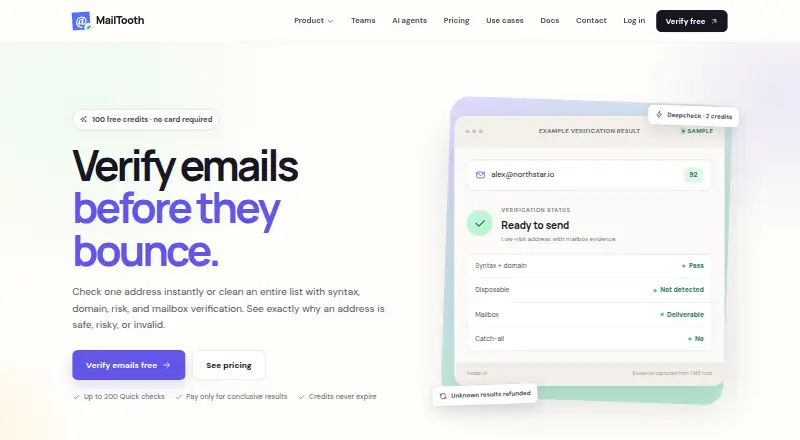
MailTooth verifies individual email addresses and lists, returning evidence for safe, risky, or invalid results. It offers dashboard workflows for CSV and TXT uploads: choose an email column and verification depth, then download the completed results. Quick checks cost 0.5 credit, Standard checks cost 1 credit, and Deepcheck costs 2 credits. Depending on depth, checks may include syntax, MX and domain signals, disposable and role-based addresses, authentication records, blocklists, WHOIS, SMTP mailbox verification, and catch-all behavior. Single-address and bulk APIs support programmatic checks, while a JavaScript integration can check form fields before submission with configurable blocking rules. A Chrome side panel can find and verify addresses while browsing, then save results to lists or export them as CSV. Workspaces organize credits, API keys, lists, and activity with owner, admin, member, and viewer roles. A free plan provides 100 credits without a card. Paid credit packs are one-time purchases, starting with Starter at $11, paid once; credits never expire. MailTooth also connects campaigns through Resend accounts and offers a remote MCP tool, limited to one email per call.
Who it suits
MailTooth suits people checking email lists, validating addresses through an API, or adding checks to forms. Its workspaces may suit teams that need role-based organization of credits, keys, lists, and activity.
What it does well
- Free plan includes 100 credits without a card.
- Bulk uploads accept CSV and TXT files.
- APIs support single-address and bulk verification.
- Chrome extension can save results to lists or export CSV.
- Paid credit packs never expire.
What to know first
- MCP verification handles one email per call.
- Quick, Standard, and Deepcheck use different credit amounts.
- Privacy policy says information is retained as reasonably necessary.
Limits
The Free credits plan includes 100 credits: up to 200 Quick checks, 100 Standard checks, or 50 Deepchecks. Quick uses 0.5 credit per check, Standard uses 1, and Deepcheck uses 2; paid packs contain larger balances and their credits never expire. The MCP verification tool handles one email per call, with large datasets directed to bulk verification.
Plans
| Plan | Billed and limits | Price |
|---|---|---|
| Free credits | 100 credits · up to 200 Quick checks, 100 Standard checks, or 50 Deepchecks · no card required | Free |
| Starter | one time · 3,600 credits · 7,200 Quick checks · 3,600 Standard checks · 1,800 Deepchecks · credits never expire | $11, paid once |
| Scale | one time · 55,000 credits · 110,000 Quick checks · 55,000 Standard checks · 27,500 Deepchecks · credits never expire | $111, paid once |
| Growth | one time · 10,200 credits · 20,400 Quick checks · 10,200 Standard checks · 5,100 Deepchecks · credits never expire | $27, paid once |
| Pro | one time · 32,600 credits · 65,200 Quick checks · 32,600 Standard checks · 16,300 Deepchecks · credits never expire | $72, paid once |
As mailtooth.com lists them, read 11 Oct 2026. The maker's own page has the final word.
Getting started
- Open the MailTooth website.
- Choose the free credits plan, which requires no card, or select a one-time credit pack.
- For dashboard verification, upload a CSV or TXT file and select its email column and verification depth.
- For programmatic use, connect through the single-address or bulk API.
- For browsing, use the Chrome side-panel extension to discover and verify addresses.
Verdict
MailTooth offers several ways to verify addresses, from uploaded lists to APIs, forms, and a browser extension. The free credits provide a way to start, while larger usage requires choosing a one-time credit pack.
Questions
Is there a free plan?
Yes. Free credits cost nothing and include 100 credits, with no card required.
How much do paid plans cost?
Starter is $11, paid once, Growth is $27, paid once, Pro is $72, paid once, and Scale is $111, paid once. Each is billed one time, and credits never expire.
Which platforms does MailTooth support?
MailTooth is available on the web, through an API, and as a Chrome extension.
What verification options are available?
Quick costs 0.5 credit, Standard costs 1 credit, and Deepcheck costs 2 credits. Checks vary by depth and can include syntax, domain and mail-server signals, authentication records, blocklists, WHOIS, SMTP mailbox verification, and catch-all behavior.
Can MailTooth verify bulk lists?
Yes. Upload CSV or TXT files in the dashboard, choose the email column and depth, and download results. A bulk verification API is also available.
Does MailTooth support teams and integrations?
Workspaces offer owner, admin, member, and viewer roles. MailTooth supports campaigns through connected Resend accounts and provides a remote MCP tool for compatible AI clients.
Facts from MailTooth's own pages
- API
- The service offers single-address and bulk verification APIs for programmatic verification. · mailtooth.com, 11 Oct 2026
- Bulk workflow
- Users can upload CSV or TXT files in the dashboard, select an email column and verification depth, and download completed results. · mailtooth.com, 11 Oct 2026
- Checks
- Depending on depth, checks include syntax, MX and domain signals, disposable and role-based addresses, SPF/DKIM/DMARC, blocklists, WHOIS, SMTP mailbox verification, and catch-all behavior. · mailtooth.com, 11 Oct 2026
- Chrome extension
- The Chrome side-panel extension discovers and verifies addresses while browsing and can save results to lists or export them as CSV. · mailtooth.com, 11 Oct 2026
- Form protection
- A one-line JavaScript integration checks email fields before form submission and supports configurable blocking rules. · mailtooth.com, 11 Oct 2026
- Integrations
- MailTooth supports campaigns through connected Resend accounts and exposes a verify_email tool through a remote MCP server for compatible AI clients. · mailtooth.com, 11 Oct 2026
- Limits
- The MCP verification tool handles one email per call; MailTooth directs large datasets to bulk verification. · mailtooth.com, 11 Oct 2026
- Privacy and retention
- MailTooth processes verification inputs, results, bulk files, and usage records, and retains information as reasonably necessary for service, legal, dispute-resolution, and abuse-prevention purposes. · mailtooth.com, 11 Oct 2026
- Product
- MailTooth verifies individual email addresses and lists and shows evidence for safe, risky, or invalid results. · mailtooth.com, 11 Oct 2026
- Security
- The privacy policy says MailTooth uses administrative and technical safeguards, while noting that no online service can guarantee absolute security. · mailtooth.com, 11 Oct 2026
- Support
- The site lists [email protected] as its contact address. · mailtooth.com, 11 Oct 2026
- Team features
- Workspaces support owner, admin, member, and viewer roles, with credits, API keys, lists, and activity organized per workspace. · mailtooth.com, 11 Oct 2026
- Verification depths
- Quick costs 0.5 credit, Standard costs 1 credit, and Deepcheck costs 2 credits. · mailtooth.com, 11 Oct 2026
Where MailTooth stands on Freedom251
- Email Finder Software#17 of 33