LogoNuri
What LogoNuri is
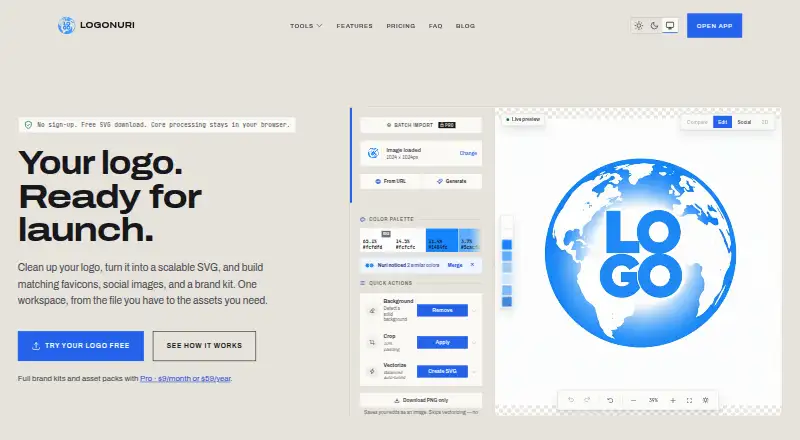
LogoNuri is a web app that turns existing logo artwork into SVG files and launch assets such as favicons, social images, and brand kits. Its browser-based vectorization traces raster art into SVG paths, with manual controls for curves, colors, and detail. The editor also offers background removal, color extraction and adjustment, cropping, and 4× AI upscaling. It supports SVG, PNG, PDF, ICO, JSON, and CSS, including vector and transparent exports. The Free plan saves one project in the browser and allows five AI upscales and five background removals per day, without signup. Pro adds unlimited use of those AI tools, batch import and export, email support, and cloud sync for up to 100 projects. Pro Monthly costs $9 a month; Pro Yearly costs $59 a year and renews automatically until canceled. Pro can package logo variations, favicons, social images, palette files, HTML snippets, a web manifest, and a brand guidelines PDF. Its 3D workspace exports stills, video, and models. Pro branded QR codes support editable destinations and scan analytics. Logo processing happens in the browser, while cloud sync and published brand kits upload selected assets.
Who it suits
LogoNuri may suit startups, agencies, freelancers, web developers, brand redesign teams, marketing teams, and PWA developers working with logo assets. It offers a free option for small projects and paid tools for larger asset libraries or QR-code workflows.
What it does well
- Traces raster artwork into editable SVG paths.
- Includes cropping, color tools, and background removal.
- Free plan saves one project without signup.
- Pro supports cloud sync for up to 100 projects.
What to know first
- Free plan saves only one project.
- Free AI upscaling is limited to five per day.
- Free background removal is limited to five per day.
- Cloud sync uploads selected assets.
Limits
Free saves one project in the browser and allows five AI upscales and five background removals per day. Pro cloud sync supports up to 100 projects and up to 50 active dynamic QR codes; each upload can be up to 20 MB.
Plans
| Plan | Billed and limits | Price |
|---|---|---|
| Free | $0 /forever · 1 project saved in browser · AI upscaling 5/day · AI background removal 5/day · no signup required | Free |
| Pro Yearly | $59 /year · Same features as monthly Pro · renews automatically until canceled | $59 a year |
| Pro Monthly | $9 /month · Unlimited AI upscaling and background removal · cloud sync up to 100 projects · batch import and export · email support | $9 a month |
As logonuri.com lists them, read 10 Oct 2026. The maker's own page has the final word.
Getting started
- Open https://logonuri.com/ in a supported Chrome, Edge, Firefox, or Safari browser
- Upload logo artwork up to 20 MB per file
- Vectorize the artwork and adjust curves, colors, or detail
- Use background removal, color tools, cropping, or AI upscaling as needed
- Export in a supported format such as SVG, PNG, PDF, ICO, JSON, or CSS
- Choose Pro Monthly or Pro Yearly for cloud sync, batch transfers, and expanded tools
Verdict
LogoNuri covers logo vectorization and a broad set of launch-asset tools in a browser app. The free plan has clear project and daily AI limits; Pro adds cloud sync and expanded asset features.
Questions
What does LogoNuri do?
It converts existing logo artwork into SVGs and creates assets such as favicons, social images, and brand kits.
Is there a free plan?
Yes. Free costs nothing, requires no signup, and saves one browser project.
How much is Pro?
Pro Monthly costs $9 a month. Pro Yearly costs $59 a year and renews automatically until canceled.
Which browsers work with LogoNuri?
The maker lists current Chrome, Edge, Firefox, or Safari browsers with WebAssembly support. The app can also be installed as a PWA on supported desktop and mobile browsers.
Does LogoNuri upload my logo for processing?
Logo processing happens in the browser. Cloud sync and published brand kits upload selected assets.
What does Pro add?
Pro adds unlimited AI upscaling and background removal, cloud sync for up to 100 projects, batch import and export, email support, brand-kit packaging, and branded QR codes with editable destinations and scan analytics.
Facts from LogoNuri's own pages
- 3D and QR
- The 3D workspace exports stills, video, and models, while branded QR codes can include editable destinations and scan analytics with Pro. · logonuri.com, 10 Oct 2026
- Brand kit
- Pro can package logo variations, favicons, social images, palette files, HTML snippets, a web manifest, and a brand guidelines PDF. · logonuri.com, 10 Oct 2026
- Data providers
- The privacy policy names Stripe for payments, Resend for transactional email, and Cloudflare for hosting, database, storage, and edge infrastructure. · logonuri.com, 10 Oct 2026
- Image tools
- The editor includes background removal, color extraction and adjustment, cropping, and 4× AI upscaling. · logonuri.com, 10 Oct 2026
- Integrations
- The privacy policy lists optional Canva export, with connected Canva OAuth tokens stored for the account. · logonuri.com, 10 Oct 2026
- Intended users
- The product describes use cases for startups, agencies and freelancers, web developers, brand redesign teams, marketing teams, and PWA developers. · logonuri.com, 10 Oct 2026
- Processing and privacy
- LogoNuri says logo processing happens in the browser and uploaded images are not sent to its servers for processing; cloud sync and published brand kits upload selected assets. · logonuri.com, 10 Oct 2026
- Purpose
- LogoNuri turns existing logo artwork into SVGs and launch assets such as favicons, social images, and brand kits. · logonuri.com, 10 Oct 2026
- Support
- Pro includes email support, and the site provides a contact form for questions, bug reports, feature requests, or partnership enquiries. · logonuri.com, 10 Oct 2026
- Supported browsers
- The maker lists current Chrome, Edge, Firefox, or Safari browsers with WebAssembly support and says the app can be installed as a PWA on supported desktop and mobile browsers. · logonuri.com, 10 Oct 2026
- Usage limits
- Uploads can be up to 20 MB per file, and Pro supports cloud sync for up to 100 projects and up to 50 active dynamic QR codes. · logonuri.com, 10 Oct 2026
- Vectorization
- It traces raster artwork into SVG paths using VTracer in a browser worker and offers manual controls for curves, colors, and detail. · logonuri.com, 10 Oct 2026
Where LogoNuri stands on Freedom251
- AI Logo Makers#38 of 65