Freedom251 › AI Presentation Software
Lingint Slide Maker
What Lingint Slide Maker is
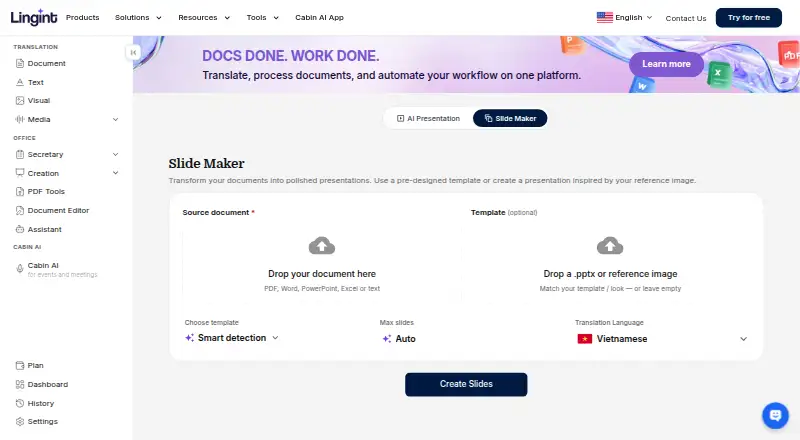
Lingint Slide Maker creates PowerPoint presentations from either a prompt or a source document. It accepts PDF, Word, PowerPoint, Excel, and text files, then lets you export the generated deck as PPTX. You can upload a .pptx template or reference image to guide the presentation’s appearance. Generated slides may contain charts, action titles, and speaker notes. Controls include a maximum-slide setting with an Auto option and a translation-language setting. Slide Maker is available on the web and is listed among Lingint’s API capabilities. New accounts receive five free credits for trying modules, and the service offers a free plan and free trial alongside paid access. Lingint says uploaded files are processed for results rather than AI training and protected on an ISO 27001 certified platform. Team features include shared workspaces, administration, multiple seats, and centralized billing.
Who it suits
It suits individuals and global teams turning documents or prompts into editable PowerPoint decks. Teams can use shared workspace and administration features when choosing the Team plan.
What it does well
- Generates decks from prompts or documents
- Accepts five common source formats
- Exports presentations as PPTX
- Supports templates and reference images
- Five free credits for new accounts
What to know first
- Team Subscription price is not fully listed
- Web platform requires uploaded source files
- Free credits are limited to five
- Paid access is needed beyond free options
Plans
| Plan | Billed and limits | Price |
|---|---|---|
| Team Subscription | Best price starts at ~ 6 cents per page · Team management up to 10 members · data protection · dashboard reporting | On request |
As lingint.ai lists them, read 12 Oct 2026. The maker's own page has the final word.
Verdict
Lingint Slide Maker offers two ways to start a presentation and gives control over slides, language, and visual references. Its export, file handling, and team tools make it suitable for document-driven presentation work.
Facts from Lingint Slide Maker's own pages
- AI data use
- Lingint’s FAQ says uploaded files are processed to generate results and are not used to train AI models. · lingint.ai, 12 Oct 2026
- API
- Lingint lists Slides Maker among the capabilities available through its API. · lingint.ai, 12 Oct 2026
- Document-to-deck generation
- Yes · lingint.ai, 22 Sept 2026
- Free credits
- The FAQ says new accounts start with 5 free credits to try every module. · lingint.ai, 12 Oct 2026
- Generated content
- Generated decks can include charts, action titles, and speaker notes. · lingint.ai, 12 Oct 2026
- Input formats
- The slide maker accepts PDF, Word, PowerPoint, Excel, and text as source documents. · lingint.ai, 12 Oct 2026
- Intended users
- Lingint describes its platform as serving global teams, and says its tools support creating presentations from documents and company templates. · lingint.ai, 12 Oct 2026
- Maker history
- ThinkPrompt says it was founded in 2023 to create global AI products. · lingint.ai, 12 Oct 2026
- PPTX export
- Yes · lingint.ai, 22 Sept 2026
- Prompt-to-deck generation
- Yes · lingint.ai, 22 Sept 2026
- Purpose
- Slide Maker generates a PowerPoint deck from a document or prompt. · lingint.ai, 12 Oct 2026
- Security
- Lingint says its files are protected on an ISO 27001 certified platform. · lingint.ai, 12 Oct 2026
- Slide controls
- The slide maker offers a maximum-slide setting with Auto as an option, and a translation-language setting. · lingint.ai, 12 Oct 2026
- Support
- Support is available through a contact form, Zalo, Facebook, phone, WhatsApp, and email. · lingint.ai, 12 Oct 2026
- Team features
- The FAQ says the Team plan includes a shared workspace, admin dashboard, multiple seats, and centralized billing. · lingint.ai, 12 Oct 2026
- Templates
- Users can upload a .pptx template or a reference image to guide the presentation’s look. · lingint.ai, 12 Oct 2026
Where Lingint Slide Maker stands on Freedom251
- AI Presentation Software#43 of 84
- AI Presentation Makers#92 of 109