Lightning Voice
What Lightning Voice is
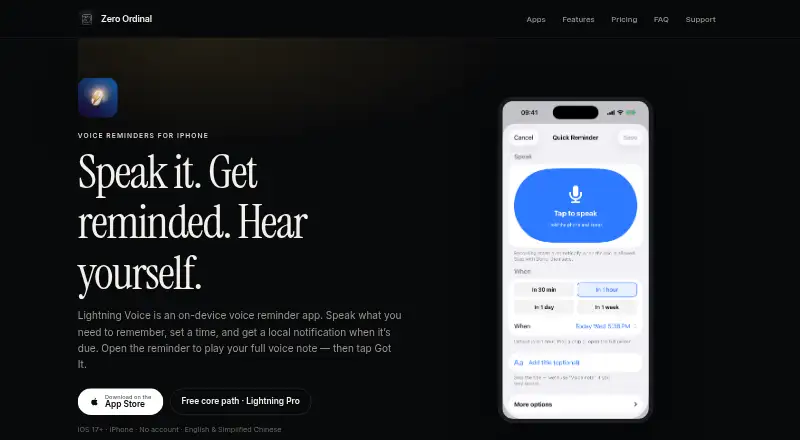
Lightning Voice is an iPhone app for scheduled voice reminders. At the chosen time, it sends a local notification; the alert is short, and you open the reminder to play its recorded voice note. A title is optional when a voice note is attached. Set a time with a quick preset or the full time picker, and use the additional options to repeat reminders on weekdays. The on-device history keeps track of reminders that were heard or missed.
A Home Screen widget shows the next reminder. On supported systems, Control Center and Siri can open New Voice Reminder. Reminders and recordings remain on the device, with no Zero Ordinal cloud sync or required account. The microphone is used when you begin a recording, not for continuous background listening. Lightning Voice requires iOS 17 or later on iPhone and lists English and Simplified Chinese.
The free plan allows up to 10 reminders enabled at once and includes unlimited in-app voice notes, full history, and the next-reminder widget. Lightning Pro starts at $0.99 a month; yearly and lifetime options are also offered. Notification delivery follows iOS settings, so Focus modes, mute, Low Power Mode, or denied notification permission can limit alerts. The app is not a system alarm.
Who it suits
Lightning Voice suits iPhone users who want reminders paired with their own recorded voice notes and an on-device history. It is intended for people using iOS 17 or later who are comfortable with notifications rather than relying on a system alarm.
What it does well
- Voice notes can accompany reminders, with an optional title.
- Quick time presets and a full time picker support scheduling.
- Weekday repeats are available under more options.
- On-device history tracks heard and missed reminders.
- No account or Zero Ordinal cloud sync is required.
- A widget displays the next reminder.
What to know first
- Requires iOS 17 or later on iPhone.
- The free plan allows up to 10 enabled reminders at once.
- Notification settings and Focus modes can limit alerts.
- The app is not a system alarm.
Limits
The free plan supports up to 10 enabled reminders at once. More than 10 requires Lightning Pro, which starts at $0.99 a month; the yearly plan includes a 7-day free trial for eligible new subscribers.
Plans
| Plan | Billed and limits | Price |
|---|---|---|
| Free | Up to 10 reminders enabled at once · Unlimited in-app voice notes (device storage applies) · Full history · Next-reminder widget | Free |
| Lightning Pro monthly | monthly · More than 10 reminders enabled at once | $0.99 a month |
| Lightning Pro yearly | yearly · More than 10 reminders enabled at once · 7-day free trial for eligible new subscribers | $4.99 a year |
| Lightning Pro lifetime | lifetime · More than 10 reminders enabled at once | $9.99, paid once |
As zeroordinal.com lists them, read 9 Oct 2026. The maker's own page has the final word.
Getting started
- Install Lightning Voice on an iPhone running iOS 17 or later.
- Choose a quick time preset or set the reminder with the time picker.
- Record a voice note when desired, then save the reminder.
- Use the free plan or choose a Lightning Pro monthly, yearly, or lifetime option for more than 10 enabled reminders.
Verdict
Pick Lightning Voice if you want scheduled voice notes, on-device history, and no required account or cloud sync. Look elsewhere if you need an alarm that is independent of iOS notification settings or more than 10 enabled reminders without a paid plan.
Questions
What does Lightning Voice cost?
The free plan costs nothing. Lightning Pro costs $0.99 a month, $4.99 a year, or $9.99, paid once for lifetime access.
What is included in the free plan?
It allows up to 10 reminders enabled at once, unlimited in-app voice notes subject to device storage, full history, and the next-reminder widget.
Is there a free trial?
The yearly Lightning Pro plan includes a 7-day free trial for eligible new subscribers.
Which devices and languages are supported?
The app requires iOS 17 or later on iPhone. It lists English and Simplified Chinese.
Do reminders or recordings upload to Zero Ordinal?
During normal operation, the privacy policy says the app does not upload voice recordings or reminder content to ZeroOrdinal servers. Reminders and recordings stay on the device, and the app does not sell personal information.
How are voice reminders delivered?
A short local notification appears when a reminder is due; open the reminder to play its voice note. Delivery follows iOS settings, and the app is not a system alarm.
Facts from Lightning Voice's own pages
- Delivery limitation
- Notification delivery follows iOS settings, and Focus modes, mute, Low Power Mode, or denied notification permission can limit alerts; the app is not a system alarm. · zeroordinal.com, 9 Oct 2026
- Intended audience
- The privacy policy says the app is not directed to children under 13 or the applicable minimum age in the user's jurisdiction. · zeroordinal.com, 9 Oct 2026
- iPhone shortcuts
- A Home Screen widget shows the next reminder, and Control Center and Siri can open New Voice Reminder on supported systems. · zeroordinal.com, 9 Oct 2026
- Microphone
- The microphone is used when the user starts a recording, and the app does not continuously listen in the background. · zeroordinal.com, 9 Oct 2026
- Platform and language
- The app requires iOS 17 or later on iPhone and lists English and Simplified Chinese. · zeroordinal.com, 9 Oct 2026
- Playback and history
- The notification is a short alert; users open the reminder to play the voice note, and history keeps heard and missed reminders on the device. · zeroordinal.com, 9 Oct 2026
- Privacy
- Reminders and recordings stay on the device, with no Zero Ordinal cloud sync or required account. · zeroordinal.com, 9 Oct 2026
- Purchase services
- Apple processes payments, while RevenueCat helps verify and manage subscription status and entitlements. · zeroordinal.com, 9 Oct 2026
- Purpose
- Lightning Voice is an on-device voice reminder app that sends a local notification when a scheduled reminder is due. · zeroordinal.com, 9 Oct 2026
- Scheduling
- The app offers quick time presets, a full time picker, and weekday repeats under more options. · zeroordinal.com, 9 Oct 2026
- Security and data handling
- The privacy policy says the app does not upload voice recordings or reminder content to ZeroOrdinal servers during normal operation and does not sell personal information. · zeroordinal.com, 9 Oct 2026
- Support
- Support is by email at [email protected], and the maker aims to reply within a few business days. · zeroordinal.com, 9 Oct 2026
- Voice notes
- Users can record a short voice note for a reminder, and a title is optional when a voice note exists. · zeroordinal.com, 9 Oct 2026
Where Lightning Voice stands on Freedom251
- Voice Note Apps#13 of 34