
Lightning Design System
What Lightning Design System is
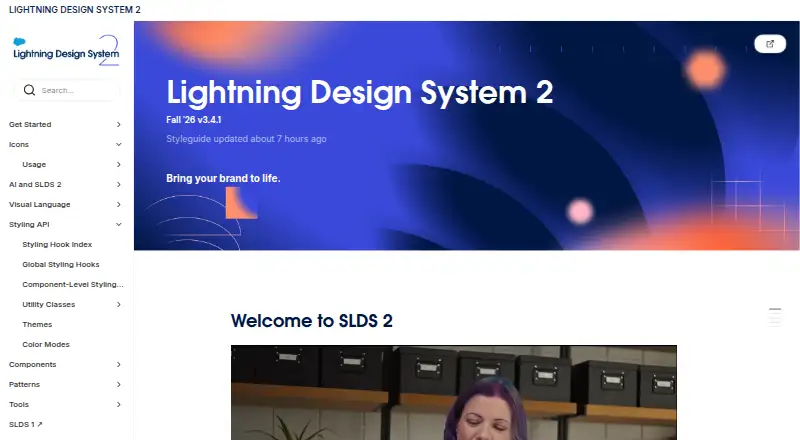
Lightning Design System 2 (SLDS 2) provides resources for building scalable, accessible web interfaces using Salesforce's design system. Its official @salesforce-ux/design-system-2 package contains production-ready CSS, themeable design tokens, and abstract User Interface Format definitions, with installation commands for npm and Yarn. CSS custom properties called styling hooks support theming and customization. The development guide recommends using Lightning base components first, then component blueprints, and custom components when needed. SLDS 2 also includes reusable Figma components, style guides, design principles, and patterns. Accessibility guidance covers semantic HTML, color contrast, forms, links, images, and ARIA, and recommends checking applications for WCAG 2.1 AA conformance before release. SLDS Linter checks code against SLDS 2 rules and can apply suggested fixes across a repository; SLDS Validator supports verification for both SLDS 1 and SLDS 2. Component-level styling hooks remain a developer preview and should not be used in production. The newest global styling hooks are available in Lightning Experience, not Experience Cloud sites. The system is free and open source.
Who it suits
SLDS 2 suits teams building Salesforce-oriented web interfaces that need reusable design and accessibility guidance. Developers should note the limits on preview styling hooks and global styling hooks.
What it does well
- Official package includes production-ready CSS and design tokens.
- CSS styling hooks support customization and theming.
- Includes reusable Figma components and design guidance.
- Accessibility guidance covers WCAG 2.1 AA.
- SLDS Linter can apply fixes across a repository.
What to know first
- Component-level styling hooks are a developer preview, not for production.
- Newest global styling hooks are not supported for Experience Cloud sites.
- SLDS Linter verifies SLDS 2, while SLDS Validator covers SLDS 1 and 2.
Limits
Component-level styling hooks are a developer preview that may change or be deprecated, and the site says not to implement them in production. The newest global styling hooks are available in Lightning Experience but are not supported for Experience Cloud sites.
Getting started
- Open the Lightning Design System website
- Install @salesforce-ux/design-system-2 with the provided npm or Yarn command
- Use Lightning base components before blueprints or custom components
- Apply styling hooks and design tokens for theming
- Review accessibility against WCAG 2.1 AA before release
- Run SLDS Linter or SLDS Validator on the codebase
Verdict
SLDS 2 combines implementation resources, design assets, and accessibility guidance for Salesforce interfaces. Check platform support and preview limitations before adopting particular styling hooks.
Questions
What does SLDS 2 cost?
SLDS 2 is free and open source.
How do I install it?
The site provides installation commands for npm and Yarn for the official @salesforce-ux/design-system-2 package.
What is included in the package?
It contains production-ready CSS, themeable design tokens, and abstract User Interface Format definitions.
Does SLDS 2 support accessibility?
Yes. Guidance covers semantic HTML, contrast, forms, links, images, and ARIA, and recommends checking for WCAG 2.1 AA conformance before release.
Can styling hooks be used in production?
Component-level styling hooks are a developer preview and the site says not to use them in production. Newest global hooks are available in Lightning Experience, not Experience Cloud sites.
Which Salesforce products are discussed with SLDS?
The development guide discusses architectures combining Salesforce products such as Sales Cloud, Slack, Tableau, and Experience Cloud.
Facts from Lightning Design System's own pages
- Accessibility
- The accessibility guidance recommends reviewing applications before release for WCAG 2.1 AA conformance. · lightningdesignsystem.com, 9 Oct 2026
- Accessibility patterns
- The accessibility guidance covers semantic HTML, color contrast, accessible forms, links, images, and ARIA use. · lightningdesignsystem.com, 8 Oct 2026
- AI coding
- The site describes using Agentforce Vibes with Figma designs and Salesforce DX MCP to generate Lightning Web Components and SLDS 2 code. · lightningdesignsystem.com, 9 Oct 2026
- Components
- The development guide recommends Lightning base components first, then component blueprints, then custom components when needed. · lightningdesignsystem.com, 8 Oct 2026
- Customization
- SLDS 2 uses CSS styling hooks to separate structure from visual design and support customization and theming. · lightningdesignsystem.com, 9 Oct 2026
- Design resources
- SLDS 2 includes reusable Figma components, style guides, design principles, and patterns. · lightningdesignsystem.com, 9 Oct 2026
- Developer preview
- Component-level styling hooks are a developer preview, may change or be deprecated, and the site says not to implement them in production. · lightningdesignsystem.com, 8 Oct 2026
- Development package
- The official @salesforce-ux/design-system-2 npm package contains production-ready CSS, themeable design tokens, and abstract User Interface Format definitions. · lightningdesignsystem.com, 9 Oct 2026
- Fonts
- SLDS uses device system fonts and lists SF Pro for Apple devices, Segoe UI for Windows, and Roboto for Android. · lightningdesignsystem.com, 9 Oct 2026
- Installation
- The site gives npm and Yarn commands for installing the SLDS 2 package. · lightningdesignsystem.com, 8 Oct 2026
- Integrations
- The Figma kits page lists UI libraries and pattern kits, including an SLDS 2 web components library and an agentic experience design library. · lightningdesignsystem.com, 9 Oct 2026
- Linter limit
- The site describes SLDS Linter as providing SLDS 2 verification; SLDS Validator supports SLDS 1 and SLDS 2 verification. · lightningdesignsystem.com, 8 Oct 2026
- Migration tool
- SLDS Linter checks code against SLDS 2 rules, suggests improvements, and can apply fixes in bulk. · lightningdesignsystem.com, 9 Oct 2026
- Package
- The official @salesforce-ux/design-system-2 package contains production-ready CSS, themeable design tokens, and abstract User Interface Format definitions. · lightningdesignsystem.com, 8 Oct 2026
- Platform limitation
- The site says the newest global styling hooks are available only in Lightning Experience and are not supported for Experience Cloud sites. · lightningdesignsystem.com, 9 Oct 2026
- Platform support
- The site says the newest global styling hooks are available in Lightning Experience and are not supported for Experience Cloud sites. · lightningdesignsystem.com, 8 Oct 2026
- Preview limitation
- Component-level styling hooks are a developer preview, and the site says not to use them in production. · lightningdesignsystem.com, 9 Oct 2026
- Purpose
- SLDS 2 provides reusable design tools and development guidance for building consistent Salesforce interfaces. · lightningdesignsystem.com, 9 Oct 2026
- Tooling
- SLDS Linter analyzes code against SLDS 2 rules and can apply suggested fixes in bulk across a repository. · lightningdesignsystem.com, 8 Oct 2026
Where Lightning Design System stands on Freedom251
- UI Kit Libraries#26 of 26