Freedom251 › Photography Website Builders
Lightfolio
What Lightfolio is
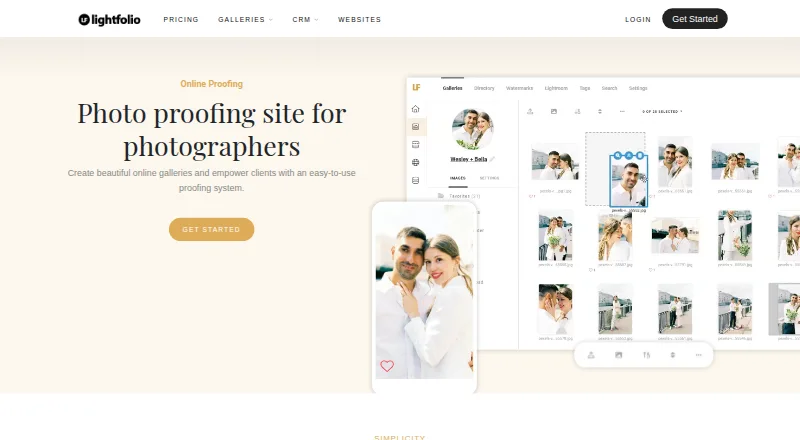
Lightfolio is an online gallery and proofing service for photographers. Clients can mark favorite images, group their choices into lists, and collaborate; photographers and clients can also comment or message on individual photos. Gallery controls include passwords, optional text or image watermarks, folders, and download settings. Galleries can sell prints, albums, and digital downloads. Paid plans have zero sales commission, while sales through the free plan carry a 15% commission. The free plan costs nothing and includes 3 GB of photo storage, 500 MB of video storage, and three galleries. Other listed plans offer unlimited galleries, with photo storage ranging from 30 GB to unlimited and video storage from 3 GB to 60 GB. Supported photo formats are JPG, GIF, PNG, and TIF, up to 70 MB per file; larger limits are available on request. The mobile-friendly proofing service works on clients’ mobile devices. Lightfolio also lists a Lightroom Classic plug-in, print lab partners Bay Photo Lab and Loxley Colour, email support, and a knowledge base.
Who it suits
Lightfolio suits independent photographers and small studios that need client image selection, collaboration, gallery controls, or gallery sales. Its mobile-friendly proofing also suits clients reviewing images on mobile devices.
What it does well
- Clients can organize image selections into lists.
- Galleries support passwords and optional watermarks.
- The free plan includes three galleries.
- Lists Lightroom Classic and two print lab partners.
What to know first
- Free-plan sales carry a 15% commission.
- Free plan includes 3 GB photo storage.
- Photo files are limited to 70 MB unless requested.
Limits
The free plan includes 3 GB of photo storage, 500 MB of video storage, and three galleries, and charges a 15% sales commission. Supported photo formats have a 70 MB maximum file size, with larger limits available on request.
Plans
| Plan | Billed and limits | Price |
|---|---|---|
| Free | No charge; free forever · 3 GB photo storage · 500 MB video storage · 3 galleries · 15% sales commission | Free |
| Client Galleries — Free | Free forever · 3 GB photo storage · 500 MB video storage · 3 galleries · 15% sales commission · Proofing · Online sales | Free |
| Studio Manager — Free | Free forever · 5 documents · 10 bookings · Unlimited projects · Unlimited contacts · 5 forms · 5 client portals | Free |
| Websites — Free | Free forever · 5 pages · 100 photos · 1 blog with 5 articles · SSL/TLS · Basic visitor analytics | Free |
| Websites — Pro | Billed yearly at $120; $14 billed month to month · Unlimited pages · 500 photos · 1 blog with unlimited articles · Custom domain · Remove Lightfolio branding | $10 a month |
| Client Galleries — Starter | Billed yearly at $144; $18 billed month to month · 100 GB photo storage · 10 GB video storage · Unlimited galleries · 0% commission · Custom domain · Remove Lightfolio branding | $12 a month |
| Studio Manager — Lite | Billed yearly at $144; $15 billed month to month · Unlimited documents · 10 bookings · Unlimited projects and contacts · Unlimited forms · 5 client portals | $12 a month |
| Starter | $144 billed yearly at $12/mo; billed month to month at $18/mo · 100 GB photo storage · 10 GB video storage · Unlimited galleries · 0% commission | $144 a year |
The first 8 of 15 plans, as lightfolio.com lists them, read 29 Sept 2026. The maker's own page has the final word. Every plan
Getting started
- Open the Lightfolio photo proofing website.
- Choose the Free plan or review the Lite, Starter, Pro, and Premium plans.
- Create galleries and add supported photo files.
- Invite clients to select favorites, organize choices, and comment on images.
- Set gallery passwords, watermarks, folders, and download options as needed.
Overview
Lightfolio combines online photo galleries with client proofing and image sales for independent photographers and small studios. It is a strong fit when clients need to select, discuss, and order work in one place; photographers with growing sales should compare the free plan’s commission and tight caps with paid-plan storage.
Key features
Clients can favorite images, sort selections into lists, collaborate, and comment or message on individual photographs. Keeping choices and feedback attached to the images suits approval-heavy projects better than a gallery used only to deliver finished files.
Photographers can password-protect galleries, add text or image watermarks, organize files in folders, and configure downloads. These controls support private review and tailored delivery. JPG, GIF, PNG, and TIF files are supported up to 70 MB each; larger limits are available on request, which may matter for photographers working with unusually large files.
Galleries can sell prints, albums, and digital downloads. The free plan charges 15% sales commission, while paid plans have none, making a paid tier more appealing as orders become a regular part of the business. A Lightroom Classic plug-in and print lab partners Bay Photo Lab and Loxley Colour connect the service to editing and fulfillment, though the core value remains the proofing and gallery workflow.
The proofing platform is mobile friendly for clients. Lightfolio offers email support and a knowledge base, with priority support on Pro. Its privacy policy names Lightfolio in St. Petersburg, Florida, as the company and GDPR data controller, and cautions that absolute security cannot be guaranteed.
Pricing
Lightfolio has a free plan and paid plans available monthly or annually. Annual plans are billed for the full year. Lite, Starter, Pro, and Premium use custom pricing.
- Free: free, no charge forever. It includes 3 GB photo storage, 500 MB video storage, and 3 galleries, with a 15% sales commission. This is a workable starting point for occasional proofing, but the small gallery and storage allowances and commission make it less suitable for a growing sales workflow.
- Lite: custom pricing, 30 GB photo storage, unlimited galleries, and 3 GB video storage. It removes the free plan’s gallery cap and expands storage, but retains a relatively small video allowance.
- Starter: custom pricing, 100 GB photo storage, unlimited galleries, and 10 GB video storage. It offers more room for an active portfolio of client work without the much larger capacity of Pro.
- Pro: custom pricing, 1,000 GB photo storage, unlimited galleries, and 30 GB video storage, plus priority support. It suits photographers handling larger volumes who value a higher support priority.
- Premium: custom pricing, unlimited photo storage, unlimited galleries, and 60 GB video storage. It is the capacity-focused option for photographers who would otherwise need to manage photo-storage limits.
The free plan’s 15% commission is the clearest cost to weigh against paid plans’ zero commission. Paid prices are custom, so photographers should compare the quoted cost with expected sales and storage needs rather than assume a paid tier will save money.
Platforms
Lightfolio supports Linux, macOS, Windows, and the web. Clients can use the mobile-friendly proofing platform on their mobile devices.
Who it's for
Lightfolio is best for independent photographers and small studios that need client selections, image-specific feedback, controlled galleries, and sales in a single workflow. It is less compelling for a low-volume user who can live within three galleries and the free plan’s storage caps, or for a seller who wants to avoid a 15% commission without first establishing the cost of a paid plan.
Pros and cons
- Pro: Favorites, selection lists, collaboration, and image-level comments keep proofing decisions tied to the photographs.
- Pro: Passwords, watermarks, folders, and download controls give photographers practical options for managing gallery access and delivery.
- Pro: Unlimited galleries on every paid tier means higher plans scale storage without adding a gallery-count ceiling.
- Con: The free plan is limited to 3 galleries, 3 GB of photo storage, and 500 MB of video storage.
- Con: Free-plan sales incur a 15% commission, while the prices of the commission-free paid tiers are custom.
- Con: The stated file ceiling is 70 MB, so photographers with larger files must request a higher limit.
Alternatives
For photographers comparing adjacent tools, Photo Proofing Software is the broader category to explore. Those building a photography site rather than prioritizing proofing can browse Photography Website Builders.
Pixieset Website is a website-builder alternative with a free plan that includes 15 pages, 100 photos, five blog posts, unlimited bandwidth, SSL security, and a mobile-optimized website; choose it when those site-building limits and features better match the need.
FolioHD is another web-based option, with a Starter plan offering 36 uploads and limited features, and a Basic plan at $6 a month with 200 uploads and 10 galleries. It may suit someone whose needs are better measured by upload and gallery counts than Lightfolio’s storage tiers.
LentloSites, RebookMedia, ShootCal Websites, Zarla, EasySite, and Plot are also listed as alternatives.
Verdict
Choose Lightfolio if you are an independent photographer or small studio that wants client proofing, gallery access controls, and image sales together, and can match its storage tiers to your workload. Its strongest case is the connected review-to-sale workflow; look elsewhere if the free tier’s commission and caps are unacceptable and a custom-priced paid plan does not fit your budget.
Verdict
Lightfolio brings client proofing, gallery controls, and sales together, with a free plan for smaller needs. Check its storage and sales commission limits against your workflow before choosing a plan.
Questions
Does Lightfolio have a free plan?
Yes. The Free plan costs nothing and includes 3 GB photo storage, 500 MB video storage, and three galleries.
What commission does Lightfolio charge?
The free plan charges a 15% sales commission. Paid plans have zero sales commission.
Which platforms can I use?
Lightfolio lists Linux, macOS, web, and Windows. Its proofing platform is described as mobile friendly for clients.
What photo file types does Lightfolio support?
It supports JPG, GIF, PNG, and TIF files up to 70 MB. Larger file limits are available on request.
Does Lightfolio connect with other photography services?
It lists a Lightroom Classic plug-in and print lab partners Bay Photo Lab and Loxley Colour.
What support does Lightfolio offer?
Email support and a knowledge base are available. Pro plans include priority support.
Facts from Lightfolio's own pages
- Apps
- The reviewed official pages identify a web service and Lightroom Classic plug-in; no dedicated Lightfolio app-store listing was located in the searches performed. · help.lightfolio.com, 21 Oct 2026
- Audience
- Lightfolio says it serves independent photographers and small studios across more than 140 countries. · lightfolio.com, 29 Sept 2026
- Billing
- Paid plans are offered monthly or annually, and annual plans are billed for the full year. · lightfolio.com, 29 Sept 2026
- Company identity
- The opened company page identifies the brand as Lightfolio but does not provide a separate legal entity name, employee count, or funding information. · lightfolio.com, 21 Oct 2026
- Documentation
- The Help Center groups articles into galleries, accounts, store, studio management, subscriptions, and websites. · help.lightfolio.com, 21 Oct 2026
- Downloads
- Gallery owners can permit full-gallery or single-image downloads and set the delivered resolution. · lightfolio.com, 21 Oct 2026
- Extensibility
- The opened maker pages describe a Lightroom plug-in but do not document a public API or SDK. · help.lightfolio.com, 21 Oct 2026
- File limits
- The feature page lists JPG, GIF, PNG, and TIF image uploads, with a 70 MB maximum file size and larger limits available on request. · lightfolio.com, 21 Oct 2026
- Founded
- The reviewed official company page does not state a founding year. · lightfolio.com, 21 Oct 2026
- Gallery access
- A gallery can require a password, PIN, or email-and-password authentication for viewing or downloads. · lightfolio.com, 21 Oct 2026
- Gallery analytics
- Gallery analytics can report visits, geolocation, browser and device type, and whether images were viewed, downloaded, or favorited. · lightfolio.com, 21 Oct 2026
- Gallery controls
- Galleries can use passwords, optional text or image watermarks, folders, and configurable downloads. · lightfolio.com, 29 Sept 2026
- Gallery customization
- Photographers can customize gallery covers, thumbnail styles, fonts, layout, and color scheme. · lightfolio.com, 21 Oct 2026
- Headquarters
- Lightfolio lists its base as St. Petersburg, Florida, USA. · lightfolio.com, 21 Oct 2026
- Hosting model
- The maker presents Lightfolio as an online service and provides no self-hosted installation option on the pages reviewed. · lightfolio.com, 21 Oct 2026
- Integrations
- Lightfolio advertises a Lightroom Classic plug-in and print fulfillment through Bay Photo Lab and Loxley Colour. · lightfolio.com, 21 Oct 2026
- Licence
- No open-source licence is identified on the reviewed product or help pages; Lightfolio is presented as a hosted commercial service. · lightfolio.com, 21 Oct 2026
- Limit: organization
- A Capterra reviewer says nested folders are missing, making categorization harder for large photo collections. · capterra.com, 21 Oct 2026
- Limit: performance
- One G2 reviewer reports slow responses and delayed updates at times. · g2.com, 21 Oct 2026
- Limit: pricing
- Some Capterra reviewers characterize premium plans as relatively expensive and storage on the free plan as too limited. · capterra.com, 21 Oct 2026
- Limit: storage
- Reviewers have complained that free-tier storage is limited and that larger storage needs require a paid tier. · g2.com, 21 Oct 2026
- Limit: support responsiveness
- Some Capterra reviewers report slow or absent support responses and difficulty getting help with technical or billing issues. · capterra.com, 21 Oct 2026
- Messaging
- Photographers and clients can comment and message on individual images within the app. · lightfolio.com, 29 Sept 2026
- Mobile access
- The proofing platform is described as mobile friendly and works on clients’ mobile devices. · lightfolio.com, 29 Sept 2026
Where Lightfolio stands on Freedom251
- Photography Website Builders#2 of 46
- Photo Proofing Software#3 of 26