Freedom251 › Legal Forms Software
LawHelp Interactive
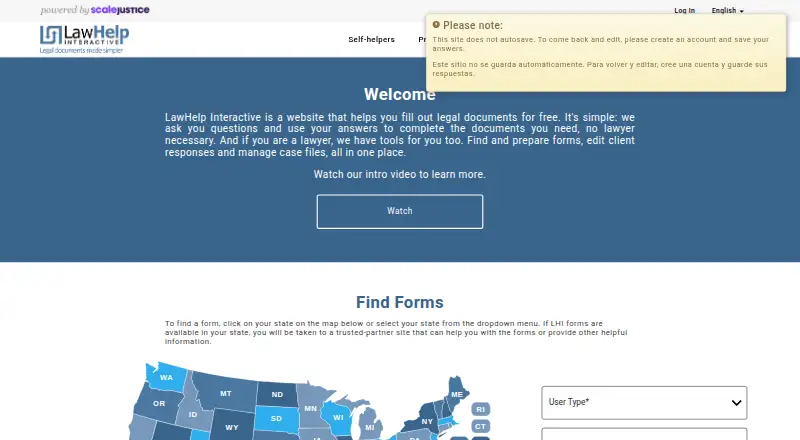
What LawHelp Interactive is
LawHelp Interactive is a free web service that turns answers to guided questions into legal forms and documents. Individuals can start without an account, but registration is needed to save their answers for later. Forms cover issues including child support and custody, domestic violence, debt collection, foreclosure, eviction, divorce, guardianship, simple wills, small-estate probate, and expungement. Users can save, edit, email, and print documents; electronic filing is available in some states. Form availability varies by state and legal issue, and users may be directed to partner sites. Attorneys, volunteers, and advocates can review and edit client answers, manage case files, and collaborate with clients. Courts and legal aid organizations can upload interviews created with HotDocs and A2J Author, and LHI also supports Neota Logic formats. The service says communications and stored answer files are encrypted and describes additional privacy safeguards, while noting that absolute security on the public web is not guaranteed. Forms are not supported on mobile devices or tablets. LawHelp Interactive does not provide legal advice or referrals.
Who it suits
LawHelp Interactive suits people seeking guided legal forms for supported issues and states. It also serves attorneys, volunteers, advocates, legal aid groups, and approved court and nonprofit partners.
What it does well
- Free access to guided legal forms.
- Users can save, edit, email, and print documents.
- Attorneys and advocates can manage case files and collaborate.
- Forms cover a range of legal issues.
- Some states support electronic filing from LHI.
What to know first
- Registration is required to save work for later.
- Forms are not supported on mobile devices or tablets.
- Availability depends on state and legal issue.
- The service does not provide legal advice or referrals.
Limits
The free plan provides legal forms and account registration. Saving answers for later requires an account, forms depend on state and legal issue, and forms are not supported on mobile devices or tablets.
Plans
| Plan | Billed and limits | Price |
|---|---|---|
| Free | Free legal forms and account registration | Free |
As lawhelpinteractive.org lists them, read 3 Oct 2026. The maker's own page has the final word.
Getting started
- Open https://lawhelpinteractive.org/ on a computer.
- Find a form available for your state and legal issue.
- Answer the guided questions to prepare the document.
- Register if you want to save your answers and return later.
- Save, edit, email, or print the completed document; electronic filing is available in some states.
LawHelp Interactive is a free, question-driven service that turns users’ answers into legal forms and related documents. It is most useful for people handling state-specific civil matters and for legal-aid, court, and nonprofit teams serving them. The main decision is whether the needed form exists for the user’s state and issue, and whether desktop-only access is acceptable.
Overview
LHI uses guided interviews rather than asking users to complete blank legal paperwork. Individuals can begin without an account, reducing the barrier to starting a form, but registration is needed to save work for a later session. That makes an account sensible for lengthy or interruption-prone matters.
The service is designed for low-income people, legal-aid advocates, pro bono lawyers, and approved court and nonprofit partners. It is a document-preparation tool, not a source of legal advice or referrals. Support can address general questions, technical errors, and navigation problems, but users needing legal guidance must obtain it elsewhere.
Key features
Guided interviews and documents
LHI converts interview answers into legal forms and other documents. Users can save, edit, email, and print the results. Electronic filing is available in some states, potentially eliminating a separate filing step, but it is not a universal feature.
Coverage and jurisdiction
Forms address child support and custody, domestic violence, debt collection, foreclosure, eviction, divorce, guardianship, simple wills, small-estate probate, and expungement. This is a useful range for common family, housing, debt, and estate matters, but state and legal-issue coverage determines whether LHI can help. When a form exists for a user’s state, LHI may direct the user to a partner site.
Professional and developer workflow
Attorneys, volunteers, and advocates can find forms, review and edit client answers, manage case files, and collaborate with clients. Legal-aid organizations and courts can upload interviews built with HotDocs or A2J Author, and LHI supports Neota Logic formats. Legal nonprofits and courts also receive online and in-person training, technical support, and access to a developer community for creating forms. Those capabilities make LHI more suitable for an organized service provider than for a solo consumer seeking a general-purpose form builder.
Security and privacy
LHI says communications and stored answer files are encrypted. Its privacy policy describes administrative, software, and physical safeguards and limits access to Social Security numbers. It also acknowledges that absolute security on the public web cannot be guaranteed, so users should still handle sensitive information carefully.
Pricing
The Free plan costs nothing and includes free legal forms and account registration. There is no free trial because the service is already free. Individuals avoid subscription charges, while partner organizations can use the same no-cost model for supported legal-aid and court workflows. The trade-off is not a paid tier with broader coverage: usefulness depends on the forms offered for the relevant state and issue.
Platforms
LHI is a web service. Its help guidance recommends a computer running Mac OS or Windows 7, 8, or 10; forms are not currently supported on mobile devices or tablets. Anyone who needs to complete forms from a phone or tablet should choose another service.
Who it's for
LHI fits individuals seeking no-cost, state-specific self-help forms, especially for family, housing, debt, domestic-violence, probate, or expungement matters. It is also a strong operational choice for legal-aid programs, pro bono lawyers, courts, and approved nonprofits that need client collaboration, case-file handling, and a way to publish interviews from supported authoring systems. It is a poor fit when the jurisdiction is not covered, when mobile completion is essential, or when the user expects legal advice.
Pros and cons
- Pros: Free access removes a financial barrier to legal-form preparation.
- Pros: Guided interviews can produce completed documents without requiring users to start from blank forms.
- Pros: Saving, editing, emailing, printing, and limited electronic filing support cover the main post-interview tasks.
- Pros: Professional tools support client review, collaboration, and case-file management.
- Pros: HotDocs, A2J Author, and Neota Logic support helps partner organizations reuse established interviews.
- Cons: Coverage varies by state and issue, so a relevant legal matter may have no usable interview.
- Cons: Unregistered users cannot save work for later.
- Cons: Desktop-only form support excludes phone and tablet workflows.
- Cons: Support does not include legal advice or referrals.
Alternatives
For estate planning across mobile and web, Trust & Will offers a free basic membership and a $49-per-year Essentials membership. Choose Docassemble instead when a self-hosted, API-capable platform is preferable and hosting costs are acceptable. Dokuily is another web option with free simple documents and limited premium-completion allowances. For nonprofit teams creating guided interviews, A2J Author is free for qualifying non-commercial organizations and courts with a registered account. eForms suits readers wanting a seven-day trial and broad document access, but its Pro Monthly plan renews at $49 per month. FreeWill focuses on free estate-planning tools without requiring a credit card. Will.com provides four state-specific documents free, with a $29-per-year paid plan. Avvoka is for organizations seeking an enterprise-oriented web, API, or extension workflow with custom pricing. Browse the Legal Forms Software category for more options.
Verdict
Choose LawHelp Interactive if you need free, guided legal forms for a covered state and issue, or if your legal-aid, court, or nonprofit team needs collaborative interview and case tools. Its strongest advantage is combining no-cost self-help preparation with professional workflows. Look elsewhere when mobile access, guaranteed jurisdiction coverage, or actual legal advice matters more than that focused mission.
Verdict
LawHelp Interactive helps users prepare forms through a guided question process, with tools for both individuals and legal professionals. Check whether forms are available for the relevant state and issue, and use a computer rather than a phone or tablet.
Questions
Is LawHelp Interactive free?
Yes. Its Free plan is listed as free and includes legal forms and account registration.
Can I use it without an account?
Individuals can complete forms without an account, but must register to save work for later.
Which devices does it support?
It is a web service. The help page recommends a Mac or Windows computer and says forms are not currently supported on mobile devices or tablets.
What kinds of legal forms are available?
Topics include child support and custody, domestic violence, debt collection, foreclosure, eviction, divorce, guardianship, simple wills, small-estate probate, and expungement. Availability depends on state and issue.
Can I file forms electronically?
In some states, users can electronically file documents from LHI.
Does LawHelp Interactive provide legal advice?
No. Its support accepts general, technical, and navigation requests, but it does not provide legal advice or referrals.
Facts from LawHelp Interactive's own pages
- Availability limit
- Forms are available according to state and legal issue, and users are directed to partner sites when forms are available for their state. · lawhelpinteractive.org, 3 Oct 2026
- Desktop compatibility
- The help page recommends a computer running Mac OS or Windows 7, 8, or 10 and says forms are not currently supported on mobile devices or tablets. · support.lawhelpinteractive.org, 3 Oct 2026
- Developer support
- Legal nonprofits and courts can access online and in-person training, technical support, and a developer community for creating forms. · lawhelpinteractive.org, 3 Oct 2026
- Document handling
- Users can save, edit, email, and print documents, and in some states electronically file them from LHI. · support.lawhelpinteractive.org, 3 Oct 2026
- Form topics
- Available forms cover matters including child support and custody, domestic violence, debt collection, foreclosure, eviction, divorce, guardianship, simple wills, small-estate probate, and expungement. · support.lawhelpinteractive.org, 3 Oct 2026
- Integrations
- Legal aid organizations and courts can upload interviews created with HotDocs and A2J Author; LHI also supports Neota Logic formats. · support.lawhelpinteractive.org, 3 Oct 2026
- Partner audience
- LHI serves low-income people, legal aid advocates, pro bono lawyers, and approved court and nonprofit partners. · support.lawhelpinteractive.org, 3 Oct 2026
- Privacy safeguards
- The privacy policy describes administrative, software, and physical safeguards and limits who may access Social Security numbers. · support.lawhelpinteractive.org, 3 Oct 2026
- Professional tools
- Attorneys, volunteers, and advocates can find forms, review and edit client answers, manage case files, and collaborate with clients. · lawhelpinteractive.org, 3 Oct 2026
- Purpose
- LawHelp Interactive guides users through questions and uses their answers to prepare legal forms and documents. · lawhelpinteractive.org, 3 Oct 2026
- Security
- LHI says communications with the system and stored answer files are encrypted, while noting that absolute security on the public web is not guaranteed. · support.lawhelpinteractive.org, 3 Oct 2026
- Self-help workflow
- Individuals can complete forms without an account, but their work cannot be saved for later unless they register. · lawhelpinteractive.org, 3 Oct 2026
- Support
- Users can submit support requests for general inquiries, technical errors, or problems navigating the site; LHI says it does not provide legal advice or referrals. · support.lawhelpinteractive.org, 3 Oct 2026
Where LawHelp Interactive stands on Freedom251
- Legal Forms Software#11 of 29