Freedom251 › Legal Trust Accounting Software
Lawcus
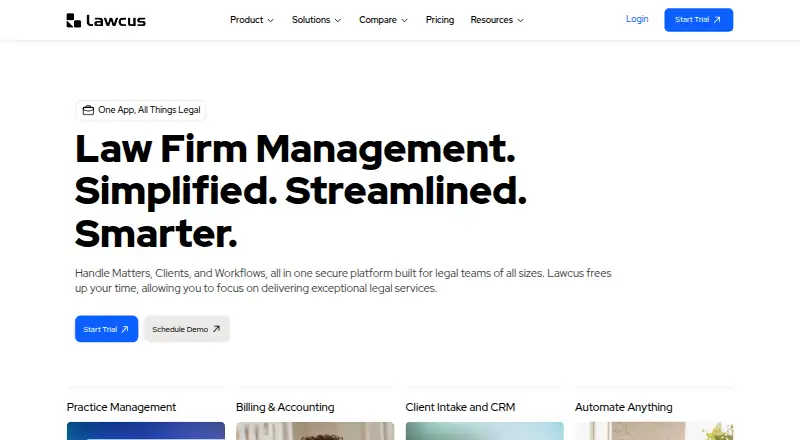
What Lawcus is
Lawcus is cloud-based legal practice management software covering client intake and CRM, matters, tasks, billing, document automation, client communication, and no-code workflows. Matter tools include collaboration, visual Kanban pipelines, and statute of limitation tracking. Billing features include time tracking, invoicing, trust accounting, retainers, and online payments. Users can create documents with automation and templates, with unlimited document storage listed among the pricing features. Lawcus lists integrations with Gmail, Microsoft 365, Dropbox, Google Drive, QuickBooks, Xero, LawPay, and Zapier. It is available on the web, Windows, macOS, Linux, iOS, Android, and through an API. The mobile app provides access to matters, contacts, tasks, time entries, documents, and notifications, but is available only to firms with more than one user. The company advertises a 14 day trial, which it may extend on request. Lawcus is headquartered in San Diego, California. Pricing is paid; the provided plans list Essential at $39 a year, Growth at $59 a year, and Elite at $79 a year, each billed annually.
Who it suits
Lawcus suits small or growing firms, firms scaling operations, and enterprises with complex or high-volume needs. Its mobile app is available only to firms with more than one user.
What it does well
- Matter tools include Kanban pipelines and limitation tracking.
- Billing includes trust accounting and online payments.
- Document automation and templates are available.
- Mobile apps cover matters, tasks, and documents.
- Advertised 14 day trial may be extended on request.
What to know first
- Mobile app requires more than one firm user.
- Enterprise requires at least 10 users.
- Private cloud deployment is a separately priced add-on.
Limits
There is no free plan. The mobile application is available only to firms with more than one user, and Enterprise requires at least 10 users.
Plans
| Plan | Billed and limits | Price |
|---|---|---|
| Essential | Annually · Case & Matter Management · Billing & Invoicing · Trust Accounting | $39 a year |
| Essential | Monthly · Case & Matter Management · Billing & Invoicing · Trust Accounting | $49 a month |
| Growth | Annually · Includes Essential · QB & Xero Integration · Google & Office365 Integration · Nova AI & Custom Fields | $59 a year |
| Growth | Monthly · Includes Essential · QB & Xero Integration · Google & Office365 Integration · Nova AI & Custom Fields | $69 a month |
| Elite | Annually · Includes Growth · Workflow Automation · Marketing Automation · Advanced Dashboards & Custom Report Builder | $79 a year |
| Elite | Monthly · Includes Growth · Workflow Automation · Marketing Automation · Advanced Dashboards & Custom Report Builder | $89 a month |
| Enterprise | Get Quote · Minimum 10 users · Includes Elite · Custom requirements | On request |
As lawcus.com lists them, read 8 Oct 2026. The maker's own page has the final word.
Getting started
- Visit the Lawcus website.
- Start the advertised 14 day trial; request an extension if needed.
- Choose a plan for a growing or small firm, scaling operations, or enterprise needs.
- Use the web app or a supported desktop platform; firms with more than one user can access the mobile app through the App Store or Google Play.
- Connect relevant listed integrations such as Gmail, Microsoft 365, Dropbox, or QuickBooks.
Lawcus is a cloud-based legal practice platform for firms that want intake, matter work, documents, billing, and client communication in one system. It is strongest for practices needing broad operational coverage, including trust accounting and client-facing tools. Firms should compare its tier boundaries and mobile eligibility against their size and workflow needs.
Overview
Lawcus combines intake and CRM, matter and task management, billing, document automation, client communication, and no-code workflows. That breadth can replace a collection of separate systems for a growing practice, but a firm seeking only timekeeping, payments, or document templates may not benefit from adopting an entire practice-management suite. The product is cloud-based and headquartered in San Diego, California.
Key features
Matter and client work
Matter collaboration, visual Kanban pipelines, and statute-of-limitation tracking address coordination, workflow visibility, and deadline control. Client intake forms and a client portal add structured onboarding and client-facing access, making Lawcus more suitable for firms that want clients connected to ongoing work rather than handled through disconnected channels.
Documents and workflow automation
Document automation and templates support repeatable drafting, and unlimited document storage removes a stated storage ceiling. No-code workflows are part of the platform, but workflow automation is reserved for Elite and Enterprise, so firms choosing Essential or Growth will not receive that higher-level process automation.
Billing, trust, and integrations
Time tracking, invoicing, trust accounting, retainers, and online payments cover the financial cycle from recorded work through collection. Integrations with Gmail, Microsoft 365, Dropbox, Google Drive, QuickBooks, Xero, LawPay, and Zapier can connect communications, files, accounting, payments, and automation. Security measures include 256-bit AES encryption, AWS infrastructure, two-factor authentication, role-based access, and nightly backups.
Pricing
Lawcus is paid software with pricing from $49/user/mo, no free plan, and a 14 day trial that the company says can be extended on request. The published plan table also gives annual prices that should be checked carefully against the per-user monthly starting figure.
| Plan | Price and billing | What it includes | Best fit |
|---|---|---|---|
| Essential | $39 a year, billed Annually | Case and Matter Management; Billing and Invoicing; Trust Accounting | Small firms needing core matter and financial controls. |
| Growth | $59 a year, billed Annually | Everything in Essential, plus QuickBooks and Xero integration, Google and Office365 integration, Nova AI, and custom fields | Firms scaling operations and needing connected accounting, office tools, and added customization. |
| Elite | $79 a year, billed Annually | Everything in Growth, plus workflow automation, marketing automation, advanced dashboards, and a custom report builder | Firms that need automated processes, marketing workflows, and deeper reporting. |
| Enterprise | Get Quote | Everything in Elite plus custom requirements; minimum 10 users | Large or complex practices with high-volume or tailored requirements. |
The lower tiers give up the workflow automation, marketing automation, advanced dashboards, and custom reporting found in Elite. Enterprise requires at least 10 users, and private-cloud deployment is an add-on priced according to infrastructure requirements. Plans list 24/7 access to help sites and AI support, with phone and email support also included among plan features.
Platforms
Lawcus supports Android, iOS, Linux, macOS, Windows, web, and API access. Its mobile app covers matters, contacts, tasks, time entries, documents, and notifications through the App Store and Google Play. The pricing page limits mobile-application availability to firms with more than one user, which makes the mobile offering less suitable for a solo practitioner even though the platform itself supports broad device coverage.
Who it's for
Growing and small firms can use Essential for foundational matter and financial management, while Growth suits practices adding accounting and office-suite integrations. Scaling firms that need process automation and management reporting have a clearer case for Elite. Enterprise is aimed at organizations with complex or high-volume needs and at least 10 users. Firms that need client intake, a portal, trust accounting, and online payments in one environment are particularly well matched.
Pros and cons
Pros
- Broad practice coverage: Intake, CRM, matters, documents, billing, trust accounting, payments, and client communication share one platform.
- Strong financial scope: Time tracking, retainers, invoicing, trust accounting, and online payments support end-to-end billing operations.
- Useful connectivity: Accounting, productivity, storage, payments, and automation integrations reduce isolated data flows.
- Cross-platform reach: Web, desktop, mobile, Linux, and API support accommodate mixed technology environments.
Cons
- No free tier: Firms must pay after the trial rather than continue on a permanent free plan.
- Mobile restriction: The mobile application is limited to firms with more than one user, excluding solo practices from mobile access.
- Automation costs more: Workflow automation and advanced reporting begin at Elite, not Essential or Growth.
- Enterprise commitment: Enterprise requires a minimum of 10 users, and private cloud adds infrastructure-based cost.
Alternatives
Choose RunSensible instead if a freemium product with a free plan, Android, iOS, and web access is the priority. LexNebulis is the alternative for users wanting free, open-source, self-hosted software under Apache 2.0.
BHL Insight is another paid option across Android, iOS, macOS, web, and Windows. LEAP suits firms seeking a tailored per-user subscription combining case management, document automation, legal accounting and billing, and legal AI. Orion Law Management is a paid cloud system whose pricing is based on the number of timekeepers. PCLaw is worth considering for firms that prefer customized-quote software across desktop, mobile, web, and self-hosted environments. SurePoint Pro is a paid web-based alternative. Account Legal fits firms wanting a paid monthly plan at $19.94 a month with unlimited access, multiple trust accounts, unlimited clients, and downloadable client and account reports.
For focused comparisons, see Legal Trust Accounting Software, Legal Payments Software, Legal Client Portal Software, and Legal Practice Management Software.
Verdict
Lawcus is a strong choice for firms that want intake, matter coordination, document work, trust accounting, billing, and client access consolidated in one broad platform. Choose it when that integrated scope outweighs the paid-only model and tiered automation. Look elsewhere if you are a solo practitioner needing the mobile app, want a free plan, or require Enterprise-style customization without a 10-user minimum.
Verdict
Lawcus brings matter work, client intake, documents, and financial workflows together, with broad platform availability and a trial. Check the plan pricing and user requirements, particularly for mobile access and Enterprise.
Questions
Does Lawcus have a free plan?
No. Lawcus is paid software and advertises a 14 day trial.
What does Lawcus cost?
The pricing note says from $49/user/mo. The listed plans show Essential at $39 a year, Growth at $59 a year, and Elite at $79 a year, each billed annually; Enterprise is quote-based.
Which platforms does Lawcus support?
Lawcus is available on Android, iOS, Linux, macOS, web, and Windows.
Can firms use Lawcus on mobile?
Yes. Mobile apps are available through the App Store and Google Play, but the pricing page says the mobile application is limited to firms with more than one user.
What integrations are listed?
Lawcus lists Gmail, Microsoft 365, Dropbox, Google Drive, QuickBooks, Xero, LawPay, and Zapier.
What is required for the Enterprise plan?
Enterprise requires at least 10 users and is priced by quote. Private cloud deployment is an add-on priced according to infrastructure requirements.
Facts from Lawcus's own pages
- Audience
- The pricing page describes plans for growing and small firms, firms scaling operations, and enterprises with complex or high-volume needs. · lawcus.com, 8 Oct 2026
- Billing
- Lawcus includes time tracking, invoicing, trust accounting, retainers, and online payments. · lawcus.com, 8 Oct 2026
- Billing and payments
- Yes · lawcus.com, 24 Sept 2026
- Client intake
- Yes · lawcus.com, 24 Sept 2026
- Client portal
- Yes · lawcus.com, 24 Sept 2026
- Document automation
- Yes · lawcus.com, 24 Sept 2026
- Document tools
- The product offers document automation and templates, and the pricing page lists unlimited document storage. · lawcus.com, 8 Oct 2026
- Enterprise limits
- Enterprise requires at least 10 users; private cloud deployment is an add-on priced according to infrastructure requirements. · lawcus.com, 8 Oct 2026
- Free plan
- No · lawcus.com, 24 Sept 2026
- Headquarters
- San Diego, California, United States · lawcus.com, 23 Sept 2026
- Integrations
- Its listed integrations include Gmail, Microsoft 365, Dropbox, Google Drive, QuickBooks, Xero, LawPay, and Zapier. · lawcus.com, 8 Oct 2026
- Matter management
- The pricing page lists matter collaboration, visual Kanban pipelines, and statute of limitation tracking among its matter management features. · lawcus.com, 8 Oct 2026
- Mobile app
- The mobile app provides access to matters, contacts, tasks, time entries, documents, and notifications, and is available through the App Store and Google Play. · lawcus.com, 8 Oct 2026
- Mobile eligibility
- The pricing page says the mobile application is available only to firms with more than one user. · lawcus.com, 8 Oct 2026
- Product
- Lawcus is cloud-based legal practice management software that brings intake and CRM, matter and task management, billing, document automation, client communication, and no-code workflows into one platform. · lawcus.com, 8 Oct 2026
- Security
- Lawcus says it uses 256-bit AES encryption, AWS cloud infrastructure, two-factor authentication, role-based access, and nightly backups. · lawcus.com, 8 Oct 2026
- Paid from
- 49 · lawcus.com, 24 Sept 2026
- Support
- The pricing page lists 24/7 access to help sites and AI support, with phone and email support also listed among plan features. · lawcus.com, 8 Oct 2026
- Time tracking
- Yes · lawcus.com, 24 Sept 2026
- Trial
- The company advertises a 14 day trial and says it can extend the trial on request. · lawcus.com, 8 Oct 2026
- Trust accounting
- Yes · lawcus.com, 24 Sept 2026
Where Lawcus stands on Freedom251
- Legal Trust Accounting Software#7 of 40
- Legal Payments Software#10 of 43
- Legal Practice Management Software#37 of 140
- Legal Client Portal Software#13 of 42
- Legal Case Management#6 of 19
- Law Practice Management#7 of 18