Freedom251 › Game Coaching Software
LaneMind
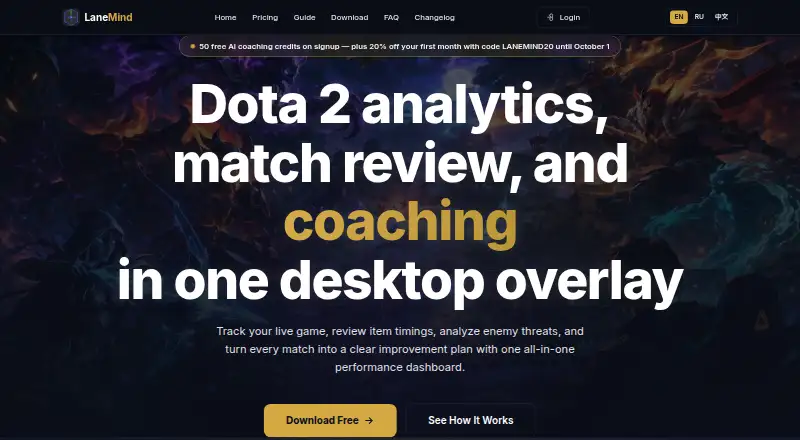
What LaneMind is
LaneMind is a Windows desktop app for Dota 2 that combines a live overlay, match statistics, post-game review, item timing analysis, and coaching insights. During a match, the overlay follows the current hero, items, economy, and game phase, then suggests possible next decisions. Afterward, reports cover laning, farming, itemization, and fight impact, along with a focus for the next game. LaneMind brings match history and statistics from OpenDota and STRATZ together with locally captured sessions. It says it uses Valve’s official Game State Integration data flow and does not read memory, automate inputs, or modify game files. Signed-in users can sync match history and coaching data after a match; live game state is not uploaded, and sync can be disabled. The free plan includes the overlay, statistics, basic history, and BYOK, but no hosted insight credits. Pro costs €9 a month during open beta; Pro+ costs €16 a month and adds priority support and billing help. It requires Windows 10 or 11 (64-bit), at least 4 GB RAM, about 100 MB of free disk space, internet access, and Dota 2 through Steam with GSI enabled.
Who it suits
LaneMind suits Dota 2 players who want in-match prompts and post-game review tailored to their rank, role, hero, and match state. It requires a Windows computer and Dota 2 installed through Steam with GSI enabled.
What it does well
- Live overlay tracks hero, items, economy, and game phase.
- Post-game reports cover laning, farming, itemization, and fight impact.
- Free plan includes OpenDota and STRATZ statistics.
- Cloud sync can be disabled.
- Product says it does not automate inputs or modify game files.
What to know first
- Free plan has no hosted insight credits.
- Requires Windows 10 or 11 (64-bit).
- Requires at least 4 GB RAM and internet access.
- Requires Dota 2 through Steam with GSI enabled.
Limits
The free plan includes no hosted insight credits. Pro includes 600 credits each month for €9 a month during open beta; Pro+ includes 1,400 for €16 a month. Prepaid refills provide 250, 700, or 1,600 credits, depending on the pack.
Plans
| Plan | Billed and limits | Price |
|---|---|---|
| Free | forever · GSI overlay · OpenDota + STRATZ stats · basic match history · BYOK · no hosted insight credits | Free |
| Medium Refill | prepaid · 700 credits | €10, paid once |
| Pro+ | monthly during open beta · 1,400 hosted insight credits each month · about 11 to 16 hosted coached matches per month · priority support and billing help | €16 a month |
| Large Refill | prepaid · 1,600 credits | €20, paid once |
| Small Refill | prepaid · 250 credits | €4, paid once |
| Pro | monthly during open beta · 600 hosted insight credits each month · about 5 to 7 hosted coached matches per month · optional prepaid refill packs | €9 a month |
As lanemind.com lists them, read 7 Oct 2026. The maker's own page has the final word.
Getting started
- Visit the LaneMind website and choose the free plan or a paid option.
- Install the app on Windows 10 or 11 (64-bit).
- Install Dota 2 via Steam and enable GSI.
- Provide internet access and at least 4 GB RAM with about 100 MB of free disk space.
- Sign in to sync match history and coaching data after matches, or disable cloud sync.
LaneMind is a Windows companion for Dota 2 that links in-match guidance with structured coaching after the final screen. It suits players who want advice tied to a particular hero, role and game state rather than broad training exercises. The main decision is whether its credit-based hosted coaching justifies adding a desktop setup to your routine.
Overview
LaneMind combines a live overlay, match statistics, item-timing analysis and post-game reports in one Dota 2 workflow. During a match it follows the current hero, items, economy and game phase, then suggests what to consider next. Afterward, reports examine laning, farming, itemization and fight impact, ending with a focus for the next game. That continuity makes it useful for players who want immediate prompts to feed into a specific improvement plan. Replay analysis is not included, so it is not a substitute for a tool built around reviewing recorded games.
Match history and statistics connect to OpenDota and STRATZ alongside sessions captured locally. LaneMind uses Valve's official Game State Integration flow and says it does not read memory, automate inputs or modify game files. Signed-in users can sync match history and coaching data after a match; live game state is not uploaded, and cloud sync can be turned off.
Key features
Live and post-game guidance
The overlay is most relevant to players who struggle with decisions while a match is unfolding, because its prompts reflect changing resources and phase rather than offering static lessons. The post-game review gives more deliberate feedback on farming, fights and item choices, with a concrete next-game objective. Together they form a coaching loop, although the lack of replay analysis limits how deeply a player can revisit individual moments.
Data, privacy and safety
LaneMind combines OpenDota and STRATZ data with local captures, which can give reports more match context than either source alone. Its privacy policy names OpenAI, Anthropic, xAI and Google as model providers. BYOK users send data directly to their selected provider, while LaneMind says it protects credentials with Electron safeStorage, uses TLS and infrastructure access controls, and does not sell personal data. Sync is optional, a useful distinction for players who want coaching without uploading live state.
Pricing
The Free plan costs nothing, billed forever. It includes the GSI overlay, OpenDota and STRATZ statistics, basic match history and BYOK, but no hosted insight credits. It is the sensible starting point for players willing to bring their own model provider; it does not provide LaneMind-hosted coaching.
Pro costs €9 a month, billed monthly during open beta. It supplies 600 hosted insight credits each month, equivalent to about 5 to 7 hosted coached matches, with optional prepaid refill packs. Pro+ costs €16 a month on the same open-beta monthly basis, raising the allowance to 1,400 credits, or about 11 to 16 hosted coached matches, and adds priority support and billing help. Pro fits occasional hosted coaching; Pro+ is for frequent players who would otherwise buy credits repeatedly. Both paid plans are monthly, so the stated open-beta billing terms matter when budgeting.
Prepaid refills avoid a recurring subscription: Small Refill is 4.00 EUR once for 250 credits, Medium Refill is 10.00 EUR once for 700 credits, and Large Refill is 20.00 EUR once for 1,600 credits. The free trial gives newcomers a way to evaluate the workflow, while the free plan remains capped at BYOK rather than hosted insight.
Platforms
LaneMind is offered on the web and as a Windows desktop app, but the Dota 2 overlay requires the Windows application. The download requirements are Windows 10 or 11 (64-bit), at least 4 GB of RAM, about 100 MB of free disk space, internet access and Dota 2 installed through Steam with GSI enabled. Players on macOS or Linux, or anyone unwilling to configure GSI, should look elsewhere.
Who it's for
Choose LaneMind if you play Dota 2 regularly and want coaching that adapts to your rank, role, hero and current match. The Free plan suits BYOK users and those primarily seeking overlay and statistics; Pro suits players wanting several hosted coached matches each month; Pro+ is aimed at heavier use and readers who value priority support. It is a poor fit for players seeking replay breakdowns, a platform-agnostic coach or a completely hosted experience without credit limits.
Pros and cons
- Pro: Live prompts and post-game reports connect immediate decisions with a next-game focus.
- Pro: OpenDota, STRATZ and local sessions provide multiple sources for match context.
- Pro: Official GSI use, no memory reading or input automation, optional cloud sync and stated encryption controls address safety and privacy concerns.
- Con: Hosted insight is credit-limited; the free tier requires BYOK and supplies no hosted credits.
- Con: Windows, Steam and GSI requirements exclude players on other desktop platforms.
- Con: No replay analysis means less help for examining precise past sequences.
Alternatives
For a broader directory of coaching tools, see Game Coaching Software.
Callup.gg is the better pick if you want iOS support, short clips and a few free coach reviews each week. Choose Aimlabs instead for aim training, 50K-plus tasks and hundreds of FPS profiles rather than Dota 2 match coaching. Sabu.gg is a free, no-card download for players who need Linux or macOS support.
DataCoach suits web-only users wanting 10 monthly replays, training plans and progression tracking. iTero offers all homepage features free with ads, with a paid tier removing ads. Refocus is a web option combining daily observation, match reports and teammate discovery. Scope.gg is preferable for FACEIT users who want match uploads and analysis. GetGood(GG) offers weekly match-review and AI-coach-message allowances without a free trial.
Verdict
LaneMind is a strong choice for Dota 2 players who want one workflow spanning live decisions and actionable post-game coaching, especially if BYOK keeps the free plan useful or a paid credit allowance matches their play volume. Look elsewhere if you need replay analysis, non-Windows support or coaching without hosted-credit limits.
Verdict
LaneMind combines live match context with review after a game, and offers a free plan alongside paid hosted insight credits. It is specific to Dota 2 and has Windows and setup requirements to consider.
Questions
Is LaneMind free?
Yes. Its free plan is billed at no cost and includes the GSI overlay, OpenDota and STRATZ statistics, basic match history, and BYOK.
What do the paid monthly plans cost?
Pro costs €9 a month during open beta and includes 600 hosted insight credits each month. Pro+ costs €16 a month and includes 1,400 credits, priority support, and billing help.
Which platforms does LaneMind support?
The app is listed for Windows. Its requirements specify Windows 10 or 11 (64-bit).
Does LaneMind offer a free trial?
Yes, a free trial is listed.
Which data sources does LaneMind connect to?
It connects match history and statistics from OpenDota and STRATZ with locally captured sessions.
Can users disable cloud sync?
Yes. Match history and coaching data sync after a match ends for signed-in users, and cloud sync can be disabled.
Facts from LaneMind's own pages
- AI providers
- The privacy policy names OpenAI, Anthropic, xAI, and Google as model providers; BYOK users send data directly to their chosen provider. · lanemind.com, 7 Oct 2026
- Audience
- The product describes its workflow as adapting to a player's rank, role, hero, and current match state. · lanemind.com, 7 Oct 2026
- Cloud sync
- Signed-in users' match history and coaching data sync after a match ends; live game state is not uploaded, and cloud sync can be disabled. · lanemind.com, 7 Oct 2026
- Game data and safety
- LaneMind says it uses Valve's official Game State Integration data flow and does not read memory, automate inputs, or modify game files. · lanemind.com, 7 Oct 2026
- Integrations
- LaneMind connects match history and statistics from OpenDota and STRATZ with locally captured sessions. · lanemind.com, 7 Oct 2026
- Live overlay
- The overlay tracks the current hero, items, economy, game phase, and suggested next decisions during a match. · lanemind.com, 7 Oct 2026
- Post-game review
- Post-game reports cover laning, farming, itemization, fight impact, and a next-game focus. · lanemind.com, 7 Oct 2026
- Product
- LaneMind combines a live Dota 2 overlay, match statistics, post-game review, item timing analysis, and coaching insights in a Windows desktop app. · lanemind.com, 7 Oct 2026
- Security and privacy
- The privacy policy says LaneMind uses TLS encryption, Electron safeStorage for credentials, and infrastructure access controls, and does not sell personal data. · lanemind.com, 7 Oct 2026
- Support
- LaneMind lists [email protected] for support and offers priority support and billing help with Pro+. · lanemind.com, 7 Oct 2026
- System requirements
- The download page lists Windows 10 or 11 (64-bit), 4 GB minimum RAM, about 100 MB free disk space, internet access, and Dota 2 installed via Steam with GSI enabled. · lanemind.com, 7 Oct 2026
Where LaneMind stands on Freedom251
- Game Coaching Software#7 of 25