Freedom251 › Keyword Clustering Tools
KW Clusterized
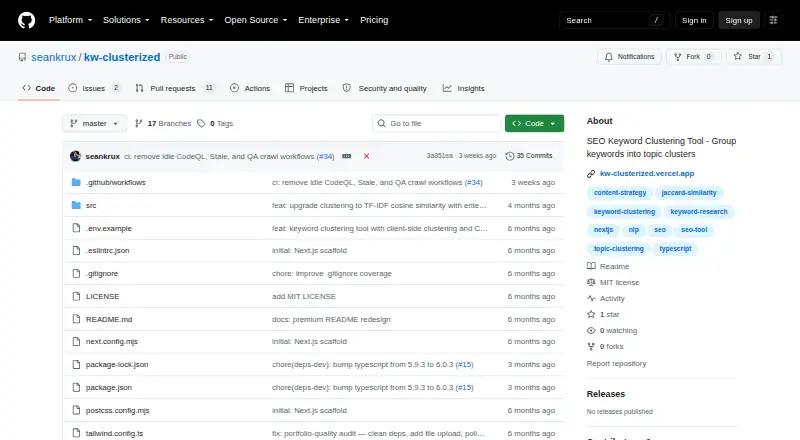
What KW Clusterized is
KW Clusterized is an open-source tool that groups keyword lists into topical clusters to help organize search intent. It is aimed at SEOs, content strategists, and growth teams. Add keywords by pasting comma-separated or newline-delimited text, or upload a CSV, TXT, or TSV file. The app can handle large keyword sets in one pass, remove duplicate entries, and group the remaining terms. Its clustering method combines word overlap, Jaccard similarity, and greedy single-linkage agglomerative clustering. The results appear as color-coded cluster cards with automatically generated labels, and assignments can be downloaded as CSV with cluster ID, label, and keyword columns. Similarity thresholds are configurable in the clustering engine’s code. The README says analysis happens in the browser, with keywords staying there and no server round-trips or API calls. The repository credits Sean G as the builder and provides the software under the MIT License, with an as-is warranty disclaimer. The README describes running the app locally with Node.js 18.17 or later and npm 9 or later, and says it can be deployed on Vercel. It also links to a live demo.
Who it suits
KW Clusterized suits SEOs, content strategists, and growth teams who need to organize large keyword lists into topical groups. It is useful when keyword input from text or CSV, TXT, or TSV files and CSV cluster exports fit the workflow.
What it does well
- Accepts pasted keywords and CSV, TXT, or TSV uploads.
- Handles large keyword sets in one pass and removes duplicates.
- Shows clusters as color-coded cards with automatic labels.
- Exports cluster IDs, labels, and keywords as CSV.
- Analysis runs in the browser, with no API calls.
- Released under the MIT License.
What to know first
- The listed export format is CSV only.
- Local setup requires Node.js 18.17 or later and npm 9 or later.
Limits
The clustering engine’s similarity thresholds can be adjusted in code. The listed export format is CSV.
Getting started
- Open the linked live demo or the repository.
- Paste comma-separated or newline-delimited keywords, or upload a CSV, TXT, or TSV file.
- Run the clustering to group and review the color-coded clusters.
- Download cluster assignments as CSV.
- To run it locally, use Node.js 18.17 or later and npm 9 or later.
Verdict
Choose KW Clusterized if you want a free, open-source way to group keyword lists and export the results as CSV. Its browser-based processing keeps keywords in the browser according to the README. Look elsewhere if you need SERP analysis.
Questions
Is KW Clusterized free?
Yes. It is open source and provided under the MIT License, with an as-is warranty disclaimer.
What input formats does it accept?
You can paste comma-separated or newline-delimited keywords, or upload CSV, TXT, and TSV files.
What can I export?
Cluster assignments can be downloaded as CSV with cluster ID, label, and keyword columns.
Does KW Clusterized make API calls?
The README says analysis runs in the browser, keywords stay there, and the app makes no API calls or server round-trips.
Can I change the similarity threshold?
The clustering engine supports configurable similarity thresholds, which the README says can be adjusted in code.
How can I run or deploy it?
The README describes local setup with Node.js 18.17 or later and npm 9 or later, and says the app can be deployed on Vercel. It also links to a live demo.
Facts from KW Clusterized's own pages
- API use
- The README says the app makes no API calls and returns immediate output. · github.com, 9 Oct 2026
- Batch handling
- The app handles large keyword sets in one pass, deduplicates entries, and groups them into clusters. · github.com, 8 Oct 2026
- Batch processing
- The tool handles large keyword sets in one pass, deduplicates entries, and groups them into reviewable clusters. · github.com, 9 Oct 2026
- Cluster display
- Clusters appear as color-coded cards with auto-generated labels. · github.com, 9 Oct 2026
- Clustering method
- It uses Jaccard similarity, word overlap analysis, and greedy single-linkage agglomerative clustering. · github.com, 9 Oct 2026
- Cluster review
- Cluster cards are color-coded and receive automatically generated labels. · github.com, 8 Oct 2026
- Data handling
- The README says analysis runs in the browser with zero server round-trips and keywords stay in the browser. · github.com, 9 Oct 2026
- Deployment
- The README says the application can be deployed on Vercel and links to a live demo. · github.com, 9 Oct 2026
- Export
- Users can download cluster assignments as CSV with cluster ID, label, and keyword columns. · github.com, 9 Oct 2026
- Input formats
- Users can paste comma-separated or newline-delimited keywords, or upload CSV, TXT, and TSV files. · github.com, 9 Oct 2026
- Intended users
- The README identifies SEOs, content strategists, and growth teams as users. · github.com, 8 Oct 2026
- License
- The repository lists an MIT license. · github.com, 9 Oct 2026
- Local setup
- The project can be run locally with Node.js 18.17 or later and npm 9 or later. · github.com, 9 Oct 2026
- Maker
- The README credits the project as built by Sean G. · github.com, 9 Oct 2026
- Purpose
- KW Clusterized is a client-side keyword clustering tool that groups raw keyword lists into topical clusters for SEOs, content strategists, and growth teams. · github.com, 9 Oct 2026
- Similarity threshold
- The clustering engine supports configurable similarity thresholds, which the README says can be adjusted in code. · github.com, 8 Oct 2026
- Technology
- The listed stack includes Next.js 14, TypeScript 5, React 18, Tailwind CSS 3, and the browser FileReader API. · github.com, 9 Oct 2026
- Thresholds
- The clustering engine supports configurable similarity thresholds in code. · github.com, 9 Oct 2026
Where KW Clusterized stands on Freedom251
- Keyword Clustering Tools#22 of 27