
KOrganizer
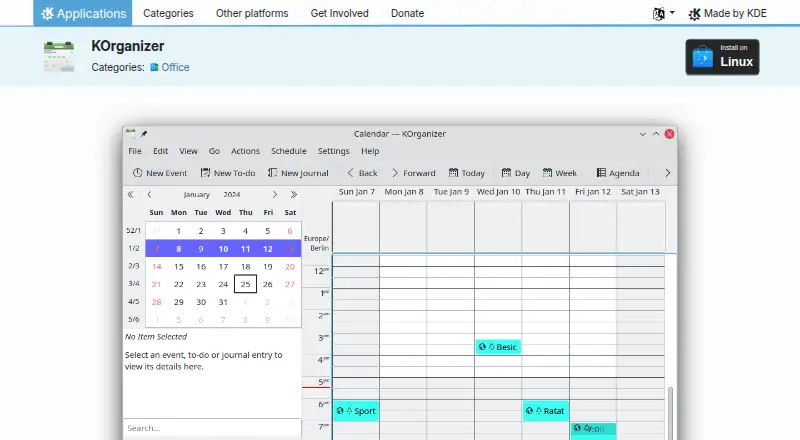
What KOrganizer is
KOrganizer is the calendar and scheduling part of Kontact, for organizing appointments, events, tasks, and journal entries. It supports multiple calendars and to-do lists, quick entries, reminders, alarm notifications, attachments, printing, and undo and redo. For shared planning, users can invite people by email, handle their responses, and share calendars through a groupware server or a network file. Group scheduling, web export, and network-based calendar data handling are also supported. KOrganizer works with services such as NextCloud, Kolab, and Google Calendar, and exchanges calendar data using vCalendar and iCalendar formats. It integrates with Kontact and KDE PIM applications, including KAddressBook birthday information and KMail invitations. Users can organize events and tasks with tags, apply colors to tags, move events by drag-and-drop, and change icon sets. KDE describes Kontact as supporting open standards, privacy, user control of data, and offline access. KOrganizer is free for Linux under the GPL-2.0+ license. It is available through Discover, other AppStream stores, or a Linux distribution’s package manager.
Who it suits
KOrganizer suits Linux users who want calendars, to-do lists, appointments, and reminders in a single organizer. It is also suited to people who need to share calendars, invite attendees, or connect with services such as NextCloud, Kolab, and Google Calendar.
What it does well
- Supports multiple calendars and to-do lists.
- Invitations can be sent by email and responses processed.
- Works with NextCloud, Kolab, and Google Calendar.
- Supports vCalendar and iCalendar data formats.
- Free to use on Linux.
What to know first
- Available for Linux only.
- No free trial is offered.
Plans
| Plan | Billed and limits | Price |
|---|---|---|
| KOrganizer | No paid plans stated | Free |
As apps.kde.org lists them, read 12 Oct 2026. The maker's own page has the final word.
Getting started
- Visit the KOrganizer website.
- Install it on Linux through Discover, another AppStream store, or your distribution’s package manager.
- Connect or use a calendaring service such as NextCloud, Kolab, or Google Calendar.
- Create calendars, events, to-do lists, or journal entries.
- Invite attendees by email or share a calendar through a groupware server or network file.
Verdict
Choose KOrganizer if you want a free Linux calendar with task lists, reminders, and calendar sharing. Its Kontact and KDE PIM integration may suit users working with those applications; look elsewhere if you need a platform beyond Linux.
Questions
How much does KOrganizer cost?
KOrganizer is free, with a listed price of $0.
Which platforms does KOrganizer support?
Linux is the listed platform.
Does KOrganizer offer a free trial?
No. It is listed as free, with no free trial.
Can I share calendars or invite people?
Yes. Users can invite people by email and share calendars through a groupware server or network file.
Which calendar services and formats does it support?
It works with NextCloud, Kolab, and Google Calendar, and supports vCalendar and iCalendar.
What license does KOrganizer use?
The product page lists it under the GPL-2.0+ license.
Facts from KOrganizer's own pages
- Calendar formats
- It supports vCalendar and iCalendar for storing and exchanging calendar data. · apps.kde.org, 12 Oct 2026
- Calendar services
- It works with calendaring services including NextCloud, Kolab, and Google Calendar. · apps.kde.org, 12 Oct 2026
- Calendar sync
- two_way · apps.kde.org, 20 Sept 2026
- Collaboration
- Users can invite people with email addresses to events, process responses, and share calendars through a groupware server or a network file. · docs.kde.org, 12 Oct 2026
- Customization
- Users can group events and to-dos with tags, highlight tags with colors, reschedule events by drag-and-drop, and customize icon sets. · docs.kde.org, 12 Oct 2026
- Download
- The product page lists Linux and says installation is available through Discover, other AppStream application stores, or a distribution package manager. · apps.kde.org, 12 Oct 2026
- Free plan
- Yes · apps.kde.org, 20 Sept 2026
- Kontact integration
- KOrganizer integrates with Kontact and KDE PIM applications; the handbook gives showing KAddressBook birthdays and using KMail for invitations as examples. · docs.kde.org, 12 Oct 2026
- License
- The product page lists KOrganizer under the GPL-2.0+ license. · apps.kde.org, 12 Oct 2026
- Organizer features
- It supports multiple calendars and to-do lists, undo and redo, attachments, quick entries, and printing. · apps.kde.org, 12 Oct 2026
- Personal information
- The handbook says users can schedule appointments and events, create to-dos, write journal entries, and receive reminders for pending tasks. · docs.kde.org, 12 Oct 2026
- Privacy and data
- KDE says Kontact supports open standards, values privacy, gives users control over their data, and allows offline access. · kontact.kde.org, 12 Oct 2026
- Publisher
- KDE e.V. is a registered non-profit organization that represents the KDE Project in legal and financial matters and was registered in Germany in 1997. · ev.kde.org, 12 Oct 2026
- Purpose
- KOrganizer is the calendar and scheduling component of Kontact for managing events and tasks. · apps.kde.org, 12 Oct 2026
- Recent release
- The product page lists version 6.8.2 dated 2026-10-08 and describes CalDAV fixes in that release. · apps.kde.org, 12 Oct 2026
- Scheduling
- It supports alarm notifications, group scheduling, web export, and network transparent handling of calendar data. · apps.kde.org, 12 Oct 2026
- Shared calendars
- Yes · apps.kde.org, 20 Sept 2026
- Support
- The product page links to the KOrganizer handbook, KDE forum, kdepim-users mailing list, and #kontact on Libera.Chat for help. · apps.kde.org, 12 Oct 2026
Where KOrganizer stands on Freedom251
- Calendar apps#52 of 194