Freedom251 › AI Coding Assistants
Klaat Code
What Klaat Code is
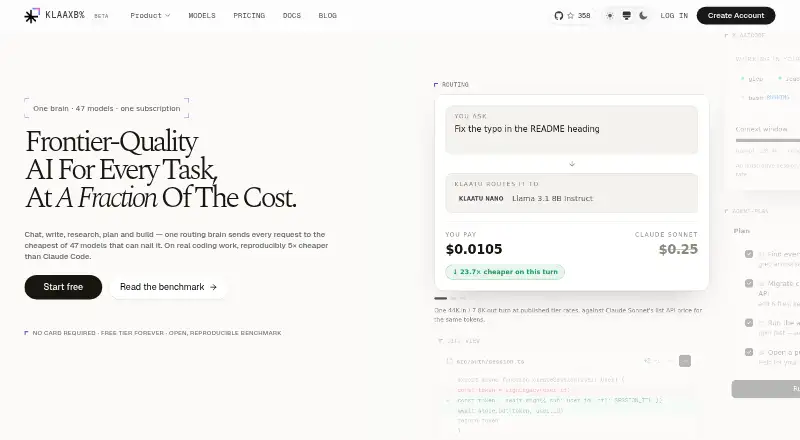
Klaat Code is an AI coding agent that runs in the terminal and builds an index of a codebase to help developers debug, implement and review code. Its command-line tool creates a local graph of project symbols, calls and imports for lookups and impact analysis. In an agent loop, it can read and edit files, run tests and execute bash. Klaatu-o1 routes requests across six tiers, choosing the least expensive tier it considers capable of the task.
Klaat Code also offers code completion, chat assistance and an agent through a VS Code extension. The extension page says it works in Cursor and compatible editors, with inline edits, tab completions and agentic chat. Cross-session memory is kept in editable Markdown files on the user's machine and shared with the editor. The product supports Model Context Protocol servers, including local stdio servers and remote HTTP servers with OAuth, and has an OpenAI-compatible API with prepaid, per-token billing. The maker says it does not train models on prompts, conversations or code; requests may go to third-party providers, which may retain data briefly for abuse monitoring, typically up to 30 days. Access is available through terminal, editor and web chat, with Linux, macOS, Windows, extension and API options. The Free plan is free forever; paid plans start at $5 a month.
Who it suits
Klaat Code suits developers who want terminal-based codebase indexing, file editing, test running and shell execution in an AI coding agent. Its terminal, editor and web chat surfaces are presented under one account, with a VS Code extension that also works in Cursor and compatible editors.
What it does well
- Builds a local code graph for lookups and impact analysis.
- Agent can read and edit files, run tests and execute bash.
- Editable Markdown memory persists across sessions and is shared with the editor.
- Supports local and remote Model Context Protocol servers.
- Free forever plan includes 1,000 files.
What to know first
- Free plan has a five-hour limit and a weekly limit.
- Requests may be sent to third-party model providers, which may retain data briefly.
- No free trial is offered.
Limits
The Free plan includes 1,000 Code Graph files and a five-hour limit plus a weekly limit. When the five-hour limit fills, quick questions continue on Nano; when the weekly limit fills, replies pause until reset.
Plans
| Plan | Billed and limits | Price |
|---|---|---|
| Starter | monthly · 80 units per day · 1,800 units per month · 1 Titan request per day · 6 Titan credits per month | $5 a month |
| Pro | monthly · 150 units per day · 2,250 requests per month · 25 Reason requests per day · 10 Ultra requests per day · 2 Titan requests per day · 16 Titan credits per month | $15 a month |
| Scale | monthly · 360 units per day · 60 Reason requests per day · 30 Ultra requests per day · 4 Titan requests per day · 26 Titan credits per month | $32 a month |
| Team | per seat · 300 units per day · 50 Reason requests per day · 25 Ultra requests per day · 4 Titan requests per day | $30 a month |
| Apex | monthly · 500 requests per day · 150 Reason requests per day · 80 Ultra requests per day · 8 Titan requests per day | $99 a month |
| Apex Max | monthly · 30,000 Core requests per month | $200 a month |
| Free | Free forever. No card. · Nano, Flash and Core (Core on the free floor model) · Code Graph: 1,000 files · Web chat, KlaatCode CLI and VS Code · Session memory · 5-hour and weekly limits | Free |
As klaatai.com lists them, read 22 Sept 2026. The maker's own page has the final word.
Getting started
- Visit klaatai.com.
- Choose the Free plan or a paid plan; the Free plan is free forever and paid plans start at $5 a month.
- Use the terminal CLI, web chat, or an extension for VS Code, Cursor or a compatible editor.
- Connect Model Context Protocol servers if needed, including local stdio or remote HTTP servers with OAuth.
- Use the documented OpenAI-compatible API with an OpenAI-compatible client if API access is your route.
Verdict
Choose Klaat Code if you want an agent that can work across a codebase from the terminal, with a local code graph and shared editor memory. Look elsewhere if you need usage without the Free plan's time and weekly limits, or do not want requests sent to third-party model providers.
Questions
Is Klaat Code free?
Yes. Its Free plan is free forever and includes 1,000 files. Paid plans start at $5 a month.
Is there a free trial?
No free trial is offered; the product has a Free plan.
Which platforms does Klaat Code support?
The listed platforms are API, extension, Linux, macOS, web and Windows. The supported IDE listing names VS Code; the extension page also says it works in Cursor and compatible editors.
Does Klaat Code support integrations?
It supports Model Context Protocol servers, including local stdio servers and remote HTTP servers with OAuth. It also documents an OpenAI-compatible API for compatible clients.
How does Klaat Code handle prompts and code?
KlaatAI says it does not train models on prompts, conversations or code. Requests may be sent to third-party providers, which may retain data briefly for abuse monitoring, typically up to 30 days.
What paid plans are available?
Starter is $5 a month, Pro $15 a month, Scale $32 a month, Team $30 per seat per month, Apex $99 a month, and Apex Max $200 a month.
Facts from Klaat Code's own pages
- Coding agent
- Yes · klaatai.com, 22 Sept 2026
- Agent tools
- The CLI can read and edit files, run tests and execute bash in an agentic tool loop. · klaatai.com, 7 Oct 2026
- API
- The maker documents an OpenAI-compatible API with prepaid, per-token billing, and says OpenAI-compatible clients can use it. · klaatai.com, 7 Oct 2026
- Chat assistance
- Yes · klaatai.com, 22 Sept 2026
- Codebase indexing
- Yes · klaatai.com, 22 Sept 2026
- Code completion
- Yes · klaatai.com, 22 Sept 2026
- Code Graph
- The CLI builds a local code graph of project symbols, call relationships and imports for codebase lookups and impact analysis. · klaatai.com, 7 Oct 2026
- Editor integrations
- The VS Code extension page says it also works in Cursor and compatible editors, and lists inline edits, tab completions and agentic chat. · klaatai.com, 7 Oct 2026
- Free plan
- Yes · klaatai.com, 22 Sept 2026
- Memory
- Cross-session memory is stored as editable plain Markdown files on the user's machine and shared with the editor. · klaatai.com, 7 Oct 2026
- Model routing
- Klaatu-o1 routes requests across six tiers, selecting the cheapest tier it considers capable of the task. · klaatai.com, 7 Oct 2026
- Notable limits
- The Free plan includes 1,000 Code Graph files plus a 5-hour limit and a weekly limit; after the 5-hour limit fills quick questions continue on Nano, and after the weekly limit fills replies pause until reset. · klaatai.com, 7 Oct 2026
- Other integrations
- KlaatCode supports Model Context Protocol servers, including local stdio servers and remote HTTP servers with OAuth. · klaatai.com, 7 Oct 2026
- Platforms
- The CLI installation page lists macOS, Linux and Windows; macOS support is specified as version 12 or later on Apple Silicon or Intel. · klaatai.com, 7 Oct 2026
- Privacy
- KlaatAI says it does not train models on prompts, conversations or code; requests may be sent to third-party model providers, which may retain data briefly for abuse monitoring, typically up to 30 days. · klaatai.com, 7 Oct 2026
- Security
- The privacy policy says traffic is encrypted in transit with TLS, stored data is encrypted by database and storage providers, API keys are hashed, and production access is limited and audited. · klaatai.com, 7 Oct 2026
- Support
- The maker directs users with questions to contact support and says privacy requests receive a response within 30 days. · klaatai.com, 7 Oct 2026
- Supported IDEs
- VS Code · klaatai.com, 22 Sept 2026
- Terminal access
- Yes · klaatai.com, 22 Sept 2026
- What it does
- KlaatCode is a terminal AI coding agent that indexes a codebase and helps debug, implement and review code. · klaatai.com, 7 Oct 2026
- Who it is for
- The maker describes KlaatCode as built for developers and presents terminal, editor and web chat surfaces under one account. · klaatai.com, 7 Oct 2026
Where Klaat Code stands on Freedom251
- AI Coding Assistants#31 of 102