Freedom251 › Code Formatting Tools
js-beautify
What js-beautify is
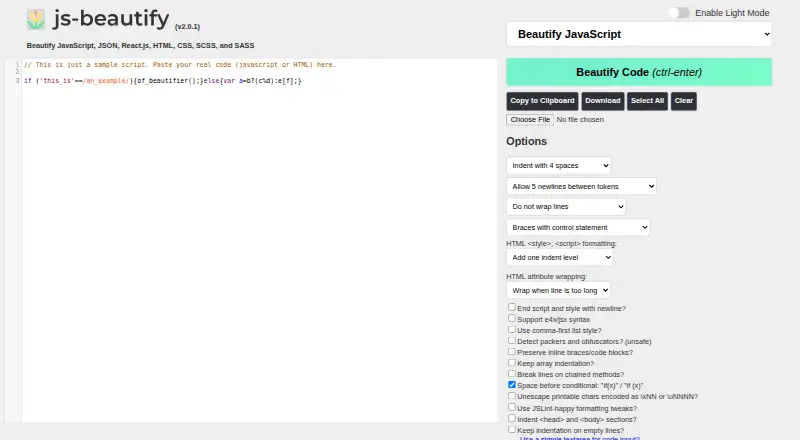
js-beautify is a code formatter for JavaScript, including bookmarklets and packed scripts. Its JavaScript version also formats JSON, React.js, HTML, CSS, SCSS, and SASS. You can use it in a web browser or from the command line with Node.js or Python. The browser interface has controls for indentation, line wrapping, chained methods, JSX syntax, and HTML attributes.
For library use, the JavaScript package provides beautifiers for JavaScript, CSS, and HTML; the Python version reformats JavaScript only. Configuration options are available through CLI flags, library options, and JavaScript configuration files such as .jsbeautifyrc. The README documents embedding the web library through scripts hosted on cdnjs and rawgit, and the project page lists editor integrations and plugins for Visual Studio Code, Sublime Text, Vim, and Emacs.
The source code is free and open under the MIT licence, with no listed usage limits. The website credits Einar Lielmanis as creator and Liam Newman as maintainer. The README says the current owners have limited time and need contributors to address bugs and implementation issues; free CDN services have no uptime or support guarantees.
Who it suits
js-beautify suits developers who want to format JavaScript and related web languages in a browser, command line, or library. It also fits users of editors such as Visual Studio Code, Sublime Text, Vim, and Emacs who want a listed integration or plugin.
What it does well
- Formats JavaScript, JSON, React.js, HTML, CSS, SCSS, and SASS.
- Browser controls cover indentation, line wrapping, chained methods, JSX, and HTML attributes.
- Available through a browser, Node.js, and Python.
- Configuration supports CLI flags, library options, and .jsbeautifyrc files.
- MIT-licensed source code is free with no listed usage limits.
What to know first
- The Python version reformats JavaScript only.
- Python 2 is no longer supported.
- Free CDN services have no uptime or support guarantees.
- The README says the project needs contributors to address bugs and implementation issues.
Plans
| Plan | Billed and limits | Price |
|---|---|---|
| Free | Source code is free and open under the MIT licence · no listed usage limits | Free |
As beautifier.io lists them, read 5 Oct 2026. The maker's own page has the final word.
Getting started
- Open https://beautifier.io/ to use the web interface.
- Choose browser controls for indentation, line wrapping, chained methods, JSX syntax, or HTML attributes.
- For command-line use, use Node.js or Python.
- For library use, choose the JavaScript or Python version and configure it with options or a .jsbeautifyrc file.
- Check the project page for integrations and plugins for Visual Studio Code, Sublime Text, Vim, and Emacs.
Verdict
Choose js-beautify if you want a free formatter with browser, command-line, library, and editor integration options. Look elsewhere if you need Python formatting for HTML or CSS, Python 2 support, or uptime and support guarantees for its free CDN services.
Questions
How much does js-beautify cost?
The free plan costs nothing. The source code is open under the MIT licence.
Which languages can it format?
The JavaScript version formats JavaScript, JSON, React.js, HTML, CSS, SCSS, and SASS. The Python version reformats JavaScript only.
Which platforms can I use?
It is available in a web browser and from the command line with Node.js or Python.
Is js-beautify open source?
Yes. Its source code is free and open under the MIT licence.
Who maintains js-beautify?
The website credits Einar Lielmanis as creator and Liam Newman as maintainer.
Does it have editor integrations?
The project page lists integrations and plugins for Visual Studio Code, Sublime Text, Vim, and Emacs.
Facts from js-beautify's own pages
- Configuration
- Options can be set through CLI flags, library options, and JavaScript configuration files such as .jsbeautifyrc. · github.com, 5 Oct 2026
- Editor support
- The project page lists related integrations and plugins for editors including Visual Studio Code, Sublime Text, Vim, and Emacs. · beautifier.io, 5 Oct 2026
- Integrations
- The README documents embedding the web library using scripts hosted on cdnjs and rawgit. · github.com, 5 Oct 2026
- Languages
- The JavaScript version formats JavaScript, JSON, HTML, CSS, SCSS, and SASS. · beautifier.io, 5 Oct 2026
- Library use
- The JavaScript library exposes beautifiers for JavaScript, CSS, and HTML, while the Python version only reformats JavaScript. · github.com, 5 Oct 2026
- Maker
- The website credits Einar Lielmanis as creator and Liam Newman as maintainer. · beautifier.io, 5 Oct 2026
- Open source
- The source code is free and open under the MIT licence, with the repository README requiring retention of the copyright notice and license. · beautifier.io, 5 Oct 2026
- Project status
- The README says the existing owners have limited time and that the project needs contributors to address bugs and implementation issues. · github.com, 5 Oct 2026
- Purpose
- js-beautify reformats and re-indents JavaScript, including bookmarklets and packed scripts. · github.com, 5 Oct 2026
- Python limitation
- The Python version does not reformat HTML or CSS, and the project no longer supports Python 2. · github.com, 5 Oct 2026
- Security
- The opened project pages provide no security or compliance certification details. · github.com, 5 Oct 2026
- Support limits
- The README says its free CDN services have no uptime or support guarantees. · github.com, 5 Oct 2026
- Ways to use
- The project can be used in a browser or from the command line with Node.js or Python. · github.com, 5 Oct 2026
- Web app options
- The web interface offers formatting controls for indentation, line wrapping, chained methods, JSX syntax, and HTML attributes. · beautifier.io, 5 Oct 2026
Where js-beautify stands on Freedom251
- Code Formatting Tools#23 of 34