Freedom251 › Geography Learning Apps

Joe's Geography Study Tool
What Joe's Geography Study Tool is
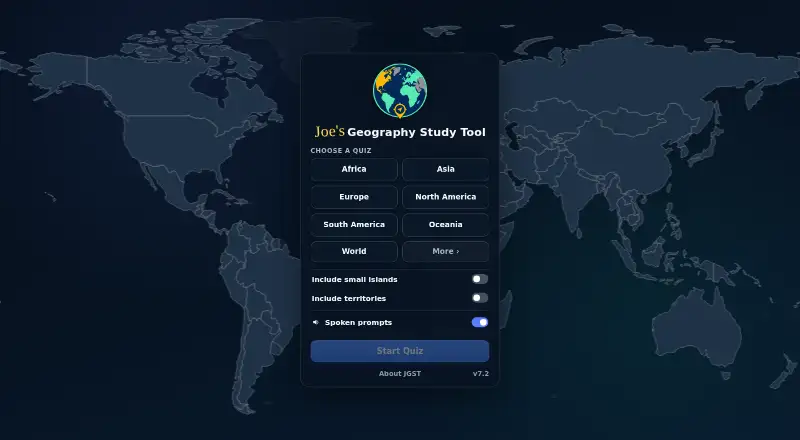
Joe's Geography Study Tool is a free web app for learning places through interactive map quizzes. Each prompt names a location, and users select it on the map. Coverage includes countries, states and other subdivisions, capitals, regions, and territories. Quiz setup offers options for small islands and territories, spoken prompts, and haptics. Explore mode includes sound, haptics, and a “Show Me” control. After a quiz, the completion screen displays the time, locations, and accuracy, with options to repeat or begin another quiz. The installable app works offline; if its offline files are removed, they download again when the site is next opened with an internet connection. The installation information says no device permissions are needed. The maker says the app operates locally in the browser and does not collect or transmit quiz answers, scores, progress, or settings. The original software code is under GNU GPL version 3 or later, while pronunciation audio has separate terms and cannot be used to train or evaluate machine-learning or artificial-intelligence technology. The maker invites feedback and reports, and states that the software comes without warranty.
Who it suits
It suits learners who want to practise identifying countries and other places on a map. Offline use and locally handled quiz information may also matter to learners choosing a web study tool.
What it does well
- Covers countries, subdivisions, capitals, regions, and territories.
- Quiz options include spoken prompts and haptics.
- Works offline after installation.
- No device permissions are required.
- No account or ads; free to use.
What to know first
- Software is provided without warranty.
- Pronunciation audio cannot be used for AI training or evaluation.
Limits
The Free plan costs nothing. The listed core coverage is countries, with mixed quiz mode; no other plan is described.
Plans
| Plan | Billed and limits | Price |
|---|---|---|
| Free | Free to use · no ads · no account | Free |
As jgeo.org lists them, read 8 Oct 2026. The maker's own page has the final word.
Getting started
- Open https://jgeo.org/ in a web browser.
- Start a quiz and choose its available setup options, including small islands and territories, spoken prompts, or haptics.
- Select the location named in each prompt by clicking it on the map.
- Use Explore mode to inspect locations with sound, haptics, or “Show Me.”
- Install the app for offline use; open the site online again if removed offline files need to download.
Verdict
The app combines map quizzes with an Explore mode and can be used offline. Note the separate restriction on pronunciation audio and the maker’s no-warranty terms.
Questions
How much does Joe's Geography Study Tool cost?
The Free plan costs nothing. It has no ads and does not require an account.
Which platforms are available?
The listed platform is web. The installable app can work offline.
What can the quizzes cover?
The tool covers countries, states and other subdivisions, capitals, regions, and territories. Quiz setup can include small islands and territories.
Does the app collect quiz progress or answers?
The maker says the software runs locally in the browser and does not collect or transmit quiz answers, scores, progress, or settings.
Is the source code open source?
The original software source code is licensed under GNU GPL version 3 or later. Pronunciation audio is governed separately.
Can the pronunciation audio be used for AI training?
No. Its terms prohibit using the pronunciation audio to train or evaluate machine-learning or artificial-intelligence technology.
Facts from Joe's Geography Study Tool's own pages
- Audio limitation
- Pronunciation audio may not be used to train or evaluate machine-learning or artificial-intelligence technology. · jgeo.org, 8 Oct 2026
- Device access
- The install information says the app requires no device permissions. · jgeo.org, 8 Oct 2026
- Explore mode
- Explore mode offers haptics, sound, and a “Show Me” control. · jgeo.org, 8 Oct 2026
- License
- The original software source code is licensed under GNU GPL version 3 or any later version, with pronunciation audio governed separately. · jgeo.org, 8 Oct 2026
- Offline use
- The installable app works offline; if its offline files are removed, they download again when the site is next opened with an internet connection. · jgeo.org, 8 Oct 2026
- Privacy
- The maker says everything runs locally in the browser and quiz answers, scores, progress, and settings are not collected or transmitted. · jgeo.org, 8 Oct 2026
- Purpose
- Interactive map quizzes help users learn countries, states and other subdivisions, capitals, regions, and territories. · jgeo.org, 8 Oct 2026
- Quiz interaction
- The quiz asks users to click the location named on the map. · jgeo.org, 8 Oct 2026
- Quiz options
- Quiz setup includes options for small islands and territories, spoken prompts, and haptics. · jgeo.org, 8 Oct 2026
- Results
- A completion screen shows completion time, locations, and accuracy, with options to repeat or start a new quiz. · jgeo.org, 8 Oct 2026
- Support
- The maker invites users to get in touch with feedback, error reports, suggestions, or other messages. · jgeo.org, 8 Oct 2026
- Warranty
- The licensing page says the software is provided without warranty, including warranties of accuracy, uninterrupted operation, compatibility, and security. · jgeo.org, 8 Oct 2026
Where Joe's Geography Study Tool stands on Freedom251
- Geography Learning Apps#16 of 31