
httpYac
What httpYac is
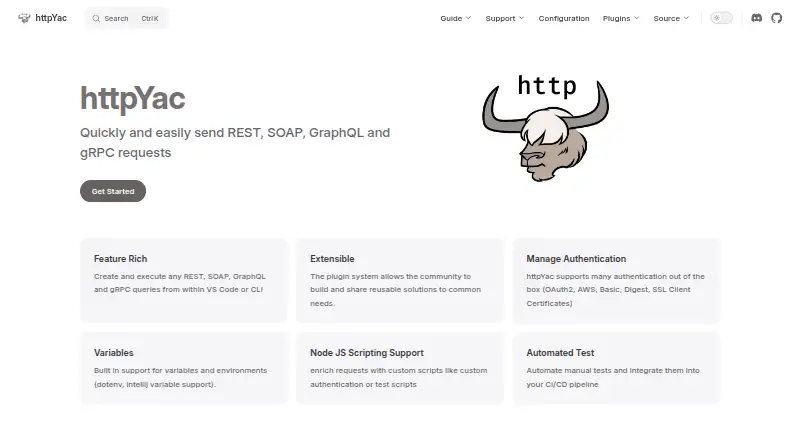
httpYac is a free API request tool with a VS Code extension, a command-line interface, and httpBook for Jupyter Notebook-format request documentation. It lets users create and run REST, SOAP, GraphQL, and gRPC requests from VS Code or the CLI. The CLI executes individual .http or .rest files, or all such files in a folder, and can return JSON output for continuous-integration workflows. Requests can include JavaScript tests and assertions to check API responses and integrations.
Authentication options include OAuth2, AWS, Basic, and Digest authentication, plus SSL client certificates. Variables and environments support dotenv and IntelliJ environment files, while Node.js scripts can add custom authentication and test logic. The request language also supports WebSocket, MQTT, AMQP, and server-sent events. Plugins can provide reusable features such as environments, variable substitution, and parser logic. Docker use is documented with the ghcr.io/anweber/httpyac image. httpYac is MIT licensed, and its documentation includes examples, troubleshooting, plugin development guidance, and an API reference. The project credits Andreas Weber as copyright holder and maintainer.
Who it suits
httpYac suits developers who work with APIs in VS Code or the CLI, and teams that want to run request tests in CI workflows. It also serves notebook users and Docker users, with httpBook documentation and documented Docker support.
What it does well
- Free plan costs nothing.
- Runs REST, SOAP, GraphQL, and gRPC requests.
- CLI runs request files individually or by folder.
- JavaScript assertions can check API responses.
- Supports OAuth2, AWS, Basic, Digest, and SSL certificates.
- MIT licensed, with a plugin system.
What to know first
- Available platforms are listed as desktop.
- Cookies are stored only in memory.
Plans
| Plan | Billed and limits | Price |
|---|---|---|
| Free | — | Free |
As httpyac.github.io lists them, read 1 Oct 2026. The maker's own page has the final word.
Getting started
- Open the httpYac website.
- Choose the VS Code extension or CLI route.
- Create or select a .http or .rest request file.
- Run the request in VS Code or with the CLI.
- Use httpBook if you want request documentation in Jupyter Notebook format.
Verdict
Choose httpYac if you want a free way to create API requests in VS Code or run and test them from the CLI. Its notebook documentation and CI-focused CLI also suit those workflows. Cookie storage is limited to memory, and the listed platform availability is desktop.
Questions
How much does httpYac cost?
The listed Free plan costs nothing.
Which protocols does it support?
It supports REST, SOAP, GraphQL, and gRPC requests, as well as WebSocket, MQTT, AMQP, and server-sent events.
Can it run automated tests?
Yes. JavaScript test scripts and assertions can verify API responses, and the CLI is intended for CI workflows.
Which platforms are available?
The listed platforms are an extension and self-hosted; available platform is desktop.
Is httpYac open source?
It is MIT licensed.
Who maintains it?
The project credits Andreas Weber as its copyright holder and maintainer.
Facts from httpYac's own pages
- API documentation
- Yes · httpyac.github.io, 20 Sept 2026
- Assertions
- JavaScript test scripts and assertion syntax can verify API responses and integrations. · httpyac.github.io, 30 Sept 2026
- Audience
- The installation guide lists CI users, VS Code users, notebook users and Docker users as supported use cases. · httpyac.github.io, 30 Sept 2026
- Authentication
- Built-in authentication includes OAuth2, AWS, Basic, Digest and SSL client certificates. · httpyac.github.io, 1 Oct 2026
- Automated testing
- Requests can be tested with assertions and integrated into CI/CD pipelines. · httpyac.github.io, 1 Oct 2026
- Automated test runs
- Yes · httpyac.github.io, 20 Sept 2026
- CI output
- CLI execution can return JSON output for use in CI. · httpyac.github.io, 1 Oct 2026
- CI testing
- The CLI is intended for automated tests in continuous-integration workflows. · httpyac.github.io, 30 Sept 2026
- CLI
- The CLI executes individual .http or .rest files or all files in a folder. · httpyac.github.io, 1 Oct 2026
- Cookie handling
- Cookies are stored only in memory and can be cleared in VS Code with the httpyac.reset command. · httpyac.github.io, 30 Sept 2026
- Cookie security
- Cookies are stored only in memory and can be cleared in VS Code with the httpyac.reset command. · httpyac.github.io, 1 Oct 2026
- Docker
- The documentation provides Docker support using the ghcr.io/anweber/httpyac image. · httpyac.github.io, 30 Sept 2026
- Extensibility
- Plugins are npm packages that can add environments, sensitive-data removal from logging, variable substitution, parser logic and actions. · httpyac.github.io, 1 Oct 2026
- Free plan
- Yes · httpyac.github.io, 20 Sept 2026
- GraphQL support
- Yes · httpyac.github.io, 20 Sept 2026
- gRPC support
- Yes · httpyac.github.io, 20 Sept 2026
- Integrations
- The request language supports GraphQL, WebSocket, MQTT and AMQP examples in addition to HTTP requests. · httpyac.github.io, 1 Oct 2026
- Interfaces
- It provides a VS Code extension, a CLI application for CI testing, and httpBook for Jupyter Notebook-format request documentation. · httpyac.github.io, 1 Oct 2026
- License
- httpYac is MIT licensed. · httpyac.github.io, 1 Oct 2026
- Maker
- The project credits Andreas Weber as its copyright holder and maintainer. · httpyac.github.io, 1 Oct 2026
- Notebook support
- httpBook provides documentation of requests in Jupyter Notebook format. · httpyac.github.io, 30 Sept 2026
- Available platforms
- desktop · httpyac.github.io, 20 Sept 2026
- Protocols
- The product supports REST, SOAP, GraphQL and gRPC requests. · httpyac.github.io, 1 Oct 2026
- Purpose
- httpYac is a system for creating, executing, and storing information about HTTP requests. · httpyac.github.io, 1 Oct 2026
Where httpYac stands on Freedom251
- API clients#20 of 38