Freedom251 › Minecraft Launchers

Hello Minecraft! Launcher
What Hello Minecraft! Launcher is
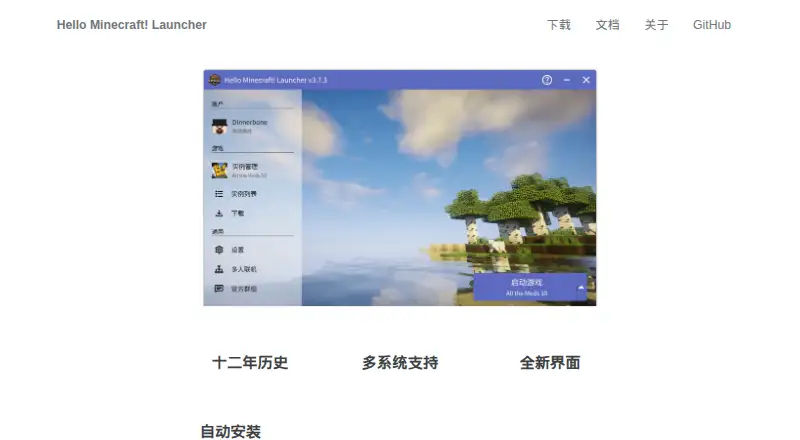
Hello Minecraft! Launcher (HMCL) is a free, open-source launcher for Minecraft, developed by Hello Minecraft! Launcher, a project founded in 2015. It brings mod management, game customization, mod loader installation and modpack creation together with controls for customizing the launcher interface. Supported loaders include Forge, NeoForge, Cleanroom, Fabric, Legacy Fabric, Quilt, LiteLoader and OptiFine. HMCL can find and download mods from CurseForge and Modrinth. It imports Curse, MultiMC and Modrinth modpacks, and exports HMCL, MultiMC and MCBBS packs. Its Java tools manage Java installations and select a suitable version for different Minecraft releases; the documentation recommends separating game instances to avoid file and mod conflicts. Interface options include multiple color schemes and custom background images. The project lists Windows, Linux, macOS and FreeBSD support, with CPU architectures including x86, ARM, RISC-V, MIPS and LoongArch. Stable downloads cover Windows 7 or later, macOS 13 or later, and universal Linux or FreeBSD builds that require Java 17 or later. HMCL is licensed under GPLv3 with additional terms for modified versions and the displayed copyright notice. Minecraft play requires a purchased Microsoft account or an offline or external account.
Who it suits
HMCL suits Minecraft players who want a free launcher with mod tools, modpack handling and Java management. It is also relevant to users who want to customize the launcher and run it on Linux, macOS, Windows or FreeBSD.
What it does well
- Free and open source under GPLv3.
- Supports eight listed mod loaders.
- Finds and downloads mods from CurseForge and Modrinth.
- Imports and exports several modpack formats.
- Manages Java versions for different Minecraft releases.
- Offers interface color schemes and custom backgrounds.
What to know first
- Stable macOS downloads require macOS 13 or later.
- Universal Linux and FreeBSD stable builds require Java 17 or later.
- Minecraft play requires a purchased Microsoft, offline or external account.
Limits
The stable macOS download requires macOS 13 or later; the universal Linux and FreeBSD builds require Java 17 or later. Minecraft play requires a purchased Microsoft account or an offline or external account.
Plans
| Plan | Billed and limits | Price |
|---|---|---|
| Hello Minecraft! Launcher | GPLv3 open source · Windows, Linux, macOS, FreeBSD | Free |
As hmcl.huangyuhui.net lists them, read 11 Oct 2026. The maker's own page has the final word.
Getting started
- Visit the HMCL website.
- Choose a stable build for Windows 7+, macOS 13+, or Linux/FreeBSD.
- For the universal Linux or FreeBSD build, use Java 17 or later.
- Use a purchased Microsoft account or an offline or external account to play Minecraft.
- Import a supported modpack or set up a game instance and manage its mods.
Verdict
Choose HMCL if you want a free, open-source Minecraft launcher with broad loader support, modpack tools and Java management. Check the stable download requirements for your operating system, and make sure you have an accepted account type for Minecraft play.
Questions
How much does Hello Minecraft! Launcher cost?
It is free; the listed plan is free.
Is HMCL open source?
Yes. It is distributed under GPLv3, with additional terms for modified versions and the displayed copyright notice.
Which operating systems does it support?
The project lists Windows, Linux, macOS and FreeBSD. Stable downloads include Windows 7+, macOS 13+, and universal Linux or FreeBSD builds requiring Java 17+.
Which mod loaders does HMCL support?
The listed loaders are Forge, NeoForge, Cleanroom, Fabric, Legacy Fabric, Quilt, LiteLoader and OptiFine.
Can HMCL import modpacks?
Yes. It imports Curse, MultiMC and Modrinth modpacks, and can export HMCL, MultiMC and MCBBS modpacks.
What account do I need to play Minecraft?
The FAQ says play requires a purchased Microsoft account or an offline or external account.
Facts from Hello Minecraft! Launcher's own pages
- Account requirement
- The FAQ says Minecraft play requires a purchased Microsoft account or an offline or external account. · docs.hmcl.net, 11 Oct 2026
- Customization
- The launcher supports multiple color schemes and custom background images. · hmcl.huangyuhui.net, 11 Oct 2026
- Download formats
- The download page lists Windows 7+, macOS 13+, and universal Linux/FreeBSD builds requiring Java 17+ for the stable release. · hmcl.huangyuhui.net, 11 Oct 2026
- File verification
- The HMCL documentation provides a page to check whether an HMCL file is an official build. · docs.hmcl.net, 11 Oct 2026
- Founded
- 2015 · hmcl.huangyuhui.net, 28 Sept 2026
- Free plan
- Yes · hmcl.huangyuhui.net, 19 Sept 2026
- Instance isolation
- The documentation recommends isolating game instances so their mods and files do not conflict. · docs.hmcl.net, 11 Oct 2026
- Java handling
- HMCL can manage Java and select a suitable Java version for different game versions. · docs.hmcl.net, 11 Oct 2026
- License
- The project is distributed under GPLv3 with additional terms for modified versions and the displayed copyright notice. · github.com, 11 Oct 2026
- Mod loaders
- The project lists support for Forge, NeoForge, Cleanroom, Fabric, Legacy Fabric, Quilt, LiteLoader, and OptiFine. · github.com, 11 Oct 2026
- Mod loader support
- multiple · hmcl.huangyuhui.net, 19 Sept 2026
- Mod management
- It supports mod management, game customization, mod loader installation, modpack creation, and interface customization. · github.com, 11 Oct 2026
- Modpack formats
- The official site says HMCL can import Curse, MultiMC, and Modrinth modpacks, and export HMCL, MultiMC, and MCBBS modpacks. · hmcl.huangyuhui.net, 11 Oct 2026
- Modpack import
- file · hmcl.huangyuhui.net, 19 Sept 2026
- Mod sources
- HMCL includes search and download for mods from CurseForge and Modrinth. · docs.hmcl.net, 11 Oct 2026
- Product
- HMCL is an open-source launcher for Minecraft. · github.com, 11 Oct 2026
- Support
- The documentation directs users to GitHub issues to report bugs or submit suggestions. · docs.hmcl.net, 11 Oct 2026
- Supported systems
- The repository lists Windows, Linux, macOS, and FreeBSD, plus x86, ARM, RISC-V, MIPS, and LoongArch CPU architectures. · github.com, 11 Oct 2026
Where Hello Minecraft! Launcher stands on Freedom251
- Minecraft Launchers#21 of 76