Freedom251 › Glass Contractor Software

Glazier
What Glazier is
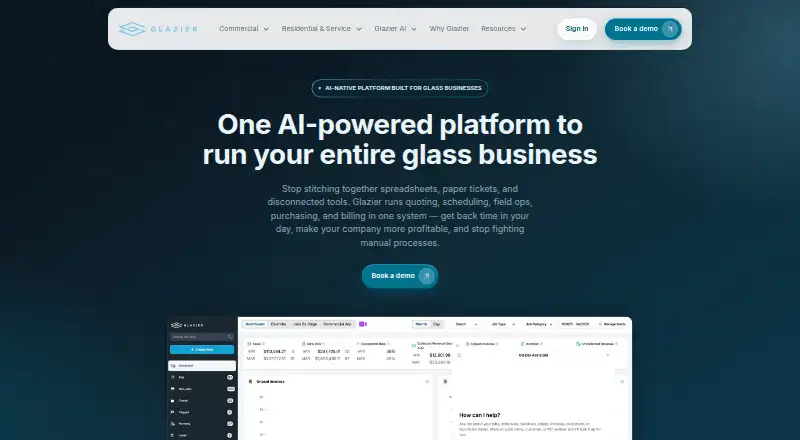
Glazier is an AI-powered platform for commercial and residential glass businesses, bringing quoting, scheduling, field operations, purchasing, and billing into one system. Commercial workflows cover bidding, submittals, purchase-order tracking, project schedules, field progress, and AIA billing. Residential and service tools include field quoting, a glass and shower builder, dispatch, auto-glass workflows, and on-site payments. Smart Takeoff reads elevations, schedules, and dimensions from uploaded commercial drawings for users to confirm before estimates are created. The commercial product has native iOS and Android apps for foremen and crews, with job progress, floor-plan pins, photos, daily reports, and purchase-order receiving. The Glazier Solution is accessed in a web browser. Listed integrations include QuickBooks Online and Desktop sync, GDS Estimating, PartnerPak, Glazier Studio, Google Calendar, NAGS, and QuickBooks Payments. Glazier says it configures workflows and pricing, trains office and field users, and supports go-live in weeks. Pricing is set in an Order Form; fees are billed monthly unless otherwise provided.
Who it suits
Glazier suits commercial and residential glass businesses that need estimating, scheduling, field, purchasing, and billing workflows. Its commercial product is used by contractors doing $50K to $5M jobs.
What it does well
- Smart Takeoff extracts drawing details for confirmation.
- Commercial apps include field progress and daily reports.
- Supports QuickBooks Online and Desktop sync.
- Residential tools include dispatch and on-site payments.
What to know first
- Pricing is available on request.
- Customers are responsible for their own backups.
- Services are provided as-is without an uninterrupted-operation warranty.
Plans
| Plan | Billed and limits | Price |
|---|---|---|
| Order Form | Fees are set in an Order Form; fees are billed monthly unless otherwise provided. | On request |
As glaziersoftware.com lists them, read 1 Oct 2026. The maker's own page has the final word.
Getting started
- Visit the Glazier website.
- Discuss fees and terms for an Order Form.
- Have Glazier configure workflows and pricing.
- Arrange training for office and field users.
- Use the web browser, or the commercial iOS and Android apps for crews and foremen.
Overview
Glazier is a glass-business platform that brings commercial project work and residential service operations into one system. It is best suited to contractors that need office and field workflows connected across both kinds of work. Its breadth is a strength, but the custom pricing and customer-owned backups are important trade-offs.
Key features
Commercial teams can handle bids, submittals, purchase-order tracking, project schedules, field progress and AIA billing. That makes Glazier a natural fit for contractors managing larger, multi-stage jobs; a business that only needs basic estimating or dispatch may find the commercial scope unnecessary. Glazier says contractors doing $50K to $5M jobs choose its commercial product.
Residential and service workflows cover field quoting, a glass and shower builder, dispatch, auto-glass processes and on-site payments. These capabilities make the platform relevant to businesses serving both project customers and service calls, rather than only commercial contractors.
Smart Takeoff extracts elevations, schedules and dimensions from uploaded commercial drawings. Users confirm those details before estimates are created, a useful check in a document-heavy bidding workflow rather than treating an automated takeoff as final.
Glazier syncs in real time with QuickBooks Online and Desktop, and integrates with GDS Estimating, PartnerPak, Glazier Studio, Google Calendar, NAGS and QuickBooks Payments. The QuickBooks sync can help connect operational work to accounting; the broader integration set is relevant to shops already using those systems.
The commercial product has native iOS and Android apps for foremen and crews, with job progress, floor-plan pins, photos, daily reports and purchase-order receiving. The Glazier Solution is also accessed through a web browser.
Pricing
Glazier is paid, with custom pricing under its Order Form plan. Fees are set in the Order Form and billed monthly unless otherwise provided. That structure may suit businesses whose workflows need configuration, but buyers should confirm the recurring cost and terms before committing; there is no published price to compare against a fixed budget.
Glass estimating, fabrication workflow, installation scheduling, material tracking, mobile app access and accounting sync are supported capabilities. The Order Form does not publish separate tiers or seat and usage limits, so buyers should confirm how the quoted scope covers their users and operations.
Platforms
Glazier supports web, iOS and Android. Web access serves office workflows, while the commercial native mobile apps give foremen and crews field tools for progress updates, plans, reporting and receiving. This combination suits teams that split work between an office and job sites.
Who it's for
Glazier is most compelling for commercial and residential glass businesses that want estimating, purchasing, scheduling, field work and billing connected, particularly contractors handling substantial commercial jobs. Shops focused exclusively on a narrower workflow, or those that need firm published pricing and provider-managed backups, should weigh other options.
Pros and cons
- Pros: Commercial project management and residential service workflows sit in one platform, supporting businesses with mixed work.
- Pros: Drawing takeoff requires user confirmation before estimates are created, adding a review step to automated extraction.
- Pros: QuickBooks sync and native commercial mobile apps connect accounting and field activity.
- Cons: Custom Order Form pricing makes cost comparison difficult until the business receives a quote.
- Cons: Customers are responsible for backing up their content; Glazier is not obligated to do so.
- Cons: The terms provide the services as-is and do not warrant uninterrupted or error-free operation.
Alternatives
Glass Contractor Software is the broader category directory for comparing options.
Mitchell RepairCenter is a paid alternative for Android, iOS and Windows.
PartnerPak+ Studio is a paid alternative for Windows, iOS and Android.
GlasPacLX is a paid alternative with Android, iOS, macOS and Windows support; its Mobile Add-on costs $45 a month per additional technician, plus a $75 one-time setup fee per technician.
Perfect ERP is a paid alternative available on Windows and web.
Auto Glass CRM is a paid alternative for Android, iOS, API and web, with a 14-day free trial. Its Starter plan costs $79 a month for one shop and includes five users; its Professional plan costs $199 a month.
Baka Glass is a paid alternative for Android, iOS and web; its Baka Production plan offers cutting optimization, machine connections, live production dashboards, and a work-floor app with scanning, at custom monthly pricing.
GlassManager is a paid Android, iOS and web alternative. Its Lite plan costs $65 a month per full user, with field users at $12 per month; it requires at least two users, has a $495 setup fee, and allows one location and two departments.
Verdict
Choose Glazier if your glass business needs commercial project controls and residential or service workflows joined to field apps, with QuickBooks sync and guided onboarding. Its strongest reason to look elsewhere is the combination of custom pricing and customer responsibility for backups, especially for buyers who need predictable costs or provider-managed data protection.
Verdict
Glazier covers commercial and residential glass workflows, with web access and native commercial apps. Buyers should account for its Order Form pricing and backup responsibility.
Questions
How is Glazier priced?
Fees are set in an Order Form and billed monthly unless otherwise provided. Pricing is on request.
Which platforms are available?
The Glazier Solution is accessed through a web browser. The commercial product includes native iOS and Android apps for foremen and crews.
What accounting integrations are listed?
Glazier lists real-time sync with QuickBooks Online and QuickBooks Desktop, as well as QuickBooks Payments.
What does Smart Takeoff do?
It extracts elevations, schedules, and dimensions from uploaded commercial drawings for users to confirm before estimates are created.
Who is the commercial product for?
Glazier says contractors doing $50K to $5M jobs choose its commercial product.
Who is responsible for backups?
Glazier's terms say customers are responsible for creating backups of their content.
Facts from Glazier's own pages
- AI takeoff
- Smart Takeoff extracts elevations, schedules and dimensions from uploaded commercial drawings for user confirmation before estimates are created. · glaziersoftware.com, 1 Oct 2026
- Backup responsibility
- The terms state that Glazier is not obligated to back up customer content and that customers are responsible for creating backups. · glaziersoftware.com, 1 Oct 2026
- Commercial workflows
- Commercial features include bidding, submittals, purchase-order tracking, project schedules, field progress and AIA billing. · glaziersoftware.com, 1 Oct 2026
- Core product
- Glazier is an AI-powered platform for running commercial and residential glass businesses, covering quoting, scheduling, field operations, purchasing and billing. · glaziersoftware.com, 1 Oct 2026
- Integrations
- Glazier lists real-time QuickBooks Online and Desktop sync plus integrations with GDS Estimating, PartnerPak, Glazier Studio, Google Calendar, NAGS and QuickBooks Payments. · glaziersoftware.com, 1 Oct 2026
- Mobile apps
- The commercial product includes native iOS and Android apps for foremen and crews with job progress, floor-plan pins, photos, daily reports and purchase-order receiving. · glaziersoftware.com, 1 Oct 2026
- Onboarding and support
- Glazier says its team configures workflows and pricing, trains office and field users hands-on, and supports go-live in weeks. · glaziersoftware.com, 1 Oct 2026
- Residential workflows
- Residential and service features include field quoting, a glass and shower builder, dispatch, auto-glass workflows and on-site payments. · glaziersoftware.com, 1 Oct 2026
- Security safeguards
- Its terms commit Glazier to commercially reasonable physical, administrative and technical measures designed to maintain personal-data availability, integrity and confidentiality. · glaziersoftware.com, 1 Oct 2026
- Service disclaimer
- The terms state that the services are provided as-is and that Glazier does not warrant uninterrupted or error-free operation. · glaziersoftware.com, 1 Oct 2026
- Target customers
- Glazier says contractors doing $50K to $5M jobs choose its commercial product. · glaziersoftware.com, 1 Oct 2026
- Web access
- The Glazier Solution is accessed through a web browser. · glaziersoftware.com, 1 Oct 2026
Where Glazier stands on Freedom251
- Glass Contractor Software#14 of 22