GhostEdit
What GhostEdit is
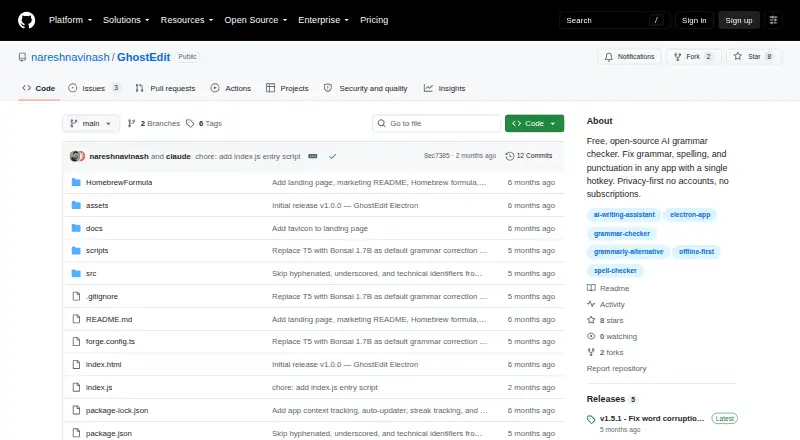
GhostEdit is a free desktop tool for correcting grammar, spelling, and punctuation in any application through a system-wide hotkey. Its Bonsai model runs on-device, allowing offline corrections after downloading a model; available sizes are 1.7B, 4B, and 8B. It can also use Claude, OpenAI, Gemini, cloud CLI tools, OpenAI-compatible providers such as OpenRouter, Groq, Together AI, and Grok, plus local Ollama, LM Studio, and custom endpoints. Five tone presets and 13 languages with automatic detection support different writing needs. The correction pipeline preserves URLs, @mentions, emoji codes, code, email addresses, and file paths. A side-by-side diff allows accepting, canceling, or regenerating changes before applying them. GhostEdit has no accounts, encrypts API keys at rest, and is open source under MIT. It supports macOS 12+, Windows 10+, and Linux x64 or arm64.
Who it suits
GhostEdit suits writers who want system-wide corrections with local offline processing or connections to multiple AI providers. It supports desktop users on macOS, Windows, and Linux.
What it does well
- Offline on-device Bonsai corrections
- Works across applications via hotkey
- 13 languages with automatic detection
- Side-by-side correction review
- No accounts required
What to know first
- Cloud CLI providers need separate authenticated tools
- macOS requires Accessibility permission
- Model download required for offline use
Plans
| Plan | Billed and limits | Price |
|---|---|---|
| GhostEdit | No accounts · no subscriptions · local offline model available | Free |
As github.com lists them, read 11 Oct 2026. The maker's own page has the final word.
Verdict
GhostEdit combines local correction, provider flexibility, tone controls, and a review step in a free desktop app. Its setup requirements vary depending on whether you use cloud CLIs, local servers, or macOS keyboard simulation.
Facts from GhostEdit's own pages
- Accessibility requirement
- On macOS, GhostEdit requires Accessibility permission for keyboard simulation. · github.com, 11 Oct 2026
- AI providers
- It supports local Bonsai, Claude, OpenAI and Gemini APIs, cloud CLI tools, and OpenAI-compatible providers including OpenRouter, Groq, Together AI, and Grok. · github.com, 11 Oct 2026
- Browser extension
- No · github.com, 21 Sept 2026
- Desktop app
- Yes · github.com, 21 Sept 2026
- Free plan
- Yes · github.com, 21 Sept 2026
- Integrations
- It can connect to local Ollama and LM Studio servers, as well as custom API endpoints. · github.com, 11 Oct 2026
- License
- The README identifies GhostEdit as open source under the MIT license. · github.com, 11 Oct 2026
- Local model sizes
- Bonsai models are available in 1.7B, 4B, and 8B sizes and are downloaded on demand. · github.com, 11 Oct 2026
- Maker
- The GitHub profile names the maker Naresh Sekar and lists Chennai and the role Engineering Manager. · github.com, 11 Oct 2026
- Offline mode
- Its built-in Bonsai model runs on-device, and corrections work offline after the model is downloaded. · github.com, 11 Oct 2026
- Privacy and security
- The README says there are no accounts, and API keys are encrypted at rest and kept out of the configuration file. · github.com, 11 Oct 2026
- Review workflow
- A side-by-side diff preview lets users accept, cancel, or regenerate a correction before applying it. · github.com, 11 Oct 2026
- Setup limitation
- Cloud CLI providers require their separate CLI tools to be installed and authenticated. · github.com, 11 Oct 2026
- Style suggestions
- Yes · github.com, 21 Sept 2026
- Support information
- The repository README includes troubleshooting instructions for hotkeys, permissions, model downloads, and provider errors. · github.com, 11 Oct 2026
- System requirements
- The README lists macOS 12+, Windows 10+, and Linux x64 or arm64 as supported operating systems. · github.com, 11 Oct 2026
- Text preservation
- The correction pipeline preserves URLs, @mentions, emoji codes, code, email addresses, and file paths. · github.com, 11 Oct 2026
- What it does
- GhostEdit corrects grammar, spelling, and punctuation in any app using a system-wide hotkey. · github.com, 11 Oct 2026
- Writing controls
- It offers five tone presets and supports 13 languages with automatic language detection. · github.com, 11 Oct 2026
Where GhostEdit stands on Freedom251
- Grammar checkers#40 of 88