Freedom251 › Geography Learning Apps
GeoGuess
What GeoGuess is
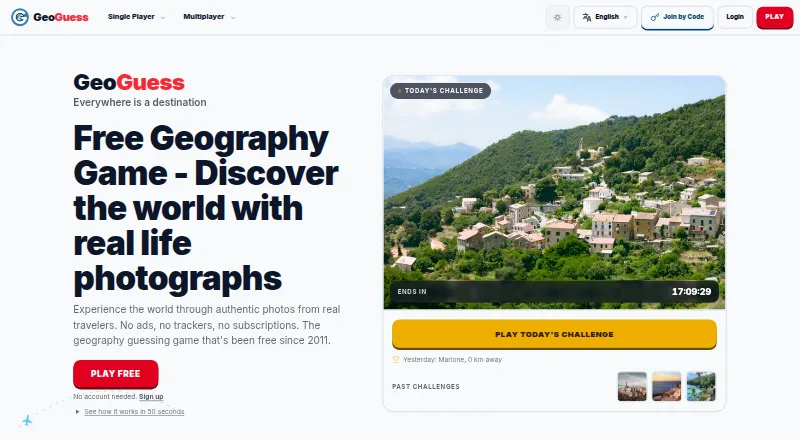
GeoGuess is a geography game in which players identify places shown in real photographs. In a classic round, players see five photos and place a pin on a map to guess where each was taken. Other options include daily challenges, party rooms, head-to-head play, survival, and community games. The photos come from travelers and community members. Party Mode lets a player create a private room so friends can make location guesses together in real time. Accounts provide progress tracking, multiplayer, leaderboards, badges, and seasonal rankings; guests can play without registering. GeoGuess is available on web, Android, and iOS, and supports 14 languages. The maker says the game has no ads or trackers and describes it as suitable for students, teachers, and educational institutions. It does not have a dedicated teacher dashboard, though teachers can create challenges and share links. A free plan provides unlimited gameplay without a subscription. Paid access starts at $2.99/mo. An internet connection is needed to load photos and maps.
Who it suits
GeoGuess suits players who enjoy map-based location guessing, solo challenges, or multiplayer games with friends. The maker also describes it as suitable for education, though teachers should note that it has no dedicated dashboard.
What it does well
- Classic rounds use five real photographs
- Includes daily, multiplayer, survival, and community modes
- Guests can play without registering
- Supports 14 languages
- Free plan has unlimited gameplay and no subscription
What to know first
- Internet is required to load photos and maps
- No dedicated teacher dashboard
- No free trial
Limits
The free plan includes unlimited gameplay and has no subscription. The game requires an internet connection to load photos and maps.
Plans
| Plan | Billed and limits | Price |
|---|---|---|
| Free | Unlimited gameplay · no ads or trackers · no subscription | Free |
As geoguess.com lists them, read 28 Sept 2026. The maker's own page has the final word.
Getting started
- Open https://geoguess.com/ or get the game on Android or iOS.
- Start playing as a guest, or create an account for progress tracking and account features.
- Choose a game mode, such as a classic round, daily challenge, or party room.
- For a private party, create a room and invite friends.
- Keep an internet connection available to load photos and maps.
GeoGuess is a photo-based geography game for people who would rather infer a place from its scenery than memorize a map. It suits casual players, friends, and teachers looking for a shared classroom challenge; its strongest case is varied play that works for guests, while its reliance on an internet connection rules out offline sessions.
Overview
Each guess starts with a real photograph: players place a pin on a map to identify where it was taken. A classic round uses five photos, making it a compact format for a quick solo session or a longer contest across its other modes. Images come from travelers and community members, so the game’s core appeal is interpreting real-world places rather than answering conventional multiple-choice questions.
Key features
GeoGuess offers daily challenges, classic rounds, survival, community games, head-to-head matches, and party rooms. That mix supports both individual practice and competitive play. Party Mode lets a host create a private room and invite friends to make guesses together in real time, a useful option for a group that wants to play together rather than compare scores afterward.
Guests can play without registering, which lowers the barrier to trying a round. An account adds progress tracking, multiplayer, leaderboards, badges, and seasonal rankings; these give regular players reasons to return, though a guest will miss those persistent features. GeoGuess is offered in 14 languages, and its maker says the game has no ads or trackers.
Teachers can create challenges and share links with students, but there is no dedicated teacher dashboard. That makes GeoGuess workable for an informal class activity, not a purpose-built classroom management tool. Photos and maps require an internet connection, so the game is not suited to offline use.
Pricing
The Free plan costs nothing and includes unlimited gameplay, with no ads or trackers and no subscription. That is a substantial entry point for casual play or classroom challenges: there is no stated gameplay quota to manage. GeoGuess is freemium, with paid plans from 2.99 /mo. The free plan has no trial attached, and the published plan information does not establish what the paid tier adds, so the free option is the clearest choice for players who do not need more than unlimited access to the game.
Platforms
GeoGuess runs on web, iOS, and Android. That spread makes it accessible across common phone and browser use, but the required connection remains a constraint on every platform.
Who it's for
Choose GeoGuess if you enjoy visual geography puzzles, want to play with friends in private real-time rooms, or need a free, shareable challenge for students. It is less suitable for teachers who need a dedicated dashboard, players who want offline access, or anyone looking for a conventional country-and-capital quiz rather than photo-based location guessing.
Pros and cons
- Pros: Unlimited free gameplay avoids a session cap for regular players.
- Pros: Guests can start without an account, while accounts add progress records and competitive features.
- Pros: Private party rooms and several solo and competitive modes make it usable for both individual and group play.
- Cons: An internet connection is necessary to load photos and maps, so it cannot serve as an offline geography game.
- Cons: Teachers must manage shared challenges without a dedicated dashboard.
- Cons: The paid offer starts at 2.99 /mo, but its added benefits are not clear enough to weigh against the unlimited free plan.
Alternatives
GeoGuessr is the closest alternative for players who want a similar freemium geography game on web, iOS, and Android; its free version is limited, while GeoGuessr Pro Unlimited costs $3.99 a year, billed $47.88/yr and displayed as $3.99/mo, on a recurring yearly subscription.
For free quizzes rather than photo-based location rounds, Seterra offers quizzes at no cost across web, iOS, Android, and macOS. World Map & Countries suits someone seeking country coverage on Apple platforms, with a free selection and a 4.99 USD one-time All Countries Premium unlock. For younger learners, World Quest for Kids starts with 30+ countries for free and offers the entire world in its paid plans.
CapitalsQuiz is a capitals-quiz alternative on iOS and web. Fathom offers web quizzes and packs for free without an account. Myatlastic is another freemium option on web, iOS, and macOS. MapZap is a freemium option for iOS and Android. Browse the Geography Learning Apps list for more choices.
Verdict
GeoGuess is a strong pick for curious players and groups who want an unlimited, ad-free way to turn real photographs into geography challenges, with guest access and private multiplayer rooms as practical advantages. Look elsewhere if offline play or classroom controls are essential; for everyone else, the free plan makes it easy to try before considering paid access.
Verdict
GeoGuess combines photo-based geography rounds with solo and multiplayer modes, and lets guests play without an account. Its free plan offers unlimited gameplay, but an internet connection is required and teachers do not get a dedicated dashboard.
Questions
Is GeoGuess free?
Yes. Its free plan includes unlimited gameplay with no subscription. Paid access starts at $2.99/mo.
Which devices can I use?
GeoGuess is available on the web, Android, and iOS.
Can I play without an account?
Yes. Guests can play without registering. Accounts provide progress tracking, multiplayer, leaderboards, badges, and seasonal rankings.
Can I play with friends?
Yes. Party Mode lets players create a private room and invite friends to guess locations together in real time.
Can teachers use GeoGuess with students?
The maker describes it as suitable for students, teachers, and educational institutions. Teachers can create challenges and share links, but there is no specific teacher dashboard.
Does GeoGuess work offline?
No. An internet connection is required to load photos and maps.
Facts from GeoGuess's own pages
- Community features
- Accounts provide progress tracking, multiplayer, leaderboards, badges, and seasonal rankings; guests can play without registering. · geoguess.com, 28 Sept 2026
- Education
- The maker describes GeoGuess as suitable for students, teachers, and educational institutions. · geoguess.com, 28 Sept 2026
- Founded
- 2011 · geoguess.com, 28 Sept 2026
- Game
- GeoGuess is a geography game where players guess the locations shown in real photographs. · geoguess.com, 28 Sept 2026
- Gameplay
- Players drop a pin on a map to guess where a photo was taken; a classic round has five photos. · geoguess.com, 28 Sept 2026
- Languages
- GeoGuess is available in 14 languages. · geoguess.com, 28 Sept 2026
- Modes
- The game offers daily challenges, classic rounds, party rooms, head-to-head play, survival, and community games. · geoguess.com, 28 Sept 2026
- Multiplayer
- Party Mode lets players create a private room and invite friends to guess locations together in real time. · geoguess.com, 28 Sept 2026
- Offline use
- An internet connection is required to load the photos and maps. · geoguess.com, 28 Sept 2026
- Photos
- The game uses photographs from travelers and community members. · geoguess.com, 28 Sept 2026
- Platforms
- The game is available on the web, iOS, and Android. · geoguess.com, 28 Sept 2026
- Privacy
- The maker says the game has no ads or trackers. · geoguess.com, 28 Sept 2026
- Support
- The maker directs users to its contact page or [email protected] for help. · geoguess.com, 28 Sept 2026
- Teacher tools
- The maker says it does not have a specific teacher dashboard; teachers can create challenges and share links with students. · geoguess.com, 28 Sept 2026
Where GeoGuess stands on Freedom251
- Geography Learning Apps#4 of 31