GameTimeDev Sims 4 Mod Manager
What GameTimeDev Sims 4 Mod Manager is
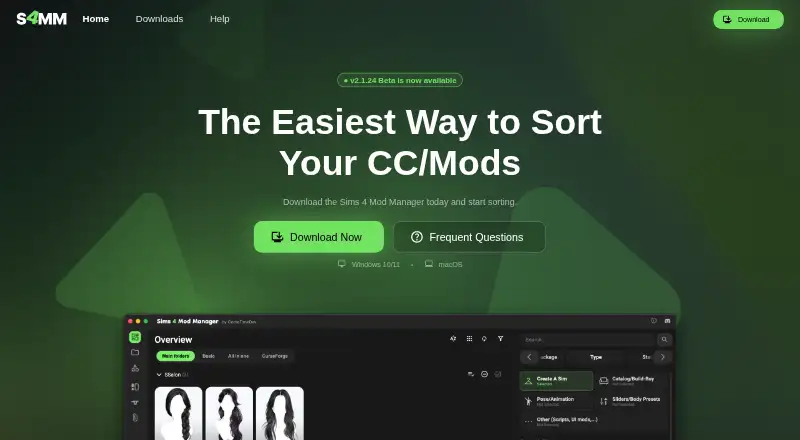
GameTimeDev Sims 4 Mod Manager is a free tool for organizing The Sims 4 Mods folder and custom content on Windows and macOS. It supports mod profiles, conflict detection, and automatic updates. Files can be deleted, moved, renamed, activated, deactivated, or placed in subfolders. CurseForge integration lets users browse and download mods, update sourced mods, and identify CurseForge files already in the Mods folder. Preview tools display available thumbnails, recover missing thumbnails from cache, and open CAS or Build/Buy content in a 3D viewer. Utilities find duplicate files, package ID conflicts, and empty folders, and can disable Sims 4 packs and kits. The Downloads tab scans a local folder, extracts thumbnails, unpacks archives, and moves files into Mods. A Chromium extension for Chrome, Edge, and Brave adds a download button on Patreon and The Sims Resource, though it is not yet in the Chrome Web Store. The manager is ad-financed and needs internet access for downloads and updates.
Who it suits
This manager suits Sims 4 players managing large custom-content collections on Windows or macOS. It also fits users who source mods through CurseForge or supported creator pages.
What it does well
- Supports mod profiles and conflict detection
- Manages files and subfolders
- Integrates with CurseForge
- Offers thumbnail and 3D previews
- Finds duplicates and package conflicts
What to know first
- Ad-financed software
- Large folders may reduce performance
- Internet required for downloads and updates
- Browser extension not yet in Chrome Web Store
Plans
| Plan | Billed and limits | Price |
|---|---|---|
| Free (ad-supported) | Ad-supported · no paid plans stated | Free |
As s4mm.gametimedev.de lists them, read 11 Oct 2026. The maker's own page has the final word.
Verdict
GameTimeDev Sims 4 Mod Manager combines file organization, conflict tools, previews, and CurseForge access. It is free, but ads, system requirements, and performance limits matter for larger collections.
Facts from GameTimeDev Sims 4 Mod Manager's own pages
- Automatic updates
- Yes · s4mm.gametimedev.de, 23 Sept 2026
- Browser extension
- A Chromium browser extension for Chrome, Edge, and Brave adds a “Download with S4MM” button on Patreon and The Sims Resource pages; the maker says it is not yet in the Chrome Web Store. · s4mm-wiki.gametimedev.de, 11 Oct 2026
- Conflict detection
- Yes · s4mm.gametimedev.de, 23 Sept 2026
- CurseForge
- The manager integrates with CurseForge to browse and download mods, update sourced mods, and detect CurseForge mods in the Mods folder. · s4mm.gametimedev.de, 11 Oct 2026
- Download limits
- The direct-download method limits files to 50 MB and blocks executable files and .ts4script files for security reasons. · s4mm-wiki.gametimedev.de, 11 Oct 2026
- Downloads
- The Downloads tab can scan a local downloads folder for Sims 4 files, extract thumbnails, and unpack archives before files are moved to the Mods folder. · s4mm-wiki.gametimedev.de, 11 Oct 2026
- File management
- Users can delete, move, rename, activate, and deactivate files and create subfolders. · s4mm.gametimedev.de, 11 Oct 2026
- Free plan
- Yes · s4mm.gametimedev.de, 23 Sept 2026
- Mod profiles
- Yes · s4mm.gametimedev.de, 23 Sept 2026
- Performance limitation
- The maker says the manager is not highly optimized or lightweight and that large mod folders may reduce performance or cause crashes on lower-end systems. · s4mm.gametimedev.de, 11 Oct 2026
- Previews
- It can show available internal thumbnails, retrieve missing thumbnails from cache, and open CAS or Build/Buy content in a 3D viewer. · s4mm.gametimedev.de, 11 Oct 2026
- Privacy and ads
- The manager is ad-financed and asks users to adjust privacy options for ads at first start. · s4mm-wiki.gametimedev.de, 11 Oct 2026
- Purpose
- The Mod Manager helps users organize their The Sims 4 Mods folder and custom content. · s4mm.gametimedev.de, 11 Oct 2026
- Security
- The maker says official Windows and Mac releases are digitally signed and advises downloading only from the official website or Discord. · s4mm.gametimedev.de, 11 Oct 2026
- Support
- The maker directs users to the GameTimeDev Discord community for support, feedback, and connection with other users. · s4mm.gametimedev.de, 11 Oct 2026
- System requirements
- The maker recommends Windows 10/11 64-bit or macOS Big Sur 11 or later, 8 GB RAM or more, and at least 500 MB of free storage; an internet connection is required for downloads and updates. · s4mm.gametimedev.de, 11 Oct 2026
- Tools
- Tools include finding duplicate files, listing package ID conflicts, finding empty folders, and disabling Sims 4 packs and kits. · s4mm-wiki.gametimedev.de, 11 Oct 2026
Where GameTimeDev Sims 4 Mod Manager stands on Freedom251
- Mod managers#46 of 78
- Game Mod Managers#54 of 79