Freedom251 › AI video generators

FrameCompose
What FrameCompose is
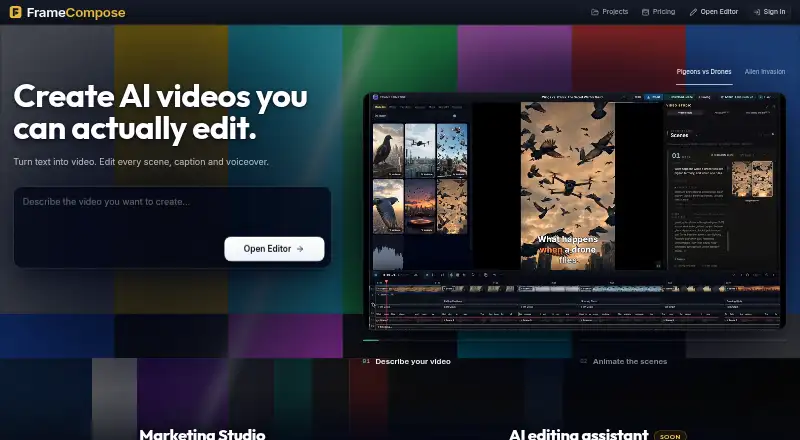
FrameCompose is a browser-based AI video editor available on the web and as an extension. It generates videos from text or images, then lets you adjust scenes, captions, timing, voiceovers, effects, and transitions on a timeline. Manual edits do not consume AI credits, and the editor can remove silence from clips. Marketing Studio converts a screen recording of a website, app, or product demo into an editable promotion with captions, effects, auto zooms, voiceover, narration, and music. Exports include 9:16, 16:9, and 1:1 formats. Projects stay on the device by default unless you choose otherwise; opening a new project requires a free account. The Free plan costs $0.00 per free and includes two daily AI scenes, unlimited projects, 200 MB uploads, and browser exports. Paid plans include Pro at $20.00 per month, Studio at $50.00, and Max at $100.00.
Who it suits
It suits founders, marketers, agencies, creators, and small teams making product videos. It is also useful for people who want text- or image-generated video with timeline editing and multiple social formats.
What it does well
- Generates video from text or images
- Manual edits do not use AI credits
- Silence removal included
- Marketing Studio builds editable promos
- Free plan available
What to know first
- Free uploads limited to 200 MB per file
- Opening projects requires a free account
- Paid credits refresh weekly and do not roll over
- No free trial is listed
Plans
| Plan | Billed and limits | Price |
|---|---|---|
| Free | forever · 2 free AI scenes every day · unlimited projects · 200 MB/file uploads · free browser exports | Free |
| Pro | $20 USD / month · 1,000 credits every week · 1 GB uploads · credits refresh weekly and don't roll over | $20 a month |
| Max | $100 USD / month · 5,500 credits every week · credits refresh weekly and don't roll over | $100 a month |
| Studio | $50 USD / month · 2,750 credits every week · credits refresh weekly and don't roll over | $50 a month |
| Creator Pack | $9.99 USD once · 1,000 credits · credits never expire · no subscription | $9.99, paid once |
As framecompose.com lists them, read 12 Oct 2026. The maker's own page has the final word.
Verdict
FrameCompose combines AI generation with conventional timeline controls and a screen-recording promotion workflow. Its free tier supports ongoing projects, while paid plans add larger uploads and recurring weekly credit allowances.
Facts from FrameCompose's own pages
- AI processing
- For AI features, the service says it sends only the content needed for the requested feature to AI providers, which do not gain rights to that content. · framecompose.com, 12 Oct 2026
- Audience
- Marketing Studio is described as being for founders, marketers, agencies, creators, and small teams making product videos. · framecompose.com, 12 Oct 2026
- Data retention
- Projects and media are kept until deleted, and deleting a project deletes its media files from storage. · framecompose.com, 12 Oct 2026
- Editing
- Users can change individual scenes, captions, timing, voiceover, effects, and transitions after generation, and manual timeline edits do not use AI credits. · framecompose.com, 12 Oct 2026
- Exports
- Exports include vertical 9:16 video for TikTok, YouTube Shorts, and Instagram Reels, plus 16:9 and 1:1 formats. · framecompose.com, 12 Oct 2026
- Extension privacy
- The Recorder Click Bridge collects recording-related pointer, click, and page metadata only while recording, and the policy says it does not collect browsing history, page contents, typed text, passwords, or form values. · framecompose.com, 12 Oct 2026
- Free plan
- Yes · framecompose.com, 19 Sept 2026
- Image-to-video
- Yes · framecompose.com, 19 Sept 2026
- Integrations
- The privacy policy names Stripe for payments, PostHog for usage analytics, Sentry for error diagnostics, and AI providers for features such as voiceovers and transcription. · framecompose.com, 12 Oct 2026
- Local projects
- Projects are local by default and stay on the device unless the user chooses otherwise; opening a new video project requires a free account. · framecompose.com, 12 Oct 2026
- Marketing Studio
- Marketing Studio turns a screen recording of a website, app, or product demo into an editable promo with captions, effects, auto zooms, voiceover, narration, and music. · framecompose.com, 12 Oct 2026
- Notable limit
- Free supports uploads up to 200 MB per file, while Creator Pack and Pro list a 1 GB per-file maximum. · framecompose.com, 12 Oct 2026
- Platforms
- FrameCompose runs in a modern desktop browser without installation and uses WebGPU and WebCodecs for editing and export on the device. · framecompose.com, 12 Oct 2026
- Privacy
- The privacy policy says uploaded and created content is stored in private, user-scoped storage and is not used for advertising or sold. · framecompose.com, 12 Oct 2026
- Product
- FrameCompose is a browser-based AI video editor for generating video from text and editing scenes, captions, and voiceovers on a timeline. · framecompose.com, 12 Oct 2026
- Silence removal
- The editor detects and removes silence and dead air from clips. · framecompose.com, 12 Oct 2026
- Text-to-video
- Yes · framecompose.com, 19 Sept 2026
Where FrameCompose stands on Freedom251
- AI video generators#90 of 242