Freedom251 › Phone Number Validation Software

FoneSwift Bulk Phone Validator
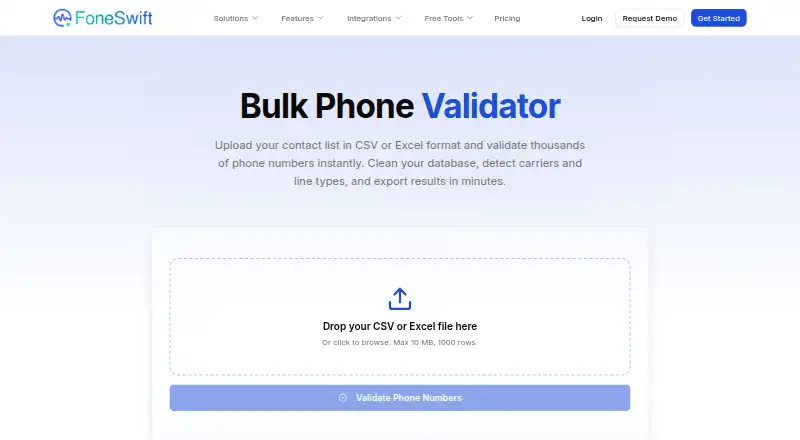
What FoneSwift Bulk Phone Validator is
FoneSwift Bulk Phone Validator is a web tool for checking and standardizing phone numbers in contact lists. Upload a CSV or XLSX file, and the tool finds the phone number column automatically. It checks number formats for more than 200 countries, identifies the country, carrier, and line type, and can convert numbers to E.164 format. Lists can include numbers with or without country codes.
Results show valid or invalid status, country, carrier, line type, and formatted numbers. Filter the results and download them as CSV or Excel for import into a CRM or database. FoneSwift lists Salesforce, HubSpot, Zendesk, Slack, Zapier, and Make among its integrations; its REST API and webhooks support custom workflows. The free tool handles up to 1,000 rows or 10 MB per upload, and the page says uploads, validation, and downloads are available without signup. FoneSwift says uploaded numbers are deleted after validation and not retained. The free checker assesses format and line type, while real-time network reachability checks are directed to the enterprise platform. Paid plans start at $15/user/mo and are described as offering larger uploads, API access, real-time HLR lookup, and automated list-cleaning workflows.
Who it suits
It suits teams cleaning CRM contacts, checking lead lists, preparing sales or marketing campaigns, or standardizing phone data during a system migration. The no-signup web flow is useful for occasional batch checks; teams that need scheduled validation, API workflows, or network reachability checks are directed to enterprise plans.
What it does well
- Accepts CSV and XLSX, with automatic phone column detection.
- Checks formats across more than 200 countries.
- Identifies country, carrier, and line type; converts to E.164.
- Filters and exports results as CSV or Excel.
- Free uploads support up to 1,000 rows or 10 MB.
- Can be used without signing up.
What to know first
- Free checks do not verify real-time network reachability.
- Free uploads are capped at 1,000 rows or 10 MB.
- Larger uploads, API access, and HLR lookup are on paid plans.
Limits
The free tool allows up to 1,000 rows or 10 MB per upload and checks number format and line type, but not real-time network reachability. Paid plans start at $15/user/mo and are described as offering larger uploads, API access, HLR lookup, and automated list-cleaning workflows.
Getting started
- Open the FoneSwift Bulk Phone Validator website.
- Upload a CSV or XLSX contact list within the free limit of 1,000 rows or 10 MB.
- Let the tool detect the phone number column and validate the numbers.
- Filter results, then download them as CSV or Excel for import into a CRM or database.
- For larger uploads, API access, HLR lookup, or automated workflows, review the paid plans.
Verdict
Choose FoneSwift Bulk Phone Validator for no-signup batch checks, number formatting, and downloadable results for CRM or database workflows. Look elsewhere if your main need is real-time reachability checking in the free tool; FoneSwift directs that use to its enterprise platform.
Questions
Is FoneSwift Bulk Phone Validator free?
Yes. The pricing note lists a free plan, and the tool allows up to 1,000 rows or 10 MB per upload.
How much do paid plans cost?
Paid plans start at $15/user/mo.
Is there a free trial?
The pricing note lists a 14-day trial, while the free-trial field says no.
Which file types and platforms does it support?
It is a web tool that accepts CSV and XLSX files.
Does it check whether numbers can be reached on a live network?
No. The free bulk validator checks format and line type; FoneSwift directs users to its enterprise platform for HLR status checks.
What integrations are listed?
FoneSwift lists Salesforce, HubSpot, Zendesk, Slack, Zapier, and Make. Its REST API and webhooks can support custom integrations and workflows.
Facts from FoneSwift Bulk Phone Validator's own pages
- Company
- FoneSwift describes its mission as making enterprise-grade communication accessible to businesses through intelligent automation and VoIP infrastructure. · foneswift.com, 7 Oct 2026
- Company description
- FoneSwift describes itself as building AI-driven business communication tools using automation and VoIP infrastructure. · foneswift.com, 8 Oct 2026
- CRM workflow
- The page says exported results can be imported into a CRM or database. · foneswift.com, 7 Oct 2026
- Custom integrations
- FoneSwift says its REST API and webhooks can support custom integrations, data synchronization, call logging, and workflow triggers. · foneswift.com, 7 Oct 2026
- File formats
- It accepts CSV and XLSX files and automatically detects the phone number column. · foneswift.com, 8 Oct 2026
- Integrations
- FoneSwift lists Salesforce, HubSpot, Zendesk, Slack, Zapier, and Make among its integrations. · foneswift.com, 7 Oct 2026
- Integrations and automation
- The bulk validator exports files for CRM or database import; the page says automated scheduled validation and API-based workflows are available through enterprise plans. · foneswift.com, 8 Oct 2026
- Larger-scale use
- The page directs users with larger files to paid plans for larger uploads, API access, real-time HLR lookup, and automated list-cleaning workflows. · foneswift.com, 7 Oct 2026
- Number formatting
- It can convert numbers to E.164 format and handle lists with or without country codes. · foneswift.com, 7 Oct 2026
- Platform context
- FoneSwift’s integrations page lists Salesforce, HubSpot, Zendesk, Slack, Zapier, and other integrations, and describes REST API and webhook support for custom workflows. · foneswift.com, 8 Oct 2026
- Privacy
- FoneSwift says uploaded phone numbers are processed securely and deleted immediately after validation rather than stored or retained. · foneswift.com, 8 Oct 2026
- Purpose
- The Bulk Phone Validator checks uploaded contact lists to identify valid and invalid phone numbers, carriers, line types, and countries. · foneswift.com, 8 Oct 2026
- Results
- Results include valid or invalid status, carrier information, and line type, and can be filtered and exported as CSV or Excel. · foneswift.com, 7 Oct 2026
- Results and exports
- Results include validity status, carrier, line type, country, and formatted versions, and can be downloaded as CSV or Excel. · foneswift.com, 8 Oct 2026
- Signup
- The page says users can upload, validate, and download results without signing up. · foneswift.com, 7 Oct 2026
- Support
- The bulk validator page promotes dedicated support with its enterprise platform. · foneswift.com, 8 Oct 2026
- Upload limit
- The product page says the free tier supports up to 1,000 rows or 10 MB per upload, whichever limit is reached first. · foneswift.com, 8 Oct 2026
- Use cases
- The page describes using the tool to clean CRM contact lists, check lead lists, prepare sales and marketing campaigns, and standardize data during system migrations. · foneswift.com, 8 Oct 2026
- Validation
- The tool checks number formats for more than 200 countries and can identify countries, carriers, and line types. · foneswift.com, 7 Oct 2026
- Validation coverage
- It validates phone number formats for more than 200 countries and supports automatic country identification and E.164 conversion. · foneswift.com, 8 Oct 2026
- Validation limitation
- The free bulk validator checks format and line type but does not check real-time network reachability; the page directs users to its enterprise platform for HLR status checks. · foneswift.com, 8 Oct 2026
Where FoneSwift Bulk Phone Validator stands on Freedom251
- Phone Number Validation Software#10 of 25