Freedom251 › RSS Reader Software
FocusReader
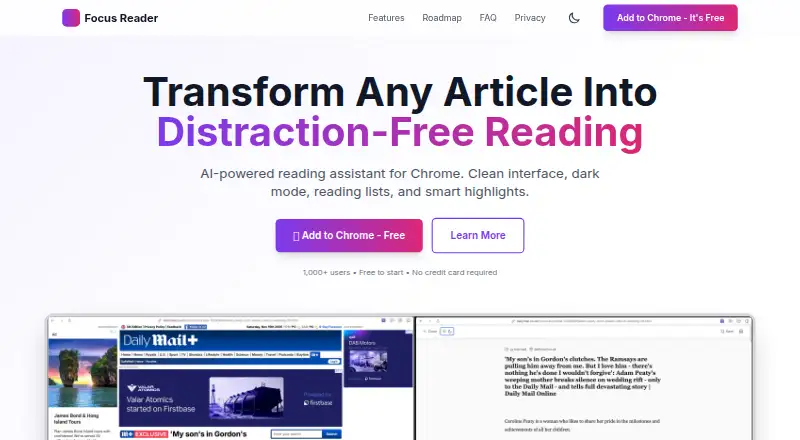
What FocusReader is
FocusReader is a browser extension that turns web articles into a simpler reading view. It extracts article content from sites such as Medium, Substack, blogs, and news sites. The free version includes reading mode, light and dark themes, three font styles, reading progress tracking, and a list for saving up to 10 articles. Readers can choose Serif, Sans-Serif, or Monospace, adjust font size, and open Reader Mode from the toolbar, popup button, or Alt+R shortcut. Offline reading is supported. Heavy JavaScript pages may not parse correctly, paywalled content may be blocked, and some sites prevent reader extensions from working. The extension needs Active Tab access to read the current page and Storage to keep settings and the reading list locally. Its privacy policy says those settings and list stay on the device, while anonymous usage events, website domains, and extension details are collected through PostHog; analytics can be disabled. The policy states that FocusReader complies with GDPR and CCPA.
Who it suits
FocusReader may suit students, professionals, news readers, researchers, and others seeking less cluttered web reading. Its free features fit people who want basic reading controls and a short saved-article list.
What it does well
- Extracts articles from Medium, Substack, blogs, and news sites.
- Includes three font styles and light or dark themes.
- Reader Mode has a toolbar, popup, and keyboard shortcut.
- Settings and reading-list data stay on the device.
- Offline reading is supported.
What to know first
- The free reading list holds up to 10 articles.
- Heavy JavaScript pages may not parse correctly.
- Paywalled content may be blocked.
- Some sites block reader mode extensions.
Limits
The free plan allows up to 10 saved articles. Heavy JavaScript pages may not parse correctly, paywalled content may be blocked, and some sites block reader extensions.
Plans
| Plan | Billed and limits | Price |
|---|---|---|
| Free | Reader Mode · dark/light themes · 3 font styles · reading list up to 10 articles · reading progress tracking | Free |
| PRO | Planned features include AI summaries, AI text-to-speech, smart highlights, unlimited reading list, focus timer, cloud sync and export | On request |
As focusreader.app lists them, read 4 Oct 2026. The maker's own page has the final word.
Getting started
- Visit https://focusreader.app/ to access FocusReader.
- Use the extension platform to add it to your browser.
- Open a web article and activate Reader Mode from the toolbar, popup or Alt+R.
- Choose a theme and font, adjust text size, and save articles to the reading list.
Verdict
FocusReader offers a focused article view with basic reading customization and offline reading. Its parsing can be limited on some pages, and its free reading list is capped at 10 articles.
Questions
Is FocusReader free?
Yes. The Free plan costs nothing and includes Reader Mode, themes, three font styles, a reading list of up to 10 articles and reading progress tracking.
What platforms does FocusReader support?
It is listed as an extension.
Can I read offline?
Yes, offline reading is supported.
What data does FocusReader collect?
Its privacy policy says settings and reading-list data stay on the device. Anonymous usage events, website domains and extension details are collected through PostHog; analytics can be disabled.
Who makes FocusReader?
The Chrome Web Store lists TechMode LLC, at Nazarbayev street 28a, Almaty 050039, Kazakhstan, as the developer.
Facts from FocusReader's own pages
- Activation
- Reader Mode can be activated from the browser toolbar, from the popup button, or by the Alt+R keyboard shortcut. · focusreader.app, 4 Oct 2026
- Article parsing
- It extracts article content from websites and supports sites such as Medium, Substack, blogs and news sites. · focusreader.app, 4 Oct 2026
- Company
- The Chrome Web Store lists the developer as TechMode LLC, at Nazarbayev street 28a, Almaty 050039, Kazakhstan. · chromewebstore.google.com, 4 Oct 2026
- Compatibility limits
- Heavy JavaScript pages may not parse correctly, paywalled content may be blocked, and some sites block reader mode extensions. · focusreader.app, 4 Oct 2026
- Compliance
- The privacy policy states that Focus Reader complies with GDPR and CCPA. · focusreader.app, 4 Oct 2026
- Customization
- Users can choose Serif, Sans-Serif or Monospace fonts, adjust font size, and switch between light and dark themes. · focusreader.app, 4 Oct 2026
- Intended users
- The Chrome Web Store listing describes it for students, professionals, news readers, book lovers, researchers and people seeking less cluttered web reading. · chromewebstore.google.com, 4 Oct 2026
- Permissions
- The help page says the extension needs Active Tab access to read the current page and Storage to save settings and the reading list locally. · focusreader.app, 4 Oct 2026
- Privacy
- The privacy policy says settings and reading-list data stay on the device, while anonymous usage events, website domains and extension details are collected through PostHog; analytics can be disabled. · focusreader.app, 4 Oct 2026
- Purpose
- Focus Reader turns web articles into a clean, distraction-free reading view. · focusreader.app, 4 Oct 2026
- Reading features
- The available free version includes reading mode, dark/light themes, three font styles, reading progress and saving up to 10 articles. · focusreader.app, 4 Oct 2026
- Support
- General support is available at [email protected]. · focusreader.app, 4 Oct 2026
Where FocusReader stands on Freedom251
- RSS Reader Software#13 of 33