Freedom251 › Distraction Blocking Software
Focuser
What Focuser is
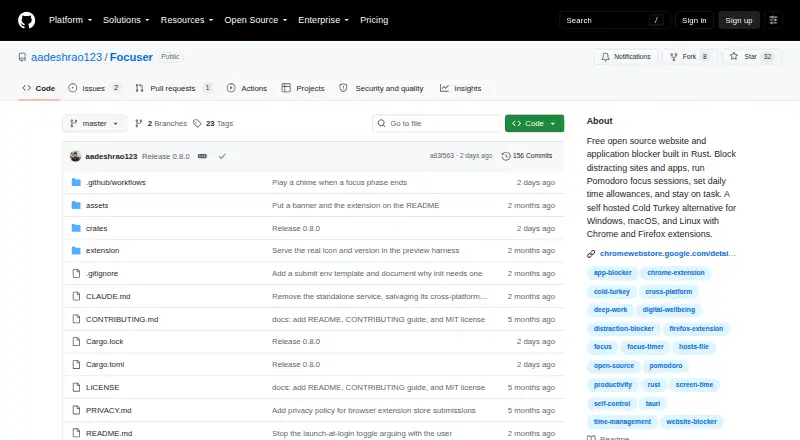
Focuser is a free, open-source blocker for websites and applications, built in Rust and offered under the MIT License. It can block domains, keywords, wildcards, URL paths or all internet access, though some pattern rules depend on its browser extension. Applications can be blocked by executable name, full path or window title. Focus options include Pomodoro sessions that switch blocking between work and break periods, daily time allowances, and weekly schedules. Lists can be locked for a chosen duration so they cannot be changed or disabled before the timer ends. The project includes 1,207 domains in 13 ready-to-import categories. Browser extensions are listed for Chrome, Firefox, Edge, Brave and Opera. Block lists and statistics are stored in a local SQLite file; the project says it has no cloud sync, accounts, analytics or telemetry. The extension checks tab URLs locally rather than sending or logging them. Focuser is listed for Linux, macOS and Windows, with no mobile apps.
Who it suits
Focuser suits people who want scheduled website or app blocking on Linux, macOS or Windows. Its local storage and absence of cloud sync may also suit users who prefer to keep block lists and statistics on-device.
What it does well
- Blocks websites and applications.
- Pomodoro sessions switch blocks between work and breaks.
- Lists can be locked for a chosen duration.
- Stores lists and statistics in a local SQLite file.
- Free and open-source under the MIT License.
What to know first
- Some pattern rules require the browser extension.
- No cloud sync is listed.
- No mobile apps are listed.
Limits
Focuser has no mobile apps. Some website pattern rules are enforced by its browser extension.
Plans
| Plan | Billed and limits | Price |
|---|---|---|
| Free | Free, open-source blocker | Free |
As github.com lists them, read 4 Oct 2026. The maker's own page has the final word.
Getting started
- Open the Focuser project website on GitHub.
- Use the browser extension through the Chrome Web Store or Firefox Add-ons if needed.
- Choose website or application targets to block.
- Import any of the 13 ready-made domain categories, or set your own blocking rules.
- Set time allowances, a weekly schedule, Pomodoro sessions, or a lock duration.
Verdict
Focuser offers scheduled and locked blocking across desktop systems, with local storage for lists and statistics. It may fit people who want those controls without mobile apps or cloud sync.
Questions
How much does Focuser cost?
Focuser is free. Its Free plan costs nothing.
Is there a free trial?
No. The listed pricing information says there is no free trial.
Which platforms does it support?
Focuser is listed for Linux, macOS, Windows, and browser extensions. No mobile apps are listed.
What can Focuser block?
It can block websites by domain, keyword, wildcard, URL path, or all internet access, and apps by executable name, full path, or window title.
Does Focuser store data in the cloud?
The project says block lists and statistics are stored locally in a SQLite file, with no cloud sync, accounts, analytics, or telemetry.
Is Focuser open source?
Yes. Its source code is offered under the MIT License.
Facts from Focuser's own pages
- Application blocking
- It can block applications by executable name, full path, or window title. · github.com, 4 Oct 2026
- Data sharing
- The privacy policy says Focuser does not sell, transfer, or share user data with third parties and that the extension uses no third-party services. · github.com, 4 Oct 2026
- Extension privacy
- The privacy policy says tab URLs are checked locally, never sent to an external server, and not stored or logged by the extension. · github.com, 4 Oct 2026
- Focus tools
- It offers Pomodoro sessions that toggle blocks across work and break phases, plus daily time allowances for sites and apps. · github.com, 4 Oct 2026
- Integrations
- The browser extension is listed for Chrome, Firefox, Edge, Brave, and Opera, with Chrome Web Store and Firefox Add-ons installs identified. · github.com, 4 Oct 2026
- License
- The source code is offered under the MIT License. · github.com, 4 Oct 2026
- Local data
- The project says block lists and statistics are stored locally in a SQLite file and that it has no cloud sync, accounts, analytics, or telemetry. · github.com, 4 Oct 2026
- Platforms
- Release downloads are provided for Windows, macOS Intel and Apple Silicon, and Linux; the README says Windows 10/11 is tested while macOS and Linux builds need real-world testing. · github.com, 4 Oct 2026
- Purpose
- Focuser is a free, open-source website and application blocker built in Rust. · github.com, 4 Oct 2026
- Scheduling and lock
- Block lists can follow a weekly schedule and be locked for a chosen duration so they cannot be disabled, deleted, or edited until the timer ends. · github.com, 4 Oct 2026
- Starter lists
- It includes 1,207 domains across 13 ready-to-import categories. · github.com, 4 Oct 2026
- Support
- The project asks users to report bugs by opening a GitHub issue with expected and actual behavior, OS and browser version, and reproduction steps. · github.com, 4 Oct 2026
- Website blocking
- It blocks domains, keywords, wildcards, URL paths, or the entire internet, with some pattern rules enforced by its browser extension. · github.com, 4 Oct 2026
Where Focuser stands on Freedom251
- Distraction Blocking Software#5 of 29