Freedom251 › Affiliate Link Management Software
Flyn
What Flyn is
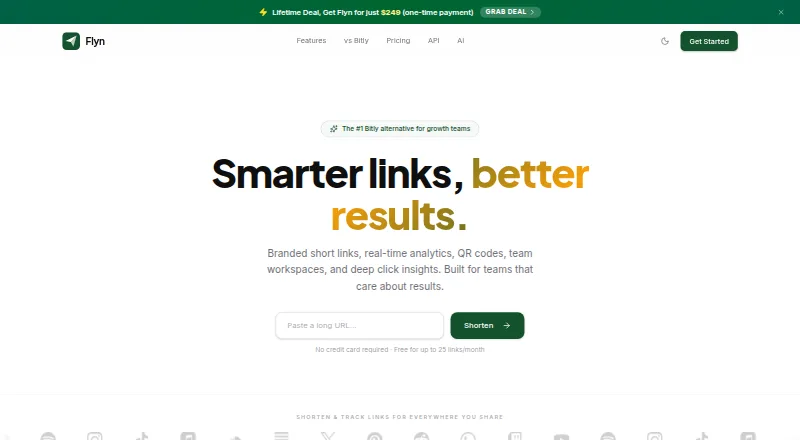
Flyn is a link management platform for creating short links, tracking clicks, and managing where visitors go. Its analytics break down clicks by location, device, browser, and referrer. Smart routing can direct visitors based on their device or location, and A/B testing can distribute traffic among up to 12 destinations. Dynamic QR codes allow a destination to be changed without replacing the printed code. Developers can manage links and click events with a REST API, TypeScript SDK, and webhooks. Flyn lists native Zapier and Make apps, a verified n8n node, and integration guides for services including Mailchimp, HubSpot, Google Analytics 4, and Notion. Its MCP server lets assistants such as Claude, ChatGPT, and Cursor create and manage links. Flyn is available on the web, as an extension, and through an API. The free plan allows 25 links per month and keeps analytics for 30 days; custom domains are a Pro feature. Pro costs $12.00 per month when billed monthly, or $9/mo billed annually at $108/year.
Who it suits
Flyn suits growth teams, solo creators, and marketing teams that need to manage links and review click activity. Developers can use its API, SDK, and webhooks.
What it does well
- Click breakdowns include location, device, browser, and referrer.
- Routing can target visitors by device or location.
- A/B tests can split traffic across up to 12 destinations.
- Dynamic QR code destinations can be changed without reprinting.
What to know first
- Free plan allows 25 links per month.
- Free analytics retention is 30 days.
- Custom domains require Pro.
Limits
The Free plan allows 25 links per month and retains analytics for 30 days. Custom domains are a Pro feature. Pro is listed at $12.00 per month when billed monthly, or $9/mo billed annually at $108/year.
Plans
| Plan | Billed and limits | Price |
|---|---|---|
| Free | 25 links per month · unlimited tracked clicks · 30-day data retention · QR codes · link expiration · links on flyn.co · 3 folders | Free |
| Pro | billed monthly; switch to annual to save 25% ($9/mo billed annually at $108/year) · Unlimited links and tracked clicks · 3 custom domains · unlimited data retention · API access and webhooks · team workspaces for 3 people, then $4/seat/month | $12 a month |
| Lifetime Founder Deal | with code FOREVER at checkout · Pro features and future updates for life · team workspaces available; additional seats $4/month | $249, paid once |
As flyn.to lists them, read 28 Sept 2026. The maker's own page has the final word.
Getting started
- Visit Flyn's website
- Choose the Free plan or review Pro and the Lifetime Founder Deal
- Create links on the web, through the extension or with the API
- Use QR codes, routing or analytics for your links
- Connect a listed integration if needed
Overview
Flyn is a link management platform for growth teams, solo creators, and marketers who need more than short URLs. It combines link analytics with destination routing, split testing, and dynamic QR codes. Its free tier is useful for a small link set, but the 25-link monthly cap and 30-day retention make Pro the more practical fit for ongoing campaigns.
Key features
Flyn’s click analytics break activity down by location, device, browser, and referrer, giving campaign owners several ways to understand where visits come from. It says it uses clicker IP addresses for approximate geolocation without storing them in its analytics database. Analytics retention is 30 days on Free and unlimited on Pro, a meaningful difference for teams comparing campaigns over longer periods.
Smart routing can direct visitors by device or location, while link localization, geo-targeting, and link rotation support different destination strategies. A/B testing can divide traffic among up to 12 destinations, which makes Flyn a stronger choice for teams actively comparing landing pages than for users who only need a permanent short link.
Dynamic QR codes let users change a destination without reprinting the code. Free also includes QR codes and link expiration, so occasional campaigns can use these tools without a subscription. Flyn offers a REST API, TypeScript SDK, and webhooks for link management and click events. Native Zapier and Make apps, a verified n8n node, and integration guides for services such as Mailchimp, HubSpot, Google Analytics 4, and Notion extend its workflow options. Its MCP server supports link creation and management through Claude, ChatGPT, and Cursor on Free and Pro.
Flyn states that data is encrypted in transit with TLS 1.3 and at rest with AES-256, and hosted in SOC 2 Type II certified data centers. Those measures may matter to teams weighing a link platform for business workflows, though they do not replace an organization’s own security review.
Pricing
Free costs nothing. It includes 25 links per month, unlimited tracked clicks, 30-day data retention, QR codes, link expiration, links on flyn.co, and three folders. The unlimited-click allowance is generous for testing or modest use, but the link quota and lack of custom domains limit how comfortably it can support a growing branded program.
Pro costs $12 a month when billed monthly, or $9/mo billed annually at $108/year, a 25% saving. It adds unlimited links and tracked clicks, three custom domains, unlimited data retention, API access and webhooks, and priority support. Team workspaces cover three people, then cost $4/seat/month. Pro fits teams that need branded domains, integrations, or historical analytics; solo users with a low-volume link need may not get enough from the extras to justify the subscription.
Lifetime Founder Deal costs $249, paid once with code FOREVER at checkout. It includes Pro features and future updates for life, with team workspaces available and additional seats at $4/month. It trades a larger upfront payment for ongoing Pro access; readers should compare that commitment with the monthly or annual Pro terms and their expected use.
Platforms
Flyn is available on web, as an extension, and through an API. The API, TypeScript SDK, and webhooks make it relevant to developers and teams automating link workflows, while the web and extension options serve users who manage links directly.
Who it's for
Flyn is best suited to growth and marketing teams, creators, and developers who need routing, campaign measurement, or QR-code updates alongside link shortening. Free can suit a small-scale project that stays within 25 new links each month. Teams managing branded campaigns or needing longer-term analytics are better served by Pro. It is less compelling for someone seeking only basic redirects without routing or measurement needs.
Pros and cons
- Pro: One platform combines geographic and device-level analytics, routing, up-to-12-way A/B tests, and dynamic QR codes.
- Pro: Free allows unlimited tracked clicks, making its 25-link monthly allowance usable for campaigns with substantial traffic.
- Pro: API, SDK, webhooks, automation integrations, and MCP access support both conventional and AI-assisted workflows.
- Con: Free analytics expire after 30 days, and custom domains require Pro, constraining longer-term or branded use without upgrading.
- Con: Pro’s monthly price is $12.00 USD, and workspaces cost extra beyond three people, so larger teams face additional seat charges.
Alternatives
For a broader set of affiliate link management software, compare the category before settling on a general link platform.
Lasso is another freemium option for readers comparing affiliate link management tools. LinkCentral is worth considering if self-hosting is a priority, since it supports self-hosted use alongside web and API access. Pointerly may suit readers looking for a mix of link management and direct-message or AI-post allowances in its free tier. Tracklume is an alternative for users who prefer a web-based free plan with up to 25 links and 30-day analytics. iris by Avelon is free for verified Avelon affiliates, making it a narrower option for that audience. LegendLinks is the alternative to consider if self-hosted software is essential. Pretty Links is a paid alternative with self-hosted, web, and API platforms. HitPath is another option to compare.
Verdict
Choose Flyn if your link work depends on measuring and directing traffic, testing destinations, or keeping QR campaigns current: its combination of those tools and developer integrations is the central reason to pick it. Look elsewhere if you need only simple redirects, or if Free’s 25-link monthly cap and 30-day analytics window are too restrictive and Pro’s ongoing cost is not justified by your workflow.
Verdict
Flyn combines link tracking with routing, testing, and QR code management. Check the free plan’s link and retention limits, or choose Pro for custom domains and longer analytics retention.
Questions
Does Flyn have a free plan?
Yes. The Free plan costs nothing and includes 25 links per month, unlimited tracked clicks and 30-day data retention.
How much does Flyn Pro cost?
Pro is $12.00 per month when billed monthly. The listed annual option is $9/mo billed annually at $108/year.
What platforms is Flyn available on?
Flyn is listed for web, extension and API use.
What does the Free plan include?
It includes 25 links per month, unlimited tracked clicks, 30-day data retention, QR codes, link expiration, links on flyn.co and three folders.
What does Pro add?
Pro includes unlimited links and tracked clicks, three custom domains, unlimited data retention, API access and webhooks, and team workspaces for three people; additional seats are $4/seat/month.
Who makes Flyn?
Flyn is built by founder Karan Bhakuni and operated by Latracal Solutions Private Limited.
Facts from Flyn's own pages
- A/B testing
- A/B testing can split traffic across up to 12 destinations. · flyn.to, 28 Sept 2026
- AI assistant access
- Flyn's MCP server lets AI assistants including Claude, ChatGPT, and Cursor create and manage links; the pricing page lists access on Free and Pro. · flyn.to, 28 Sept 2026
- Analytics
- It provides click analytics including geographic location, device, browser, and referrer breakdowns. · flyn.to, 28 Sept 2026
- Audience
- Flyn describes its target users as growth teams, solo creators, and marketing teams. · flyn.to, 28 Sept 2026
- Developer tools
- Flyn offers a REST API, a TypeScript SDK, and webhooks for link management and click events. · flyn.to, 28 Sept 2026
- Free-plan limit
- Free includes 25 links per month and 30-day analytics retention; custom domains are a Pro feature. · flyn.to, 28 Sept 2026
- Integrations
- The integrations page lists native Zapier and Make apps, a verified n8n node, and guides for services including Mailchimp, HubSpot, Google Analytics 4, and Notion. · flyn.to, 28 Sept 2026
- Maker
- Flyn is built by founder Karan Bhakuni and operated by Latracal Solutions Private Limited. · flyn.to, 28 Sept 2026
- Privacy
- Flyn says clicker IP addresses are used for approximate geolocation and are not stored in its analytics database. · flyn.to, 28 Sept 2026
- Product
- Flyn is a link management platform for shortening, tracking, and optimizing links. · flyn.to, 28 Sept 2026
- QR codes
- Its dynamic QR codes can have their destination updated without reprinting. · flyn.to, 28 Sept 2026
- Routing
- Smart routing can redirect visitors by device or location. · flyn.to, 28 Sept 2026
- Security
- The GDPR page states that data is encrypted in transit with TLS 1.3 and at rest with AES-256, and hosted in SOC 2 Type II certified data centers. · flyn.to, 28 Sept 2026
- Support
- The Pro plan includes priority support. · flyn.to, 28 Sept 2026