Freedom251 › WebDAV Client Software

filex
What filex is
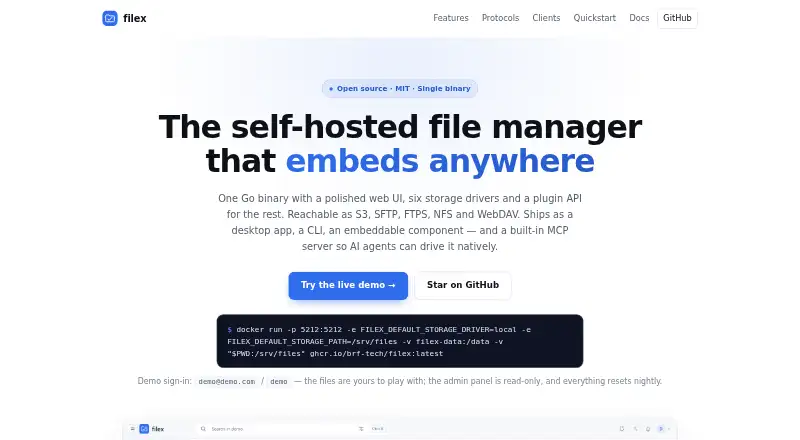
filex is a free, MIT-licensed file manager for people and teams who want to manage storage they host themselves. It runs as a single Go binary or container and can connect local disks, S3, SFTP, FTP, WebDAV, and SMB/CIFS storage; plugins can add other backends. The same files can be served over S3, SFTP, FTPS, NFSv3, WebDAV, and HTTPS. Search covers filenames and file contents, and the system includes trash retention and version history. Roles and inherited per-item grants control access, while public links can use a PIN, expiry, and download cap. Users can sign in with local passwords, OIDC, LDAP or Active Directory, or proxy headers. Filex offers a web interface and desktop apps for Windows, Linux, and macOS. Desktop and command-line clients support two-way folder sync, and the CLI can mount a remote server as a local folder or drive. Office files have a read-only browser preview unless an optional self-hosted OnlyOffice Document Server is used for editing and co-authoring. Filex uses SQLite by default and supports PostgreSQL for team deployments. Its explorer can also be embedded in other products, and token-scoped REST and MCP interfaces let AI agents work within granted file access.
Who it suits
Filex suits people or teams who want to host a file manager and connect it to local or remote storage. It is also suited to developers embedding a file explorer, and teams that want desktop sync, role-based access, or AI access scoped to granted files.
What it does well
- Free and open source under the MIT license.
- Connects local disks, S3, SFTP, FTP, WebDAV, and SMB/CIFS.
- Searches filenames and file contents across mounted storage.
- Desktop and CLI clients support two-way folder sync.
- Public links can use PINs, expiry, and download caps.
- Available for web, Windows, Linux, and macOS.
What to know first
- It must be run as a self-hosted binary or container.
- Office editing and co-authoring require an optional self-hosted OnlyOffice server.
- Without OnlyOffice, Office files have read-only previews.
Limits
Office files are limited to read-only browser previews unless an optional self-hosted OnlyOffice Document Server is configured for editing and co-authoring.
Getting started
- Open https://filex.sh/ and choose a deployment route.
- Run Filex as a binary or container, or use a listed deployment option such as Docker Compose or a Helm chart.
- Connect local disks or a supported remote storage backend.
- Choose sign-in and access controls for users and shared links.
- Install a Windows, Linux, or macOS desktop app, or use a CLI client for sync or mounting.
- Set up a self-hosted OnlyOffice Document Server if Office editing and co-authoring are needed.
Verdict
Choose filex if you want a free, open-source file manager that connects multiple storage backends and can be self-hosted. It offers broad access controls and sync clients; teams that need browser-based Office editing must also run an OnlyOffice Document Server.
Questions
Is filex free?
Yes. Filex is free and open source under the MIT license.
Which platforms does filex support?
Filex supports web, Windows, Linux, and macOS. The site also lists API and self-hosted availability.
Can filex connect to cloud and network storage?
It mounts local disks, S3, SFTP, FTP, WebDAV, and SMB/CIFS storage. Plugins are available for other backends.
Can I edit Office documents in the browser?
In-browser Office editing and co-authoring use an optional self-hosted OnlyOffice Document Server. Without it, Office files have a read-only preview.
Who makes filex?
BRF Tech is the maker. The company describes itself as a Bursa-based DevSecOps and software consultancy.
Does filex support folder sync?
Yes. Desktop and CLI clients support two-way folder sync. The CLI can also mount a remote server over HTTPS as a local folder or drive letter.
Facts from filex's own pages
- Access control
- It supports roles, per-item grants with inheritance, and public links that can use a PIN, expiry and download cap. · filex.sh, 4 Oct 2026
- AI integration
- A built-in MCP server and token-authenticated REST surface let AI agents work with files within their granted scope. · filex.sh, 4 Oct 2026
- Company
- BRF Tech describes itself as a Bursa-based DevSecOps and software consultancy. · brf.sh, 4 Oct 2026
- Deployment
- Filex runs as a binary or container, uses SQLite by default, and supports PostgreSQL for team deployments. · filex.sh, 4 Oct 2026
- Deployment options
- The site lists Docker Compose, a Helm chart, and listings for Umbrel, CasaOS, Runtipi, Portainer and Unraid. · filex.sh, 4 Oct 2026
- Desktop
- Desktop apps are available for Windows, Linux and macOS, with portable builds also listed for each platform. · filex.sh, 4 Oct 2026
- Desktop platforms
- The desktop app is available for Windows, Linux and macOS; the site lists Windows, Linux and macOS packages and command-line installation options. · filex.sh, 4 Oct 2026
- Embedding
- The explorer can be embedded in other products as a Vue 3 component, React adapter or framework-agnostic web component. · filex.sh, 4 Oct 2026
- Embedding and API
- The explorer is available as Vue 3 and React components and a framework-agnostic web component, with a token-scoped REST API and built-in MCP server. · filex.sh, 4 Oct 2026
- Encryption
- End-to-end encrypted folders store ciphertext on the server without sending it the encryption key. · docs.filex.sh, 4 Oct 2026
- Integrations
- The site documents self-hosted ONLYOFFICE for editing Office documents and Tesseract for including scanned pages in search. · filex.sh, 4 Oct 2026
- Maker
- The site credits BRF Tech as the maker and says FileX is built and run in production there. · filex.sh, 4 Oct 2026
- Office editing
- In-browser Office editing and co-authoring use an optional self-hosted OnlyOffice Document Server; without it, Office files have a read-only preview. · docs.filex.sh, 4 Oct 2026
- Product
- Filex is an open-source, MIT-licensed self-hosted file manager delivered as a single Go binary. · filex.sh, 4 Oct 2026
- Protocols
- It serves the same files over S3, SFTP, FTPS, NFSv3, WebDAV and HTTPS. · filex.sh, 4 Oct 2026
- Search and history
- Filex searches mounted storage by filename and file contents, and includes trash retention and version history. · filex.sh, 4 Oct 2026
- Search and retention
- It searches mounted storage by filename and file contents, and includes trash with a retention window and version history. · filex.sh, 4 Oct 2026
- Security
- Optional ClamAV scanning can scan written files through a local binary or a clamd service. · docs.filex.sh, 4 Oct 2026
- Sign-in
- Supported sign-in methods include local passwords, OIDC, LDAP or Active Directory, and proxy headers. · filex.sh, 4 Oct 2026
- Storage
- Built-in storage drivers connect local disk, S3, SFTP, FTP, WebDAV and SMB/NAS; additional storage backends can be added with plugins. · filex.sh, 4 Oct 2026
- Sync and CLI
- Desktop and CLI clients support two-way folder sync, and the CLI can mount a remote server over HTTPS as a local folder or drive letter. · filex.sh, 4 Oct 2026
- WebAssembly apps
- FileX supports sandboxed WebAssembly apps, which undergo permission review and require review before an update requesting additional permissions is installed. · filex.sh, 4 Oct 2026
Where filex stands on Freedom251
- WebDAV Client Software#15 of 26