Freedom251 › Soundboard Software

Farrago
What Farrago is
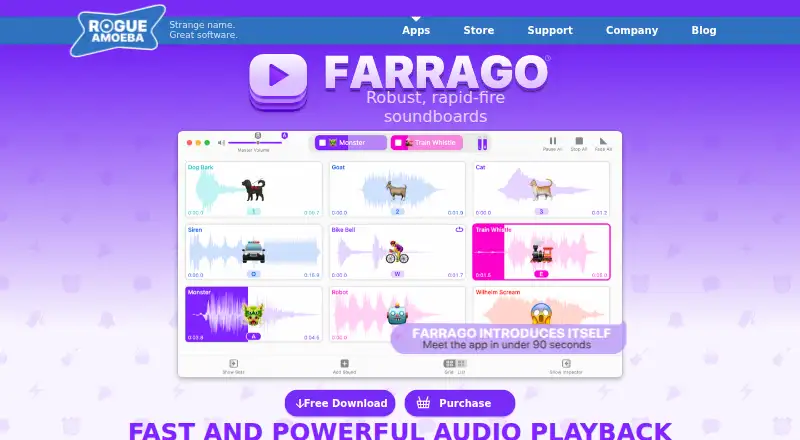
Farrago is a macOS soundboard for playing sound bites, audio effects, and music clips on demand or in planned sequences. You can arrange audio tiles in grid or list layouts and organize them into multiple sets. Its editor trims clips and applies fades. Playback controls provide looping, relative volume changes, and previewing through a separate output device. Farrago accepts control from MIDI, OSC, and Stream Deck hardware. It can search Freesound, and GarageBand or Logic Pro users can search Apple Loops. Apple Shortcuts integration allows shortcuts to be triggered inside the app. The maker describes uses in podcasting, radio, theatre, live shows, and voice or video chats. Farrago runs on macOS, with the current listed version supporting macOS 14 to 27. A trial includes all features but adds noise after 20 sounds until relaunch.
Who it suits
Farrago suits podcasters, radio users, theatre and live-show teams, and people adding sound to voice or video chats. It is for Mac users who need several organized sound sets and hardware or shortcut control.
What it does well
- Grid and list layouts for audio tiles
- Editor trims clips and applies fades
- MIDI, OSC, and Stream Deck control
- Searches Freesound and Apple Loops
- Apple Shortcuts can trigger playback actions
What to know first
- macOS only
- No free plan
- Trial adds noise after 20 sounds
- License costs $55, paid once
Limits
There is no free plan. The trial includes all features but overlays noise after 20 sounds; quitting and relaunching resets the trial.
Plans
| Plan | Billed and limits | Price |
|---|---|---|
| Farrago License Key | One-time purchase · Single user · One or more Macs · Local taxes may apply | $55, paid once |
As rogueamoeba.com lists them, read 7 Oct 2026. The maker's own page has the final word.
Getting started
- Open the Farrago website
- Install the macOS desktop app
- Start the full-featured trial
- Arrange clips in grids or lists and create sets
- Connect MIDI, OSC, or Stream Deck controls if needed
- Buy the Farrago License Key for continued use
Verdict
Farrago combines organized sound sets, clip editing, playback controls, and external device triggers in a Mac app. The trial is feature-complete, but ongoing use requires the paid license and the trial has a 20-sound noise limit.
Questions
What does Farrago cost?
The Farrago License Key costs $55, paid once as a one-time purchase for a single user on one or more Macs. Local taxes may apply.
Is there a free plan?
No. A trial with all features is available.
Which operating systems does Farrago support?
Farrago runs on macOS, and the current listed version supports macOS 14 to 27.
Can Farrago control external hardware?
Yes. It supports MIDI, OSC, and Stream Deck devices.
What audio sources can it search?
It can search Freesound, plus Apple Loops for GarageBand or Logic Pro users.
Facts from Farrago's own pages
- Audio editing
- Farrago includes an editor for trimming audio and applying fades. · rogueamoeba.com, 7 Oct 2026
- Automation
- Farrago integrates with Apple Shortcuts and can trigger shortcuts from within the app. · rogueamoeba.com, 7 Oct 2026
- Company
- Rogue Amoeba is a privately held software company based in the USA that says it has made MacOS audio tools since 2002. · rogueamoeba.com, 7 Oct 2026
- Founded
- 2002 · rogueamoeba.com, 28 Sept 2026
- Grid and list modes
- Users can arrange audio tiles in grids or lists and organize them into multiple sets. · rogueamoeba.com, 7 Oct 2026
- Hardware control
- Farrago can be controlled with MIDI, OSC, and Stream Deck devices. · rogueamoeba.com, 7 Oct 2026
- Headquarters
- Boston, Massachusetts, United States · rogueamoeba.com, 28 Sept 2026
- Intended users
- The maker describes uses including podcasting and radio, theatre and live shows, and voice or video chats. · rogueamoeba.com, 7 Oct 2026
- Platform and compatibility
- Farrago runs on MacOS, and the current listed version supports MacOS 14 to 27. · rogueamoeba.com, 7 Oct 2026
- Playback controls
- Built-in controls support looping, relative volume adjustment, and previewing audio on a separate output device. · rogueamoeba.com, 7 Oct 2026
- Privacy
- The maker says it does not sell or rent user data; enabled update checks send the app name, version, and OS version, and generalized usage statistics are collected in aggregate. · rogueamoeba.com, 7 Oct 2026
- Sound sources
- Farrago can search Freesound and, for GarageBand or Logic Pro users, Apple Loops. · rogueamoeba.com, 7 Oct 2026
- Support
- The support team provides email assistance and says it strives to reply in under 24 hours. · rogueamoeba.com, 7 Oct 2026
- Trial limit
- The trial includes all features, but overlays noise on playback after 20 sounds; quitting and relaunching resets the trial. · rogueamoeba.com, 7 Oct 2026
- What it does
- Farrago plays sound bites, audio effects, and music clips on demand or in predefined sequences. · rogueamoeba.com, 7 Oct 2026
Where Farrago stands on Freedom251
- Soundboard Software#25 of 26