Freedom251 › Video Converter Software
EncodeX
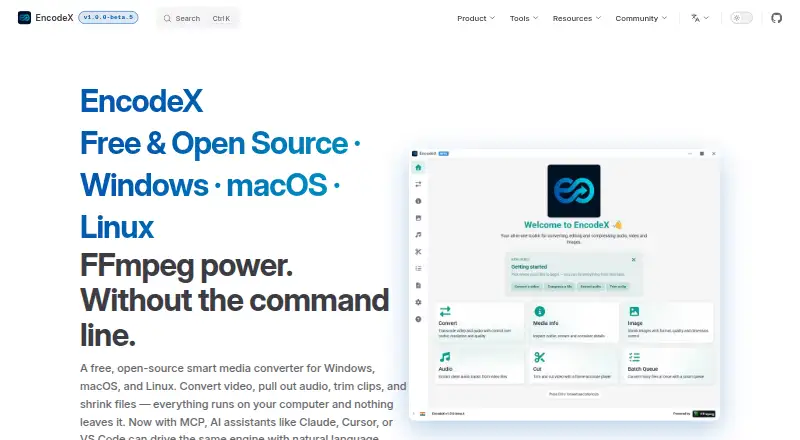
What EncodeX is
EncodeX is a free desktop media converter for Windows, macOS, and Linux. It converts video and audio, extracts audio, trims clips, compresses images, and can process folders in batches. Video formats include MP4, MKV, AVI, MOV, WebM, MPEG, and FLV; audio formats include MP3, FLAC, WAV, M4A, AAC, and OGG. The software offers more than 140 conversion profiles across eight categories, including devices, social media, streaming, professional formats, audio, images, and advanced settings. Its batch queue can be paused, resumed, cancelled, and reordered, with completion notifications and automatic shutdown when finished. Hardware acceleration is available. EncodeX also provides image compression and metadata display, and the maker says processing stays on the user's computer rather than uploading files. The product is open source under the MIT license. Listed system requirements are Windows 10 or newer, macOS 11 or newer, or a modern Linux system, with about 400 MB of disk space.
Who it suits
EncodeX may suit people who want to convert or batch-process video and audio on a desktop, as well as those needing image compression. The maker names families, students, creators, offices, and podcasters among its intended users.
What it does well
- Supports video and audio conversion formats.
- Batch queue can pause, resume, and reorder files.
- Offers hardware acceleration.
- Maker says files are not uploaded.
- Free, open source under the MIT license.
What to know first
- Requires about 400 MB of disk space.
- Windows 10 or newer is required on Windows.
- macOS 11 or newer is required on macOS.
Limits
The Free plan has no file-size limits and is free forever, with no watermark, account, or subscription. The listed system requirements include Windows 10 or newer, macOS 11 or newer, or a modern Linux system.
Plans
| Plan | Billed and limits | Price |
|---|---|---|
| Free | Free forever · no account · no subscription · no watermark · no file-size limits | Free |
As encodex.in lists them, read 11 Oct 2026. The maker's own page has the final word.
Getting started
- Open the EncodeX website
- Download it for Windows, macOS, or Linux
- Install it on a supported system with about 400 MB available
- Choose a conversion profile or media task
- Add files to the queue and start processing
Verdict
EncodeX combines conversion, batch handling, audio extraction, and image tools in a free desktop app. Check the listed operating-system requirements and supported formats against your needs.
Questions
What does EncodeX cost?
Its Free plan costs nothing and is free forever. It has no subscription, account requirement, watermark, or file-size limit.
Which platforms does EncodeX support?
It supports Windows, macOS, and Linux. The download page lists Windows 10 or newer, macOS 11 or newer, or a modern Linux system.
What media formats can it output?
Video outputs include MP4, MKV, AVI, MOV, WebM, MPEG, and FLV. Audio outputs include MP3, FLAC, WAV, M4A, AAC, and OGG.
Is EncodeX open source?
Yes. It is released under the MIT license.
Does EncodeX offer integrations?
Its MCP server connects with Claude Desktop, Claude Code, Cursor, VS Code, and other MCP-compatible clients. The embedded server binds to localhost.
Facts from EncodeX's own pages
- AI integrations
- Its MCP server connects with Claude Desktop, Claude Code, Cursor, VS Code, and other MCP-compatible clients for media tasks. · encodex.in, 11 Oct 2026
- Audio extraction
- Yes · encodex.in, 24 Sept 2026
- Batch conversion
- Yes · encodex.in, 24 Sept 2026
- Batch processing
- The queue supports adding files while running, pausing, resuming, cancelling, reordering, completion notifications, and automatic shutdown when finished. · encodex.in, 11 Oct 2026
- Formats
- It supports common formats including MP4, MKV, AVI, MOV, WebM, MP3, WAV, and FLAC. · encodex.in, 11 Oct 2026
- Free plan
- Yes · encodex.in, 24 Sept 2026
- Hardware acceleration
- The app can use NVIDIA, Intel, AMD, Apple, and other supported hardware acceleration technologies for encoding. · encodex.in, 11 Oct 2026
- Image tools
- EncodeX compresses common image formats including JPG, PNG, WebP, GIF, BMP, and TIFF, and can display image metadata. · encodex.in, 11 Oct 2026
- Intended users
- The maker describes use cases for families, students, content creators, offices, podcasters, and general users. · encodex.in, 11 Oct 2026
- Languages
- The maker says EncodeX supports more than 35 languages, including right-to-left layouts for Arabic and Hebrew. · encodex.in, 11 Oct 2026
- License
- The product is open source under the MIT license. · github.com, 11 Oct 2026
- Local processing
- The maker says media processing runs on the user's computer and files are not uploaded; it also says the embedded MCP server binds to localhost. · encodex.in, 11 Oct 2026
- Output formats
- MP4,MKV,AVI,MOV,WebM,MPEG,FLV; audio: MP3,FLAC,WAV,M4A,AAC,OGG · encodex.in, 24 Sept 2026
- Profiles
- It includes more than 140 conversion profiles across eight categories, including social media, devices, professional formats, streaming, audio, images, and advanced settings. · encodex.in, 11 Oct 2026
- Purpose
- EncodeX is a desktop media converter for converting video and audio, extracting audio, trimming clips, compressing images, and batch processing folders. · encodex.in, 11 Oct 2026
- Support
- The download page directs users with questions or problems to [email protected] and says a real person will respond. · encodex.in, 11 Oct 2026
- Supported platforms
- cross-platform · encodex.in, 24 Sept 2026
- System requirements
- The download page lists Windows 10 or newer, macOS 11 or newer, or a modern Linux system, with about 400 MB of disk space. · encodex.in, 11 Oct 2026
Where EncodeX stands on Freedom251
- Video Converter Software#24 of 76