Freedom251 › Online Voting Software
Election Runner
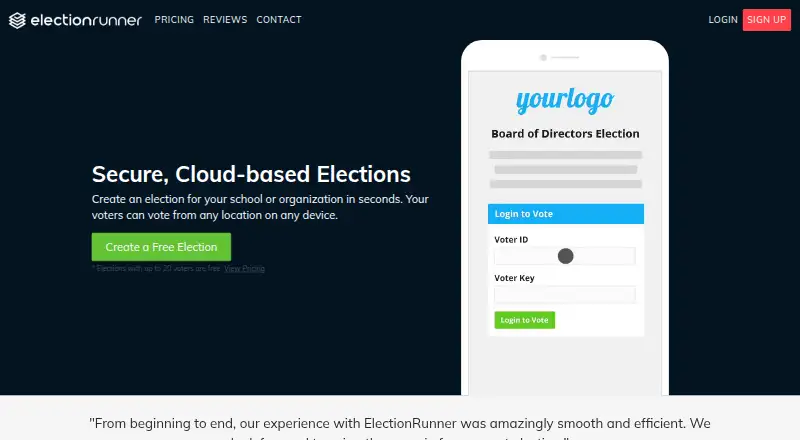
What Election Runner is
Election Runner lets schools and organizations create cloud-based elections that voters can access from a browser or its iOS and Android apps. Administrators can build ballots with questions, candidates, or measures, add photos or short biographies, and apply an organization’s logo and colors without HTML or CSS knowledge. Voter lists and ballots can be imported from Excel or CSV files, and elections can be scheduled or launched immediately. Each voter receives a unique Voter ID and Voter Key and can vote once. Results are automatically calculated, shown in charts, and available for real-time monitoring. The maker says elections use SSL-grade security with 256-bit encryption, and administrators cannot see an individual’s vote by default. The voting application targets Section 508 and WCAG 2.0 AA compliance. Elections with up to 20 voters are free. Up to 100 voters costs $19 per election, paid when launched; up to 300 voters costs $36 per election. Larger elections are priced according to eligible voter count, with a calculator on the pricing page.
Who it suits
Election Runner suits schools and organizations that need to set up elections for voters using browsers or mobile apps. It offers special subscription pricing for K–12 and higher education institutions.
What it does well
- Free elections for up to 20 voters.
- Voters can use web, iOS, or Android.
- Ballot and voter imports support Excel and CSV.
- Results are charted and monitored in real time.
- Administrators cannot see individual votes by default.
What to know first
- Elections above 20 voters have a charge.
- Over 300 voters requires calculated pricing.
- Paid plans are billed per election.
Limits
The free plan is for elections with up to 20 voters. Paid plans cover up to 100 voters for $19 per election and up to 300 voters for $36 per election; elections over 300 voters are priced according to eligible voter count.
Plans
| Plan | Billed and limits | Price |
|---|---|---|
| Up to 20 voters | Pay when you launch; free for elections with up to 20 voters · Up to 20 voters | Free |
| Up to 100 voters | Per election; pay when you launch · Up to 100 voters | $19, paid once |
| Up to 300 voters | Per election; pay when you launch · Up to 300 voters | $36, paid once |
| Over 300 voters | Calculated based on eligible voter count · Over 300 voters; price calculator on pricing page | On request |
As electionrunner.com lists them, read 2 Oct 2026. The maker's own page has the final word.
Getting started
- Open electionrunner.com.
- Choose the free plan for an election with up to 20 voters, or review the per-election plans.
- Import voter and ballot information from an Excel spreadsheet or CSV file, or prepare the ballot in the service.
- Customize the ballot with your organization's logo and colors, and add questions and candidate or measure options.
- Set start and end dates or launch the election immediately.
- Have voters use their Voter ID and Voter Key in a browser or the iOS or Android app.
Election Runner is election software for schools and organizations that want to run votes online. It is strongest for small groups that can manage voter credentials and ballot setup themselves; its free allowance is useful, but larger electorates pay for each election.
Overview
Voters can participate from a browser or Election Runner’s iOS and Android apps, making it practical for organizations whose members are not in one place. The service combines ballot creation, scheduled or immediate launches, and live result monitoring in one workflow. Basic voter authentication is a constraint for groups with more demanding access requirements.
Key features
Administrators can add questions and candidate or measure options, with photos or short biographies, then apply their organization’s logo and colors without writing HTML or CSS. Importing voter lists and ballots from Excel or CSV can cut down on repeated data entry. Each voter receives a unique Voter ID and Voter Key and can vote once.
Election Runner supports ranked-choice ballots, an audit trail, automatic result calculations, chart displays, and CSV result export. Administrators can schedule opening and closing times or launch immediately, then monitor results in real time. These capabilities suit structured organizational elections better than an informal poll, though basic authentication may be insufficient where stronger voter verification is needed.
The maker says the service uses SSL-grade security with 256-bit encryption. By default, administrators cannot see how an individual voter voted, a useful separation between ballot privacy and election administration. The voting application targets Section 508 and WCAG 2.0 AA compliance. The maker also says support averages an eight-minute response time during business hours. Voting instructions can be sent through third-party email services such as MailChimp and Constant Contact.
Pricing
The free plan costs nothing and covers elections with up to 20 voters. That is a meaningful option for small committees or school groups, but the cap makes it unsuitable for larger electorates.
The Up to 100 voters plan costs $19, paid once, billed per election and payable when launched. Up to 300 voters costs $36, paid once on the same per-election, pay-when-you-launch basis. These tiers let organizations match the charge to each election rather than a recurring subscription, but the cost rises with voter count and applies again for another election. Over 300 voters has custom pricing calculated from eligible voter count, so larger organizations should establish the cost before choosing it. Special subscription pricing is offered for K-12 and higher education institutions.
Platforms
Election Runner supports web, Android, and iOS. Voters can use a browser or the mobile apps, which gives participants more than one way to cast a ballot.
Who it's for
Schools, associations, and other organizations with defined voter lists are the natural audience, particularly those running occasional elections with 20 or fewer voters or modestly sized paid elections. Groups that need more than basic voter authentication, or that expect large electorates and want predictable costs before counting eligible voters, should compare other options.
Pros and cons
- Pros: Free elections for up to 20 voters make small-scale use possible without a per-election charge.
- Pros: Spreadsheet imports, branded ballots, scheduling, and automatic charts support an end-to-end election workflow without requiring HTML or CSS skills.
- Pros: One-vote credentials, default privacy from administrators, ranked choice, audit trail, and CSV export provide useful controls and post-election access.
- Cons: Basic authentication may not meet organizations’ stronger identity or access-control needs.
- Cons: The free tier stops at 20 voters, and paid pricing is charged per election, so repeat use and larger voter counts bring additional costs.
Alternatives
Online Voting Software is a useful directory starting point for comparing election tools across the category. Consider AssociationVoting if its free tier for 1–25 eligible voters better fits a small association election; its 26–125 voter tier is $99 per election. ElectionBuddy is another freemium option for readers comparing meeting and election voting tools.
SnapBallot may suit a very small vote: its free plan covers up to 15 voters and 3 voter emails, while 16–250 voters costs $49 per election. ElectIQ is another freemium choice, with a free plan listed in EUR. POLYAS offers a free Standard online-voting tier up to 50 voters, though features and service are not included in that tier.
Simply Voting has a free option for elections with 10 electors or fewer. VoteAlly may appeal to groups seeking an ongoing free plan, with 50 eligible voters per session, two active sessions, and one admin seat. VoterTerminal is worth considering for readers who prefer a self-hosted option; its free self-hosted plan includes unlimited elections and voters.
Verdict
Choose Election Runner for a school or organization that wants branded, configurable ballots, one-vote credentials, and live results, especially when its electorate fits the free 20-voter limit or a modest per-election tier. Its main appeal is a coherent self-managed election workflow; look elsewhere if basic authentication is not enough or if per-election pricing at a larger voter count is a poor fit.
Verdict
Election Runner supports configurable online elections, one-vote voter credentials, and live results monitoring. Small elections of up to 20 voters are free; larger voter counts carry per-election pricing.
Questions
Is Election Runner free?
Yes. Its free plan covers elections with up to 20 voters.
How much do paid elections cost?
An election with up to 100 voters costs $19 per election and is paid when launched. An election with up to 300 voters costs $36 per election.
Which platforms can voters use?
Voters can use a web browser or Election Runner's iOS and Android apps.
Can it run ranked-choice elections?
Yes. Ranked-choice is a supported ballot type.
Where is Election Runner based?
Its headquarters are in Mansfield, Texas, United States.
Facts from Election Runner's own pages
- Accessibility
- The voting application targets Section 508 and WCAG 2.0 AA compliance. · electionrunner.com, 2 Oct 2026
- Ballot design
- Administrators can customize an election with their organization's logo and colors without HTML or CSS knowledge. · electionrunner.com, 2 Oct 2026
- Ballot privacy
- By default, election administrators cannot see how an individual voter voted. · electionrunner.com, 2 Oct 2026
- Ballot setup
- Ballots can include questions and candidate or measure options, with photos or short biographies. · electionrunner.com, 2 Oct 2026
- Headquarters
- Mansfield, Texas, United States · electionrunner.com, 28 Sept 2026
- Imports
- Administrators can import voters and ballots from Excel spreadsheets or CSV files. · electionrunner.com, 2 Oct 2026
- Integrations
- The support guide describes sending voting instructions through third-party email services such as MailChimp and Constant Contact. · electionrunner.com, 2 Oct 2026
- Intended users
- The maker presents Election Runner for schools and organizations and offers special subscription pricing for K-12 and higher education institutions. · electionrunner.com, 2 Oct 2026
- Mobile apps
- Voters can vote in a web browser or through Election Runner's iOS and Android apps. · electionrunner.com, 2 Oct 2026
- Purpose
- Election Runner lets schools and organizations create cloud-based elections that voters can access from any location on any device. · electionrunner.com, 2 Oct 2026
- Results
- Results are automatically calculated, shown in charts, and can be monitored in real time. · electionrunner.com, 2 Oct 2026
- Scheduling
- Administrators can schedule election start and end dates or launch an election immediately. · electionrunner.com, 2 Oct 2026
- Security
- The maker says elections use SSL-grade security with 256-bit encryption. · electionrunner.com, 2 Oct 2026
- Support
- The maker says its support team averages an eight-minute response time during business hours. · electionrunner.com, 2 Oct 2026
- Voter credentials
- Each voter receives a unique Voter ID and Voter Key and can vote only once. · electionrunner.com, 2 Oct 2026
Where Election Runner stands on Freedom251
- Online Voting Software#5 of 31