Freedom251 › Disk Space Analyzers
Durs
by Durs
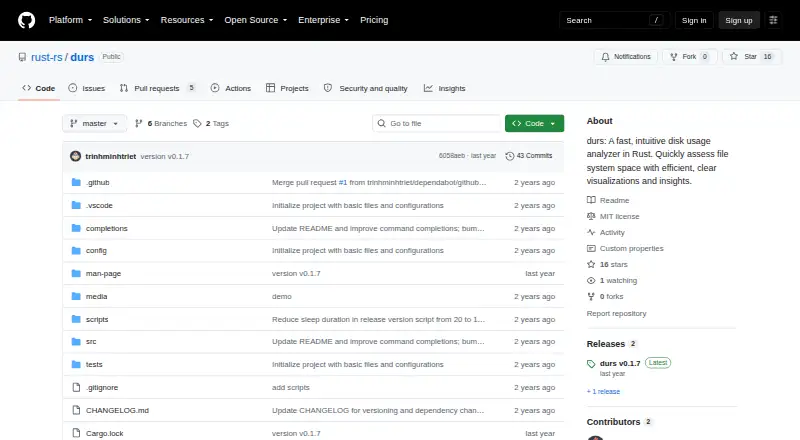
What Durs is
Durs is a free Rust disk usage analyzer for Windows, macOS, Linux, and self-hosted environments. It scans files and folders and identifies directories using the most filesystem space. In the terminal, colored bars show disk usage and folder hierarchy, while gray shades indicate nested levels. Durs displays large files or folders that fit on screen and searches deeper through the structure. Filtering can use file names, regular expressions, exclusions, or a minimum size, and results can be grouped by file type. Directory data can be printed as JSON, including output that can be piped to jq. If a folder cannot be accessed, Durs shows a permissions message and continues scanning. A screen-reader option removes bars and symbols and adds a depth-level column. Installation is documented through cargo install durs or by building a cloned repository. Configuration can be stored in ~/.config/durs/config.toml or ~/.durs.toml. The project uses the MIT License and invites contributions through forks, feature branches, and pull requests.
Who it suits
Durs suits terminal users on Windows, macOS, Linux, or self-hosted systems who need filesystem space analysis. It is also useful for screen-reader users and workflows that consume JSON output.
What it does well
- Free MIT-licensed software
- Runs on Windows, macOS, and Linux
- Filters by name, regex, or size
- Exports directory data as JSON
- Continues after permission errors
What to know first
- Terminal-focused interface
- No treemap view
- Does not show application sizes
Plans
| Plan | Billed and limits | Price |
|---|---|---|
| Free | MIT-licensed software · install with Cargo | Free |
As github.com lists them, read 9 Oct 2026. The maker's own page has the final word.
Verdict
Durs provides detailed terminal-based filesystem analysis with filtering, grouping, JSON output, and accessibility options. Its free MIT license and broad platform list make it practical for command-line storage checks.
Facts from Durs's own pages
- Accessibility
- A screen reader option removes bars and symbols and adds a depth-level column. · github.com, 9 Oct 2026
- Application sizes
- No · github.com, 22 Sept 2026
- Configuration
- Options can be set in either ~/.config/durs/config.toml or ~/.durs.toml. · github.com, 9 Oct 2026
- Directory sizes
- It shows which directories use the most disk space without requiring commands such as sort or head. · github.com, 9 Oct 2026
- Exportable reports
- Yes · github.com, 22 Sept 2026
- File-type breakdown
- Yes · github.com, 22 Sept 2026
- Filtering
- Options include filtering files by name or regex, excluding matches, and setting a minimum size. · github.com, 9 Oct 2026
- Filtering and output
- Options include filtering by file size or regex, grouping by file type, and printing directory data as JSON. · github.com, 9 Oct 2026
- Founded
- 2024 · github.com, 28 Sept 2026
- Free plan
- Yes · github.com, 22 Sept 2026
- Hierarchy
- Its color bars show directory structure and disk usage, with shades of gray indicating folder hierarchy. · github.com, 9 Oct 2026
- Installation
- The README documents installation with cargo install durs or by building from a cloned repository. · github.com, 9 Oct 2026
- Integration
- The usage documentation shows JSON output that can be piped to jq. · github.com, 9 Oct 2026
- Large items
- It displays the largest files or folders that fit on the terminal screen and searches down the file structure for them. · github.com, 9 Oct 2026
- License
- The project uses the MIT License, which grants permission to use, modify, distribute, and sell the software free of charge, subject to its conditions. · github.com, 9 Oct 2026
- Output
- Durs can print a JSON representation of directories and group results by file type. · github.com, 9 Oct 2026
- Permission errors
- When it cannot access a folder, Durs displays a permission message and continues scanning. · github.com, 9 Oct 2026
- Permission handling
- When it cannot access a folder, Durs displays a permissions message and continues scanning. · github.com, 9 Oct 2026
- Desktop platforms
- windows,macos,linux · github.com, 22 Sept 2026
- Purpose
- Durs is a Rust disk usage analyzer for assessing filesystem space. · github.com, 9 Oct 2026
- Scan scope
- files_folders · github.com, 22 Sept 2026
- Support and contributions
- The README invites contributions through repository forks, feature branches, and pull requests. · github.com, 9 Oct 2026
- Terminal display
- It displays large files or folders that fit on the terminal screen and highlights large directories with color. · github.com, 9 Oct 2026
- Treemap view
- No · github.com, 22 Sept 2026
Where Durs stands on Freedom251
- Disk Space Analyzers#31 of 105