Freedom251 › Test Data Management Software
DTM Data Generator
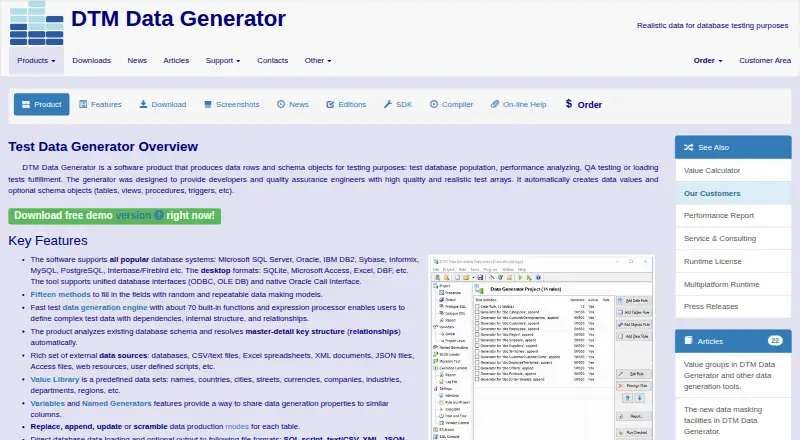
What DTM Data Generator is
DTM Data Generator creates database rows and schema objects for test databases, performance analysis, quality assurance, and load testing. It examines existing schemas and resolves master-detail key relationships, then generates values through fifteen methods. Its engine has about 70 built-in functions and an expression processor. Values can be drawn from databases, CSV and text files, Excel, XML, JSON, web resources, and user-defined scripts. Connections use ODBC, OLE DB, or Oracle Call Interface; JDBC is available with the multiplatform runtime. Supported database systems include Microsoft SQL Server, Oracle, IBM DB2, Sybase, Informix, MySQL, PostgreSQL, Interbase/Firebird, and SQLite. Results can be loaded directly into a database or exported as SQL scripts, text or CSV, XML, and JSON. XML and JSON output require Professional or Enterprise, while scrambling data is an Enterprise feature. Standard allows 128 rules per project and 10,000,000 rows per rule; higher per-rule row limits and unlimited rules are included in Professional and Enterprise. The self-hosted software supports Linux, macOS, and Windows. Demo downloads are offered for all three editions, and command-line use is available with a predefined project file.
Who it suits
Standard is aimed at individuals and small working groups. Professional suits professionals and teams working with large databases, while Enterprise is intended for corporate solution developers.
What it does well
- Generates values using fifteen methods and about 70 built-in functions.
- Analyzes schemas and resolves master-detail relationships automatically.
- Supports a broad range of database systems and value sources.
- Can load data directly or produce SQL, text, CSV, XML, and JSON.
- Offers scheduled refresh automation and API access.
What to know first
- There is no free plan; Standard starts at $149, paid once.
- XML and JSON output require Professional or Enterprise.
- Data scrambling is limited to Enterprise.
- Standard caps projects at 128 rules and 10,000,000 rows per rule.
Limits
Standard permits up to 128 rules per project and 10,000,000 rows per rule. Professional and Enterprise have unlimited rules and higher per-rule row limits; XML and JSON output require either edition, and scrambling requires Enterprise.
Plans
| Plan | Billed and limits | Price |
|---|---|---|
| DTM Data Generator Enterprise — 5 licenses | 5 licenses · Build 3.02 | $1,399, paid once |
| DTM Data Generator Standard — 1 license | 1 license · Build 3.02 | $149, paid once |
| DTM Data Generator Enterprise — 10 licenses | 10 licenses · Build 3.02 | $2,499, paid once |
| DTM Data Generator Professional — 1 license | 1 license · Build 3.02 | $299, paid once |
| DTM Data Generator Standard — 3 licenses | 3 licenses · Build 3.02 | $299, paid once |
| DTM Data Generator Enterprise — 1 license | 1 license · Build 3.02 | $439, paid once |
| DTM Data Generator Standard — 5 licenses | 5 licenses · Build 3.02 | $479, paid once |
| DTM Data Generator Professional — 3 licenses | 3 licenses · Build 3.02 | $599, paid once |
The first 8 of 10 plans, as sqledit.com lists them, read 3 Oct 2026. The maker's own page has the final word. Every plan
Getting started
- Visit https://sqledit.com/dg/ to access the product and demo downloads.
- Choose Standard, Professional, or Enterprise; demo downloads are offered for each edition.
- Select a license plan, with listed options starting at $149, paid once.
- Install on Linux, macOS, or Windows, or use the Java multiplatform runtime where applicable.
- Connect to a supported database or choose another listed value source, then configure a project.
Verdict
Choose DTM Data Generator when you need self-hosted test data generation across supported databases, with schema-aware relationships and several output formats. Standard covers individual and small-team needs; teams needing XML or JSON output, scrambling, or unlimited rules should consider the higher editions.
Questions
Is there a free plan or trial?
There is no free plan. Free demo downloads are offered for Standard, Professional, and Enterprise.
How much does DTM Data Generator cost?
Listed one-time license options start at 149.00 USD for one Standard license. Other options include multiple-license Standard, Professional, and Enterprise plans.
Which operating systems does it support?
The product lists Linux, macOS, and Windows. The download page also lists a Java multiplatform runtime.
Which databases can it work with?
Named systems include Microsoft SQL Server, Oracle, IBM DB2, Sybase, Informix, MySQL, PostgreSQL, Interbase/Firebird, and SQLite.
Which edition supports data scrambling and XML or JSON output?
Data scrambling is an Enterprise feature. XML and JSON output are available in Professional and Enterprise.
Is it open source?
The listed pricing model is paid, and the facts do not identify it as open source.
Facts from DTM Data Generator's own pages
- Command line
- Command-line operation is available using a predefined project file, and console mode is included in Professional and Enterprise editions. · sqledit.com, 3 Oct 2026
- Database connectivity
- The product supports database access through ODBC, OLE DB, or Oracle Call Interface, with JDBC supported only by the multiplatform runtime. · sqledit.com, 3 Oct 2026
- Database systems
- Named database support includes Microsoft SQL Server, Oracle, IBM DB2, Sybase, Informix, MySQL, PostgreSQL, Interbase/Firebird, and SQLite. · sqledit.com, 3 Oct 2026
- Data generation
- The product offers fifteen methods to fill fields with random and repeatable data and an engine with about 70 built-in functions and an expression processor. · sqledit.com, 3 Oct 2026
- Data modes
- The product supports selective update, append, replace, and data scramble modes; scramble mode is an Enterprise edition feature. · sqledit.com, 3 Oct 2026
- Data sources
- Supported value sources include databases, CSV and text files, Excel, XML, JSON, web resources, and user-defined scripts. · sqledit.com, 3 Oct 2026
- Edition limits
- Standard allows up to 128 rules per project and 10,000,000 rows per rule, while Professional and Enterprise have unlimited rules and higher per-rule row limits. · sqledit.com, 3 Oct 2026
- Intended users
- The maker describes Standard as intended for individuals and small working groups, Professional for professionals and working groups handling large databases, and Enterprise for corporate solution developers. · sqledit.com, 3 Oct 2026
- Output
- Generated data can be loaded directly into a database or output as SQL scripts, text/CSV, XML, or JSON, with XML and JSON output limited to Professional and Enterprise editions. · sqledit.com, 3 Oct 2026
- Platforms
- The desktop product supports Windows, while Unix/Linux and Mac OS execution is available through its multiplatform runtime. · sqledit.com, 3 Oct 2026
- Purpose
- DTM Data Generator creates data rows and schema objects for test database population, performance analysis, QA testing, and load testing. · sqledit.com, 3 Oct 2026
- Schema handling
- It analyzes existing database schemas and automatically resolves master-detail key relationships. · sqledit.com, 3 Oct 2026
- Security and privacy
- DTM soft states its free, demo, and commercial products contain no adware or spyware and do not collect or use information unless user-managed special logging is activated. · sqledit.com, 3 Oct 2026
- Support
- Enterprise includes priority technical support, and the product has built-in help and online help. · sqledit.com, 3 Oct 2026
- Trial and download
- The maker offers free demo downloads for Standard, Professional, and Enterprise editions; the download page lists Windows builds and a Java multiplatform runtime. · sqledit.com, 3 Oct 2026
Where DTM Data Generator stands on Freedom251
- Test Data Management Software#15 of 25