Freedom251 › Nintendo DS Emulators
DS Anywhere
What DS Anywhere is
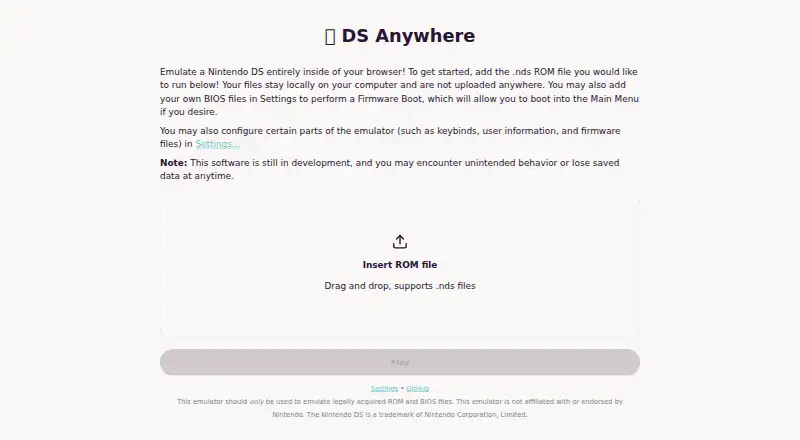
DS Anywhere is a free, open-source web emulator for Nintendo DS games. To run a game, users select an .nds ROM file or drag and drop it onto the site. The project says ROM files remain on the user’s computer rather than being uploaded. BIOS files can be added in Settings to perform a firmware boot and reach the Nintendo DS main menu. The settings include Controls, Personalization, Controller Input, Firmware, and Save Data. DS Anywhere uses a fork of melonDS compiled to WebAssembly, alongside a TypeScript bridge and a Preact/Vite frontend. Its maker describes it as a work in progress, with some features unstable or incomplete, and warns that unintended behavior or data loss may occur. Browser storage can evict save files, and saving a backup or loading a previous save is not implemented. Controller input is supported, but changing controller bindings in the interface is a future goal. Cheat codes and multiplayer are also planned rather than available features; reliable multiplayer may be difficult because of latency requirements. The maker says to use only legally acquired ROM and BIOS files. The project is personal, active development should not be expected, and code contributions and pull requests are welcome.
Who it suits
DS Anywhere suits people who want to run legally acquired Nintendo DS ROMs in a browser and are comfortable with a work-in-progress emulator. It may appeal to users who want to contribute code, but is a poor fit for anyone who needs dependable save backups, in-interface controller remapping, cheats, or multiplayer.
What it does well
- Runs in a web browser without uploading ROM files
- Accepts .nds files by selection or drag and drop
- BIOS files can enable a firmware boot to the main menu
- Includes settings for controls, personalization, firmware, and save data
- Free and open source
What to know first
- Browser storage may evict save files
- Save backup and restore are not implemented
- Controller bindings cannot be changed in the interface
- Cheat codes and multiplayer are future goals
Limits
Browser storage may evict save files, and save-file backup or loading an earlier save is not implemented. Controller binding changes, cheat codes, and multiplayer are future goals rather than available features.
Getting started
- Visit https://brxxn.github.io/ds-anywhere/
- Select an .nds ROM file or drag and drop one onto the site
- Add BIOS files in Settings if you want to perform a firmware boot
- Review the Controls, Personalization, Controller Input, Firmware, and Save Data settings
Verdict
Choose DS Anywhere if you want a free browser-based Nintendo DS emulator and can work within its unfinished features. Look elsewhere if you need save backup and restore, adjustable controller bindings, cheats, or multiplayer.
Questions
Does DS Anywhere cost anything?
It is free and open source.
How do I load a game?
Select an .nds ROM file or drag and drop it onto the site. The maker says ROM files stay on the user’s computer and are not uploaded.
Can it boot to the Nintendo DS main menu?
Users can add BIOS files in Settings to perform a firmware boot and reach the main menu.
Can I use a controller?
Controller input is supported, but changing controller bindings in the interface remains a future goal.
Does it support cheats or multiplayer?
Cheat-code support and multiplayer are listed as future goals. Reliable multiplayer may not work because of latency requirements.
Is DS Anywhere actively maintained?
The maker describes it as a personal project and says active development should not be expected. Code contributions and pull requests are welcome.
Facts from DS Anywhere's own pages
- BIOS and firmware
- Users can add BIOS files in Settings to perform a firmware boot and access the main menu. · brxxn.github.io, 4 Oct 2026
- Cheats
- Cheat-code support is listed as a future goal. · github.com, 8 Oct 2026
- Controller limitation
- Controller input is supported, but the maker says changing controller bindings in the UI remains a future goal. · github.com, 4 Oct 2026
- Controller support
- Controller use is supported, but changing controller bindings in the UI is listed as a future goal. · github.com, 8 Oct 2026
- Development status
- The maker describes the emulator as a work in progress with unstable or incomplete features. · github.com, 8 Oct 2026
- Firmware
- Users can add BIOS files in Settings to boot into the Nintendo DS main menu. · brxxn.github.io, 8 Oct 2026
- Legal use
- The maker says to use only legally acquired ROM and BIOS files and not to violate copyright restrictions. · github.com, 8 Oct 2026
- Local files
- The site says ROM files stay on your computer and are not uploaded. · brxxn.github.io, 8 Oct 2026
- Multiplayer
- Multiplayer support is listed as a future goal, and the maker says reliable multiplayer may not work because of latency requirements. · github.com, 8 Oct 2026
- Project support
- The maker describes DS Anywhere as a personal project, says active development should not be expected, and welcomes code contributions and pull requests. · github.com, 4 Oct 2026
- Purpose
- DS Anywhere emulates a Nintendo DS in a web browser. · brxxn.github.io, 8 Oct 2026
- ROM files
- The site accepts .nds ROM files by file selection or drag and drop. · brxxn.github.io, 8 Oct 2026
- ROM loading
- Users can select or drag and drop an .nds ROM file to run it. · brxxn.github.io, 4 Oct 2026
- Save data limit
- The maker says browser storage may evict save files and that save-file backup and restore are not implemented. · github.com, 8 Oct 2026
- Save data limitation
- The maker says browser storage may evict save files and that save-file backup or loading a previous save is not implemented. · github.com, 4 Oct 2026
- Security
- The project says running ROMs in a browser limits potential access to a single webpage rather than the whole computer. · github.com, 8 Oct 2026
- Security approach
- The maker says running ROMs in a browser limits potential access to a webpage rather than the whole computer. · github.com, 4 Oct 2026
- Settings
- Settings include controls, personalization, controller input, firmware, and save data. · brxxn.github.io, 8 Oct 2026
- Support and contributions
- The maker describes it as a personal project, says active development should not be expected, and welcomes code contributions and pull requests. · github.com, 8 Oct 2026
- Technology
- The project uses a melonDS fork compiled to WebAssembly and a TypeScript frontend. · github.com, 8 Oct 2026
- Unlisted features
- The maker lists cheat codes and multiplayer support as future goals. · github.com, 4 Oct 2026
Where DS Anywhere stands on Freedom251
- Nintendo DS Emulators#17 of 18