Freedom251 › Restaurant Tip Management Software

Divvy
What Divvy is
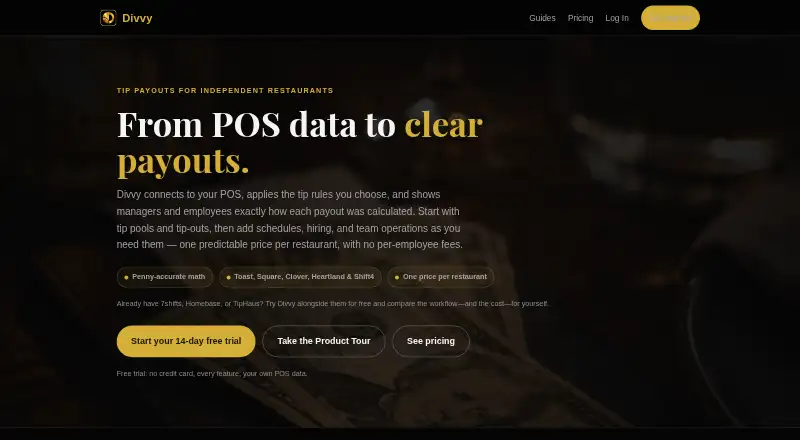
Divvy is restaurant tip management software that connects point-of-sale data to tip rules and shows employees and managers how each payout was calculated. It supports Toast, Square, Clover, Heartland and Shift4 (SkyTab), with CSV import for other data. Restaurants can set pools using even splits, hours, points, per-role rules or keep-your-own methods. Automatic tip-outs can route shares to support roles based on tips or sales, with caps so balances do not go negative.
Employees can check tips, hours, pay-period totals and real-time earnings through the employee portal and Tip Bank. Managers can review date-ranged earnings reports, export payroll data and track gross receipts for IRS Form 8027. Divvy’s audit log records payout breakdowns and history. The Hiring Hub includes job postings, applicant tracking, careers pages and onboarding into the team roster. Divvy runs in a browser on desktop, iPhone, iPad and Android; a native iOS app is in development. Core costs $39 a month per restaurant. Payouts costs $69 a month per restaurant and adds direct deposits to employee bank accounts via Stripe. A 14-day trial is available, and subscriptions can be canceled in the app at any time.
Who it suits
Divvy suits restaurants that need to calculate tip pools from POS data and give staff visibility into earnings. It also fits managers who need payroll exports, gross-receipts tracking, payout histories or hiring and onboarding tools.
What it does well
- Supports five named POS systems and CSV import for other data.
- Offers several pool methods, including per-role rules and keep-your-own.
- Shows employees real-time earnings, hours and pay-period totals.
- Provides payroll exports and IRS Form 8027 gross-receipts tracking.
- Payouts sends tips to bank accounts through Stripe.
- Subscriptions have no contract or lock-in and can be canceled in the app.
What to know first
- There is no free plan.
- Direct-deposit payouts require the $69 a month Payouts plan.
- The native iOS app is still in development.
Limits
The 14-day trial is the available trial period. Core does not include direct-deposit payouts; those are included in Payouts at $69 a month per restaurant.
Plans
| Plan | Billed and limits | Price |
|---|---|---|
| Core | billed monthly · per restaurant · no card to start · unlimited staff and pay periods | $39 a month |
| Payouts | billed monthly · per restaurant · no card to start · includes Core · direct-deposit payouts via Stripe | $69 a month |
As divvysoftware.com lists them, read 30 Sept 2026. The maker's own page has the final word.
Getting started
- Open the Divvy website.
- Start the 14-day trial; no card is needed to start the Core plan.
- Choose Core at $39 a month per restaurant, or Payouts at $69 a month per restaurant for direct deposits.
- Use Divvy in a browser on desktop, iPhone, iPad or Android.
- Connect a listed POS system or import other data by CSV.
- Set the tip-pool and automatic tip-out rules for your restaurant.
Verdict
Choose Divvy if your restaurant needs configurable tip pools, visible payout calculations and staff earnings access. The Core plan covers tip management and payroll exports; restaurants that need direct deposits must choose Payouts. Look elsewhere if you need a free plan or a finished native iOS app.
Questions
How much does Divvy cost?
Core is $39 a month per restaurant. Payouts is $69 a month per restaurant and includes Core plus direct-deposit payouts via Stripe.
Does Divvy have a free plan or trial?
There is no free plan. Divvy offers a 14-day trial, and no card is needed to start Core.
Which platforms does Divvy support?
Divvy runs in a browser on desktop, iPhone, iPad and Android. Its native iOS app is still in development.
Which POS and scheduling systems connect to Divvy?
The listed POS integrations are Toast, Square, Clover, Heartland and Shift4 (SkyTab), with CSV import for other data. Scheduling integrations include 7shifts, Sling, Deputy, WhenIWork and Homebase.
Can Divvy send tips directly to employees’ bank accounts?
Yes. The Payouts plan sends employee tips to bank accounts via Stripe.
Can a restaurant cancel its Divvy subscription?
Subscriptions have no contract or lock-in and can be canceled inside the app at any time.
Facts from Divvy's own pages
- Audit trail
- Every payout has a visible breakdown and history in Divvy's audit log. · divvysoftware.com, 30 Sept 2026
- Automatic tip-outs
- Divvy routes shares to support roles by tips or sales and caps them so no one goes negative. · divvysoftware.com, 30 Sept 2026
- Cancellation
- Subscriptions have no contract or lock-in and can be canceled inside the app at any time. · divvysoftware.com, 30 Sept 2026
- Data deletion
- Verified account and data deletion requests are completed within 30 days, with backups purged on the normal rotation afterward. · divvysoftware.com, 30 Sept 2026
- Device access
- Divvy runs in a browser on desktop, iPhone, iPad, and Android; a native iOS app is still in development. · divvysoftware.com, 30 Sept 2026
- Direct deposits
- The Payouts plan sends employee tips to bank accounts via Stripe. · divvysoftware.com, 30 Sept 2026
- Employee portal
- Employees can view tips, hours, pay-period totals, and real-time earnings in the employee portal and Tip Bank. · divvysoftware.com, 30 Sept 2026
- Hiring and onboarding
- The Hiring Hub supports job postings, applicant tracking, careers pages, and onboarding into the team roster. · divvysoftware.com, 30 Sept 2026
- Pooling methods
- Tip pools can use even splits, hours, points, per-role rules, or keep-your-own methods. · divvysoftware.com, 30 Sept 2026
- POS integrations
- Divvy lists Toast, Square, Clover, Heartland, and Shift4 (SkyTab), with CSV import for other data. · divvysoftware.com, 30 Sept 2026
- Purpose
- Divvy connects restaurant POS data, applies tip rules, and shows managers and employees how each payout was calculated. · divvysoftware.com, 30 Sept 2026
- Reports and compliance
- Divvy provides date-ranged earnings reports, payroll export, and IRS Form 8027 gross-receipts tracking. · divvysoftware.com, 30 Sept 2026
- Scheduling integrations
- Scheduling integrations include 7shifts, Sling, Deputy, WhenIWork, and Homebase. · divvysoftware.com, 30 Sept 2026
- Support
- Divvy says customers can email support and get a direct line to the developer for feature requests. · divvysoftware.com, 30 Sept 2026
Where Divvy stands on Freedom251
- Restaurant Tip Management Software#10 of 23