Freedom251 › Online Dictionaries
dict.cc
What dict.cc is
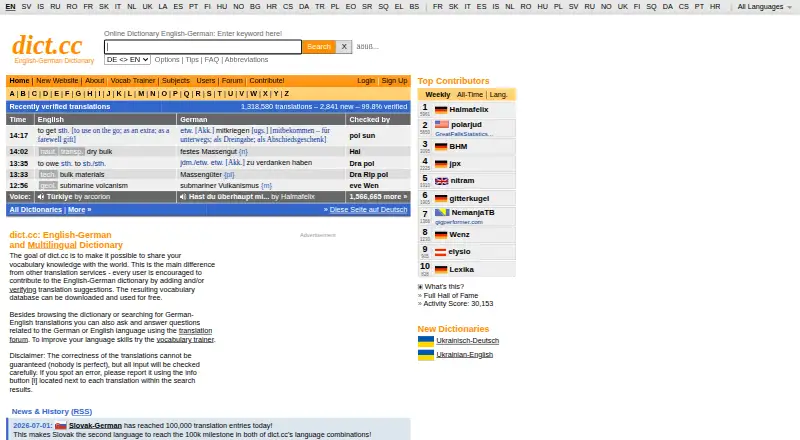
dict.cc is an online dictionary for looking up translations across language pairs such as English-German and English-French. Its vocabulary is maintained by volunteers, and users can suggest, correct, and confirm entries; registration is not required to contribute corrections. The web dictionary is free for private and business use. The maker says the Android and iPhone or iPad apps provide the complete vocabulary for offline use. For desktop PCs, dict.cc does not provide its own offline software, but it makes the vocabulary database available as a text file for personal use. The download page lists a third-party Mac OS X dictionary plugin for versions 10.5 and later, with separate downloads for 10.5 and 10.6. The FAQ provides code to add a search field or an iframe-based translation box to another website. It says automated server-side parsing is not allowed and that no API is available or planned. The service uses cookies for settings, vocabulary lists, and login status; registered-user details, postings, and vocabulary trainer lists are stored permanently.
Who it suits
dict.cc suits people who want free web translation lookup or mobile dictionary access offline. It may also suit volunteers who want to suggest or correct entries without registering.
What it does well
- Free web use for private and business purposes
- Mobile apps provide the vocabulary offline
- Users can correct entries without registering
- Website search field and translation box can be embedded
What to know first
- No own offline software for desktop PCs
- No API is available or planned
- Automated server-side parsing is not allowed
- Registered-user details and postings are stored permanently
Limits
The free web plan costs nothing. dict.cc does not provide its own offline software for desktop PCs, and automated server-side parsing is not allowed; no API is available or planned.
Plans
| Plan | Billed and limits | Price |
|---|---|---|
| dict.cc web dictionary | Free use in a web browser for private and business purposes | Free |
As dict.cc lists them, read 3 Oct 2026. The maker's own page has the final word.
Getting started
- Open https://www.dict.cc/ in a web browser for free dictionary use.
- Choose a language pair, such as English-German or English-French, and look up a translation.
- Install the iOS or Android app for access to the complete vocabulary offline.
- For personal desktop use, download the vocabulary database text file.
- For website integration, use the search-field or iframe translation-box code in the FAQ.
Overview
dict.cc is a translation dictionary backed by volunteer contributions, with browser lookup and mobile apps that work offline. It suits readers who want a free, community-maintained reference across many languages; the main trade-off is that offline use is much better served on mobile than on desktop.
Founded in 2002, the service is made by dict.cc GmbH in Vienna. Its vocabulary credits include material from TU Chemnitz and Mr Honey's Business Dictionary. For more options, browse Online Dictionaries.
Key features
Lookup with pronunciation and examples
Translation lookup is supported by audio pronunciation and usage examples, useful when a reader needs more than a bare equivalent. The site covers 26 languages, with pages for combinations including English-German and English-French.
Community-maintained vocabulary
Users can suggest, correct, and confirm translations, and corrections are open even to people without an account. That participation can help keep entries responsive to community input, but readers who prefer a centrally managed editorial process may want a different kind of reference.
Offline use and integration
The iPhone, iPad, and Android apps provide the complete vocabulary offline, making them the strongest option for travel or use without a connection. Desktop users do not get dict.cc's own offline software; they can download the vocabulary database as a text file for personal use instead. A download page also offers a third-party dictionary plugin for Mac OS X 10.5 and later, with separate downloads for 10.5 and 10.6.
For other websites, dict.cc provides code for a search field and an iframe-based translation box, both free to integrate. It does not offer an API, and automated or server-side parsing is not allowed, so it is a poor fit for software teams seeking programmatic access.
Pricing
The dict.cc web dictionary costs nothing and allows private and business use in a browser. The pricing model is freemium, and a 7-day trial is noted, but the mobile apps' pricing and trial terms are not established here. The free browser option is a straightforward fit for casual lookup; readers needing offline access should use the mobile apps, while desktop users must work with the downloadable text file rather than a dedicated PC product.
Platforms
dict.cc is available on the web, Android, iOS, and macOS. Its mobile apps support offline vocabulary. On desktop, downloadable vocabulary data is offered for personal use, and the listed Mac OS X plugin is third-party rather than dict.cc's own offline software.
Who it's for
dict.cc is a good fit for people who regularly look up translations, value pronunciation and examples, or want to help improve a shared dictionary. Mobile users who need offline access get the most complete offline option. It is less suitable for anyone who needs maker-provided desktop offline software, an API, or automated querying.
Pros and cons
- Pros: Free browser use for private and business purposes makes routine translation lookup accessible without a paid plan.
- Pros: Complete offline vocabulary in the iPhone, iPad, and Android apps supports use away from a connection.
- Pros: Audio pronunciation, examples, and community corrections add useful context and participation beyond simple lookup.
- Cons: No maker-provided offline PC software; desktop users must download and use a text-file database themselves.
- Cons: No API, with automated and server-side parsing disallowed, limits integration into software workflows.
- Cons: A third-party Mac plugin is listed for older Mac OS X versions, not as a native dict.cc desktop app.
Alternatives
Choose MDBG Chinese Dictionary when Chinese dictionary and learning tools are the priority; its free online dictionary and learning tools are available free of charge, alongside a Chinese Reader Preview Edition listed as free.
ABBYY Lingvo is another freemium dictionary option for Android, iOS, macOS, and Windows.
GoldenDict is worth considering when a desktop dictionary application is the priority: its Android, Linux, macOS, and Windows version is free under GNU GPLv3+, with dictionary content downloaded separately.
Linguee is a free alternative for readers seeking a dictionary across Android, iOS, and the web.
Oxford Learner’s Dictionaries suits readers focused on learner dictionaries; free online access includes the Oxford Advanced Learner’s Dictionary and Oxford Advanced American Dictionary, plus a Text Checker and word lists.
The Free Dictionary is an alternative when broader reference material is useful, including multiple dictionaries, a thesaurus, encyclopedias, and translation content on its free website.
WordWeb is a freemium option for Windows, Android, iOS, and macOS, with its free Windows version subject to licensing terms.
Cambridge Dictionary is another free online option, with +Plus word lists and quizzes among its offerings.
Verdict
Choose dict.cc for free translation lookup with community-maintained entries, pronunciation, examples, and complete offline vocabulary on mobile. Its clearest advantage is that mobile offline access does not depend on a connection; look elsewhere if you need a dedicated desktop offline app or programmatic access.
Verdict
dict.cc combines a free online dictionary with community-maintained entries and offline vocabulary in its mobile apps. Desktop users can download the vocabulary file, but the service does not provide its own offline PC software or an API.
Questions
Is dict.cc free?
The web dictionary is free and can be used free for private and business purposes. The pricing note also lists a 7-day trial.
Which platforms does dict.cc support?
The listed platforms are Android, iOS, macOS, and web. The Mac download page lists a third-party plugin for Mac OS X 10.5 and later.
Can I use dict.cc offline?
The maker says the iPhone, iPad, and Android apps provide the complete vocabulary offline. For desktop PCs, a vocabulary database text file is available for personal use.
Does dict.cc have an API?
No. The FAQ says no API is available or planned, and automated server-side parsing is not allowed.
Who maintains dict.cc?
The dictionary is maintained by volunteer contributors. The about page identifies dict.cc GmbH as the maker and lists Paul Hemetsberger at an address in Vienna, Austria.
Can I add dict.cc to my website?
The FAQ provides code for a search field and an iframe-based translation box that can be integrated into other websites for free.
Facts from dict.cc's own pages
- API and automated access
- The FAQ says server-side or automated parsing is not allowed and that no API is available or planned. · ende.dict.cc, 3 Oct 2026
- Community
- The dictionary is maintained by a community of volunteers, and users can participate in correcting entries even without registering. · ende.dict.cc, 3 Oct 2026
- Data retention
- The privacy page says registered-user details, postings, and vocabulary trainer lists are stored permanently. · dict.cc, 3 Oct 2026
- Desktop offline limits
- dict.cc says it does not provide its own offline software for desktop PCs, but offers its vocabulary database as a text file for personal use. · ende.dict.cc, 3 Oct 2026
- Founded
- The maker says dict.cc was started in late 2002. · dict.cc, 3 Oct 2026
- Headquarters
- Vienna, Austria · dict.cc, 28 Sept 2026
- Languages
- The site offers dictionary pages for multiple language pairs, including English-German and English-French. · dict.cc, 3 Oct 2026
- macOS download
- The download page lists a third-party dictionary plugin for Mac OS X 10.5 and later, with separate downloads for 10.5 and 10.6. · dict.cc, 3 Oct 2026
- Maker and location
- The about page identifies the maker as dict.cc GmbH and lists Paul Hemetsberger at an address in Vienna, Austria. · dict.cc, 3 Oct 2026
- Mobile offline use
- The maker says its iPhone, iPad, and Android apps provide the complete vocabulary offline. · dict.cc, 3 Oct 2026
- Privacy
- The privacy page says dict.cc uses cookies for user settings, vocabulary lists, and login status, and stores registered users' encrypted passwords and email addresses. · dict.cc, 3 Oct 2026
- Product
- dict.cc is an online dictionary and a platform where users can suggest, correct, and confirm translations. · dict.cc, 3 Oct 2026
- Support
- The FAQ directs users to the maintainer by email for cooperation requests and asks users to read the FAQ before contacting him. · ende.dict.cc, 3 Oct 2026
- Translation data
- The site credits vocabulary from TU Chemnitz and Mr Honey's Business Dictionary. · dict.cc, 3 Oct 2026
- Vocabulary data
- The maker says the vocabulary database can be downloaded, and its download page links to a vocabulary database file. · dict.cc, 3 Oct 2026
- Website integration
- The FAQ provides code for a search field and an iframe-based translation box that can be integrated into other websites for free. · ende.dict.cc, 3 Oct 2026
Where dict.cc stands on Freedom251
- Online Dictionaries#3 of 39