Freedom251 › Kitchen Display System Software

Deliverect Kitchen Display
What Deliverect Kitchen Display is
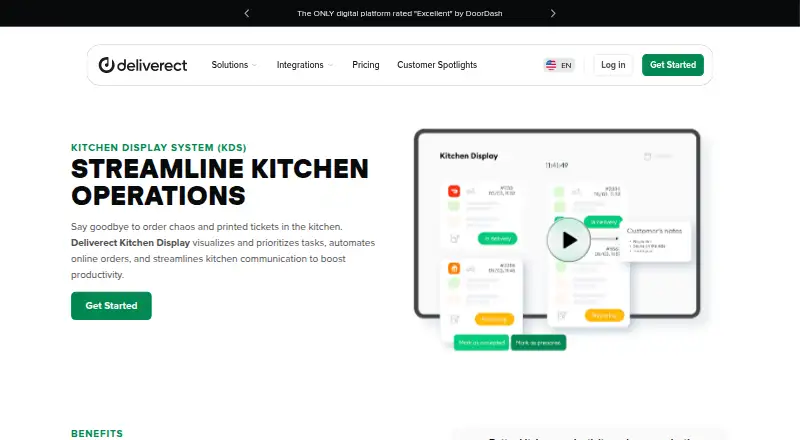
Deliverect Kitchen Display is a web-based restaurant system for organizing kitchen work and order communication. Orders from delivery channels, kiosks, and online ordering can appear in real time on kitchen screens and at the counter. Assigned workstations and product filters route requests to stations, while staff can prioritize orders and use color coding to distinguish them. The system also sends order-status updates to delivery riders until pickup. Screen settings include order status and type filters, layout, language, zoom, and views of past, current, and future orders. To open a screen, use its assigned URL in a device browser or scan its QR code, then log in to a Deliverect Kitchen Display account. The product works with the Deliverect platform. Deliverect describes an integrations hub covering delivery apps, POS systems, inventory software, and last-mile delivery solutions, with more than 1,000 platforms and tools and a form to request new integrations. Pricing is on request and depends on business needs, location, digital operations scale, number of locations, and selected solution.
Who it suits
It is intended for restaurants managing orders across delivery channels, kiosks, or online ordering. Dedicated stations and filters may help kitchens handling multiple brands and channels.
What it does well
- Displays orders in real time.
- Routes requests to assigned workstations.
- Supports order prioritization and color coding.
- Provides status updates to delivery riders.
- Screen settings include multiple order views.
What to know first
- Works with the Deliverect platform.
- Pricing is on request.
- Price depends on location and operational needs.
Plans
| Plan | Billed and limits | Price |
|---|---|---|
| Customized pricing | Price depends on location, digital operations, number of locations, and solution | On request |
As deliverect.com lists them, read 11 Oct 2026. The maker's own page has the final word.
Getting started
- Sign up for Deliverect and use its personalized onboarding
- Open the assigned kitchen screen URL in a device browser
- Alternatively scan the kitchen screen QR code
- Log in to a Deliverect Kitchen Display account
- Configure filters, layout, language, zoom, and order views
Verdict
Kitchen Display combines order routing, prioritization, and rider updates for restaurant operations. Buyers should account for its Deliverect platform dependency and request pricing for their setup.
Questions
How much does it cost?
Pricing is on request. Deliverect says the amount depends on business needs, location, digital operations scale, number of locations, and selected solution.
Which platforms are supported?
Kitchen Display is accessed on the web, including tablet browsers. It works with the Deliverect platform.
What order sources can it display?
It can show orders from delivery channels, kiosks, and online ordering stores in the kitchen and at the counter.
Does it integrate with other software?
Deliverect describes connections with delivery apps, POS systems, inventory software, and last-mile delivery solutions. Its integrations hub covers more than 1,000 platforms and tools.
How are kitchen screens configured?
Open the assigned screen URL in a device browser or scan its QR code, then log in. Controls include order filters, layout, language, zoom, and past, current, and future order views.
Facts from Deliverect Kitchen Display's own pages
- Browser access
- A kitchen screen is accessed by opening its assigned kitchen URL on the device's web browser. · help.deliverect.com, 11 Oct 2026
- Driver communication
- The system communicates order status to delivery riders until an order is ready for pickup. · deliverect.com, 5 Oct 2026
- Driver updates
- The system communicates order status until pickup and provides kitchen staff with rider updates. · deliverect.com, 11 Oct 2026
- Integration catalog
- Deliverect describes its integrations hub as covering more than 1,000 platforms and tools and provides a form to request a new integration. · deliverect.com, 5 Oct 2026
- Integrations
- Deliverect's integrations span delivery apps, POS systems, inventory software, and last-mile delivery solutions. · deliverect.com, 11 Oct 2026
- Intended users
- Deliverect describes its solutions as serving the worldwide food service community. · deliverect.com, 11 Oct 2026
- Order display
- Orders from delivery channels, kiosks, and online ordering can appear in real time on kitchen screens and the counter. · deliverect.com, 5 Oct 2026
- Order filters
- The product supports filtering orders by brand and channel and uses color-coded orders to aid visualization. · deliverect.com, 11 Oct 2026
- Order prioritization
- The product supports order prioritization and color-coded orders to help staff filter and visualize requests. · deliverect.com, 5 Oct 2026
- Order sources
- It displays orders from delivery channels, kiosks, and online ordering stores in the kitchen and at the counter. · deliverect.com, 11 Oct 2026
- Platform dependency
- Deliverect says Kitchen Display works with the Deliverect platform to automate and display orders. · deliverect.com, 11 Oct 2026
- Pricing
- Deliverect says pricing depends on business needs, location, digital operations scale, number of locations, and selected solution; it does not state a Kitchen Display price on the pages reviewed. · deliverect.com, 5 Oct 2026
- Purpose
- Deliverect Kitchen Display shows and prioritizes restaurant orders on kitchen screens to streamline kitchen operations. · deliverect.com, 11 Oct 2026
- Screen controls
- Kitchen screens can show past, current, or upcoming orders, change order status, and filter by status or order type. · help.deliverect.com, 11 Oct 2026
- Screen setup
- A kitchen screen can be set up by opening a screen URL in a device browser or scanning its QR code, then logging in to a Deliverect Kitchen Display account. · help.deliverect.com, 5 Oct 2026
- Security
- Deliverect states that it maintains SOC 2 Type 1 and ISO 27001 certifications and is GDPR compliant. · deliverect.com, 11 Oct 2026
- Support
- Deliverect's pricing page says its team provides personalized onboarding after signup. · deliverect.com, 11 Oct 2026
- Workstations
- Orders can be assigned to workstations so products reach the appropriate stations at the right time. · deliverect.com, 11 Oct 2026
Where Deliverect Kitchen Display stands on Freedom251
- Kitchen Display System Software#29 of 49