Freedom251 › Presentation Management Software

DeckLinks
What DeckLinks is
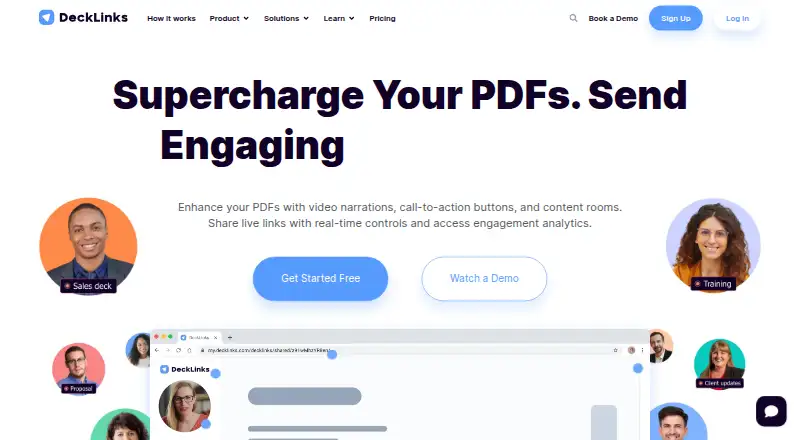
DeckLinks creates interactive Video PDFs that combine document sharing, video narration and engagement reporting. Users can narrate a PDF with a built-in teleprompter or record their screen and embed that recording in a PDF. A live link lets the sender update a shared file or disable access later. Shared files and links can be protected with a password and access controls. Recipients can view them without logging in, through an interface that works like a web page on any device, and no downloads are required.
DeckLinks reports engagement measures such as session duration, time spent per slide and clicks. Its stated uses include sales, account-based marketing, training and onboarding, and corporate communications. A central deck library is available, along with viewer analytics.
The Basic plan is free and includes one PDF, three trackable links and 100 MB of storage. Business costs $28 a month per user when billed yearly, with annual billing saving 20%; it includes unlimited PDFs and trackable links, 20 GB of storage and a 14-day free trial. Business also includes HubSpot and Salesforce integrations. Enterprise is contact-based and includes custom permissions, integrations, dashboards, reporting, domains and add-ons, plus live support. DeckLinks is headquartered in Markham, Ontario, Canada.
Who it suits
DeckLinks suits sales and account-based marketing teams that share materials and want engagement measures such as slide time and clicks. It also presents use cases for training, onboarding and corporate communications, with link controls for shared files.
What it does well
- Recipients can view shared files without logging in or downloading.
- Senders can update files or disable access through a live link.
- Reports include session duration, time per slide and clicks.
- Business includes HubSpot and Salesforce integrations.
- Password protection and access controls are available.
What to know first
- Basic is limited to one PDF, three trackable links and 100 MB.
- Business is priced per user per month.
- Enterprise pricing is contact-based.
Limits
Basic includes one PDF, three trackable links and 100 MB of storage. Business includes unlimited PDFs and trackable links, 20 GB of storage and a 14-day free trial.
Plans
| Plan | Billed and limits | Price |
|---|---|---|
| Basic | forever · 1 PDF · 3 trackable links · 100 MB storage | Free |
| Business | /user/month; yearly billing saves 20% · Unlimited PDFs · unlimited trackable links · 20 GB storage · 14-day free trial | $28 a month |
| Enterprise | Contact us · Custom user permissions · custom integrations · custom dashboards · custom reporting · custom domains · add-ons | On request |
As decklinks.com lists them, read 8 Oct 2026. The maker's own page has the final word.
Getting started
- Open https://www.decklinks.com/.
- Choose the free Basic plan or review Business and Enterprise options.
- Use the web service to create a PDF and narrate it with the teleprompter or record a screen to embed.
- Share the file through a live link and set password or access controls as needed.
- Review engagement measures such as session duration, time per slide and clicks.
DeckLinks is a web service for turning PDFs into narrated, trackable video presentations. It fits sales, account-based marketing, training, onboarding, and corporate communications teams that send materials to outside viewers. The strongest case is controlled sharing with measurable engagement; the main constraint is the small free library and the web-only platform.
Overview
DeckLinks combines a central deck library with interactive Video PDFs, so a team can distribute one presentation while retaining control over its links and seeing how recipients use it. Viewers open files as ordinary web pages on any device, without creating an account or downloading software. That low-friction experience is well suited to prospects, customers, trainees, and other audiences who should not have to install a viewer.
The product is narrower than a general document-management suite. Its value comes from adding video context, link governance, and engagement measurement to PDF-based communications rather than from broad content-authoring capabilities.
Key features
Video presentation tools
A built-in teleprompter supports narrated PDFs, while screen recording can be embedded in a PDF. These tools help a presenter explain dense material or demonstrate a process without sending a separate recording. Teams that already produce video elsewhere may find this focused workflow less important.
Controlled live sharing
Live links remain editable after distribution, allowing a team to update a file without issuing a new URL. Access can also be turned off at any time. Password protection and additional access controls provide a practical barrier for sensitive sales, onboarding, or internal documents, although recipients still access the content through the browser.
Engagement tracking and integrations
Reports include session duration, time per slide, and clicks. Those signals can identify whether viewers reach key pages or leave quickly, supporting follow-up decisions in sales and communications. Business connects with HubSpot and Salesforce; custom integrations, dashboards, and reporting are reserved for Enterprise.
Pricing
Basic costs nothing, billed forever. It includes one PDF, three trackable links, and 100 MB of storage. That is a useful proof-of-concept or personal showcase, but the caps are too restrictive for a team with several active campaigns or training documents.
Business costs $28 a month per user with yearly billing; annual billing saves 20%. It removes the library bottleneck with unlimited PDFs and unlimited trackable links, provides 20 GB of storage, and includes a 14-day free trial. HubSpot and Salesforce integrations make this the practical tier for sales and marketing teams, but the per-user annual commitment matters for organizations with many occasional contributors.
Enterprise uses custom pricing. It adds custom user permissions, integrations, dashboards, reporting, domains, and add-ons, plus white-glove onboarding and live support. This tier is aimed at organizations that need governance, branded delivery, or tailored analytics rather than a fixed self-serve package.
Platforms
DeckLinks runs on the web. Recipients need no login and no download, which broadens reach across devices, while teams wanting a dedicated desktop or mobile application will need another approach.
Who it's for
Choose it for sales teams sharing evolving proposals, account-based marketers tracking named-account engagement, trainers distributing narrated onboarding material, and corporate communications groups that need revocable links. Business is the sensible starting point when multiple documents or CRM connections are central to the workflow. Basic suits a single small project; Enterprise fits larger programs requiring custom controls and support.
Pros and cons
- Pros: No-login, no-download viewing reduces recipient friction; live links can be updated or disabled after sending; password and access controls support governed sharing; slide-level timing, session, and click data inform follow-up; Business includes HubSpot and Salesforce connections.
- Cons: Basic permits only one PDF, three trackable links, and 100 MB; Business requires yearly billing for its 28.00 USD per-user monthly rate; custom dashboards, reporting, domains, permissions, and integrations require Enterprise pricing; delivery is web-only.
Alternatives
For a broader presentation-management directory, browse Presentation Management Software.
SlideVault is a better fit for locally oriented libraries, with API, Linux, macOS, and Windows support and a free Personal plan covering up to 500 slides, search, duplicate detection, organization, watched folders, and multiple view modes.
ChatSlide suits users who want a credit-based web plan with PDF export, starting with 100 free credits and a Plus tier at $8.25 a month.
HummingDeck is worth considering for deal-room workflows across web, API, and extension platforms; its free tier allows five documents, five links, one deal room, and 100 MB of storage.
Shufflrr is an alternative for organizations working through PowerPoint, OneDrive, SharePoint, or Dynamics 365.
DeckForge is the neutral choice for teams seeking a self-hosted, no-license-fee deployment without seat limits.
Decky is an option for creating editable presentations from your own materials with web and extension access.
SendDeck offers free shareable links and slide-engagement analytics, with a three-upload-per-month allowance.
Salesframe is the alternative to consider when Android, iOS, Windows, and web access, plus a sales-focused trial, are priorities.
Verdict
DeckLinks is a strong choice for teams that need narrated PDFs, revocable sharing, and concrete viewer-engagement signals in one web workflow. Pick Business when unlimited documents and CRM integrations justify a per-user annual plan; look elsewhere if you need native apps, a larger free tier, or advanced customization without moving to Enterprise.
Verdict
Choose DeckLinks if you need to share interactive Video PDFs, control link access and review viewer engagement. The free Basic plan covers a small library; teams needing unlimited PDFs and links can consider Business at $28 a month per user with yearly billing. Enterprise is the option for custom integrations and dashboards, with pricing handled by contact.
Questions
Is DeckLinks free?
Yes. Basic is free and includes one PDF, three trackable links and 100 MB of storage.
How much does Business cost?
Business costs $28 a month per user with yearly billing. Annual billing saves 20%, and the plan includes a 14-day free trial.
What platforms does DeckLinks support?
DeckLinks is available on the web.
Do recipients need an account or a download?
Recipients do not need to log in, and no downloads are required.
Which integrations are included?
Business includes HubSpot and Salesforce integrations. Enterprise lists custom integrations.
Where is DeckLinks headquartered?
DeckLinks is headquartered in Markham, Ontario, Canada.
Facts from DeckLinks's own pages
- Downloads
- The maker says no downloads are required. · decklinks.com, 8 Oct 2026
- Enterprise features
- Enterprise includes custom dashboards, custom reporting, custom domains, white-glove onboarding, and live support. · decklinks.com, 8 Oct 2026
- Headquarters
- Markham, Ontario, Canada · decklinks.com, 28 Sept 2026
- Integrations
- The Business plan includes HubSpot and Salesforce integrations, while custom integrations are listed for Enterprise. · decklinks.com, 8 Oct 2026
- Intended users
- DeckLinks presents use cases for sales, account-based marketing, training and onboarding, and corporate communications. · decklinks.com, 8 Oct 2026
- Live sharing
- Users can share files through a live link, update files after sharing, and turn off access at any time. · decklinks.com, 8 Oct 2026
- Product
- DeckLinks lets users create and share interactive Video PDFs with real-time controls and engagement analytics. · decklinks.com, 8 Oct 2026
- Security controls
- DeckLinks offers password protection and access control for shared links and files. · decklinks.com, 8 Oct 2026
- Support
- The Enterprise plan includes live support, and the site offers demo requests through its contact page. · decklinks.com, 8 Oct 2026
- Tracking
- Document tracking reports engagement metrics including session duration, time per slide, and clicks. · decklinks.com, 8 Oct 2026
- Video tools
- Users can narrate PDFs with a built-in teleprompter and record their screen for embedding in a PDF. · decklinks.com, 8 Oct 2026
- Viewer access
- Recipients do not need to log in, and the viewer interface works like a regular web page on all devices. · decklinks.com, 8 Oct 2026
Where DeckLinks stands on Freedom251
- Presentation Management Software#7 of 24